
How to Build a Claude Skill That Works
Build a Claude skill that holds up: the full sequence for triggers, body, references, testing, and maintenance, refined on one real skill across 14 evals.

If your Claude skills keep slipping, it isn’t because you stopped paying attention.
Tell me if this sounds familiar.
You learned Claude skills. You built one. You wrote a description, added some rules, tested it once.
It worked.
So you started maintaining it. Updating it when outputs drifted. Adding rules when something went sideways. The more you maintained it, the less reliable it got.
Not broken. Just slower. Less precise.
That was me. I spent weeks adding rules.
The rules were never the problem.
Where you put them was. Claude reads the rules at the top first, before it knows the task. Then it starts executing. By step four, the rules from the top have faded.
They’re still in the file. They’re just out of focus when the work happens. Adding more rules to the top just adds more things to forget.
I have close to 100 Claude skills in my Claude setup. The ones that held up weren’t the ones I maintained most carefully. They were the ones built with the right structure from the start.
Structure is fixable. This is what we’ll resolve.

What’s inside:
🎁 A complete build sequence checklist you can run on your next Claude skill
🎁 A voice skill template: a plug-and-play skill folder with fill-in markers Claude completes from your writing samples.
Hi, I’m Jenny 👋
I believe anyone can thrive with AI, not by mastering the tools, but by building real things with them. I run Build to Launch and the Practical AI Builder program, where we go from experimenting to shipping. Come build with us.
If you’re new to Build to Launch, welcome! Here’s what you might enjoy:

How Claude Skills Work
Every Claude skill is three parts, and each one fails in its own way.
The format is small. A folder with one file, SKILL.md: a few lines of metadata at the top, the instructions below, and optional supporting files alongside.
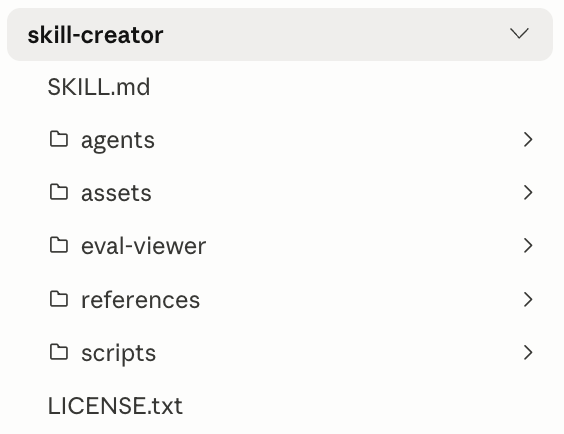
Claude reads the folder, decides whether the skill applies, and runs the instructions when it does.
The three parts, in the order the rest of this article follows:
Frontmatter: name and description. What Claude reads to decide whether to load the skill at all.
Body: the instructions Claude follows once the skill is loaded.
References: supporting files Claude pulls in only when a task calls for them.
Get the frontmatter wrong and the skill never runs. Get the body wrong and it runs but forgets your rules. Get the references wrong and it bloats every session it loads into. Three parts. Three distinct failures. The build sequence takes them in that order.
The mechanic underneath is timing: the three parts load at different moments. The description is always in context. The body loads only when the skill triggers. The references load only when a step calls for one.
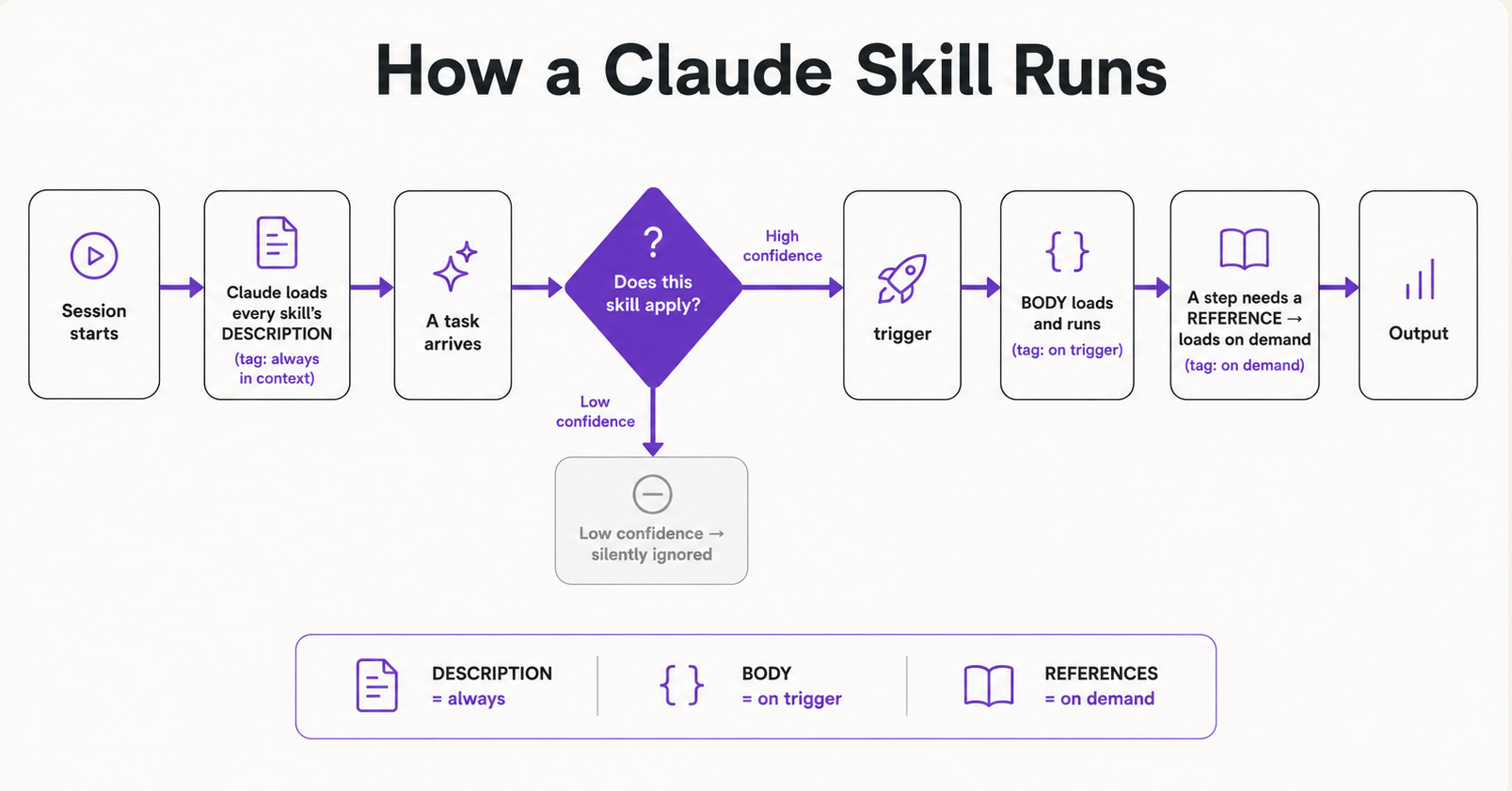
Most of a skill sits unloaded most of the time. That’s by design, and it’s why where you put a rule decides whether it’s even in the room when the work happens.
The same SKILL.md runs in Cursor, Claude Code, Cowork, and OpenClaw. I’ll use Claude Code here because it’s the most documented runtime.
The best way to understand skill structure is to open a skill Anthropic actually ships.
Skill-creator comes with Claude, and it's the most complete example I've seen. Beyond the basics it bundles scripts/, assets/, an eval-viewer/, even an agents/ folder of subagents that run from inside the skill.
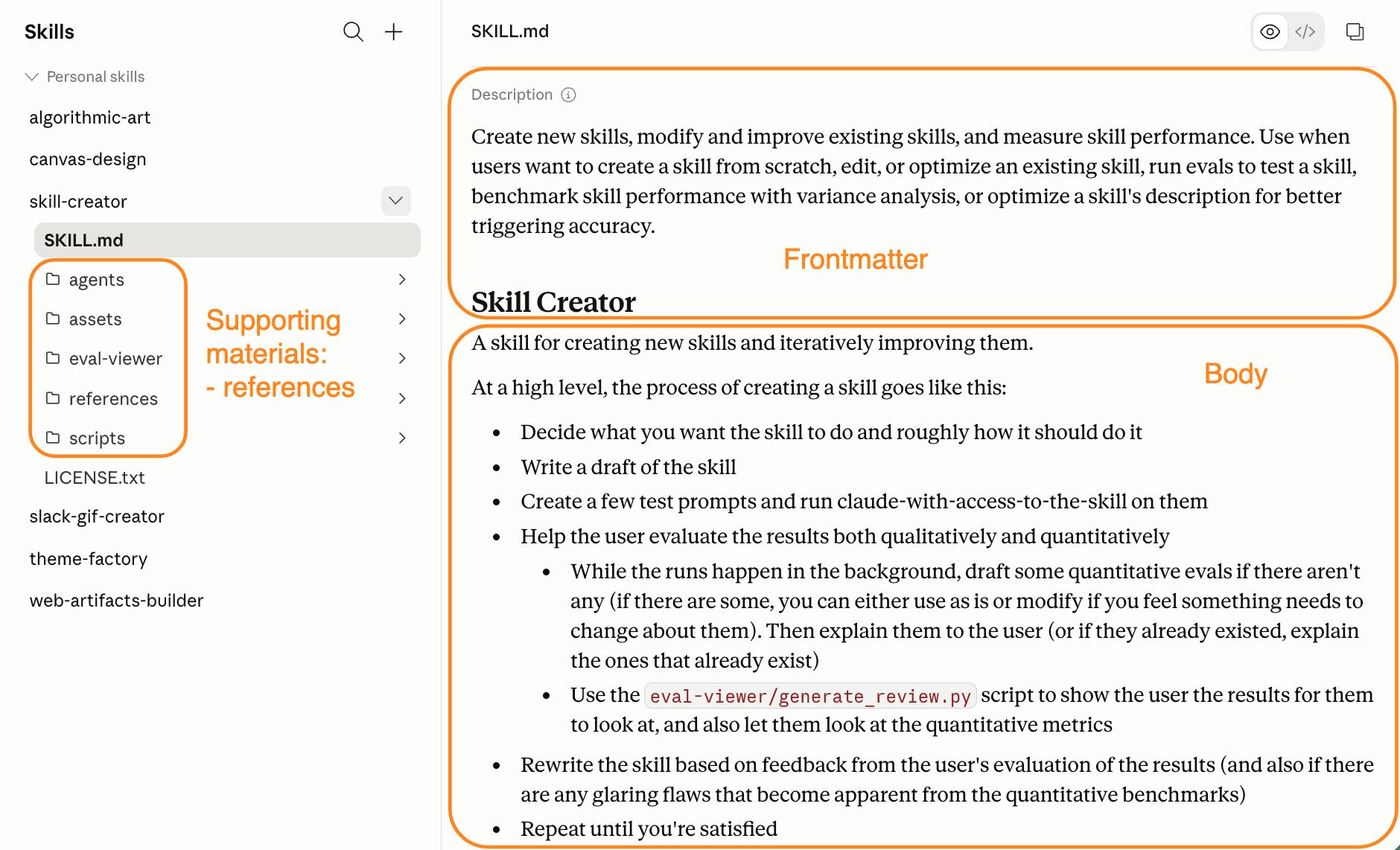
The left panel is the folder. The right panel is what Claude reads before opening any of it: the description field, the trigger label, how it was built.
Skills are one of three extension mechanisms in Claude. For how they compare to MCPs and plugins, see Claude MCP vs Plugins vs Skills
How to Write a Claude Skill Description That Triggers
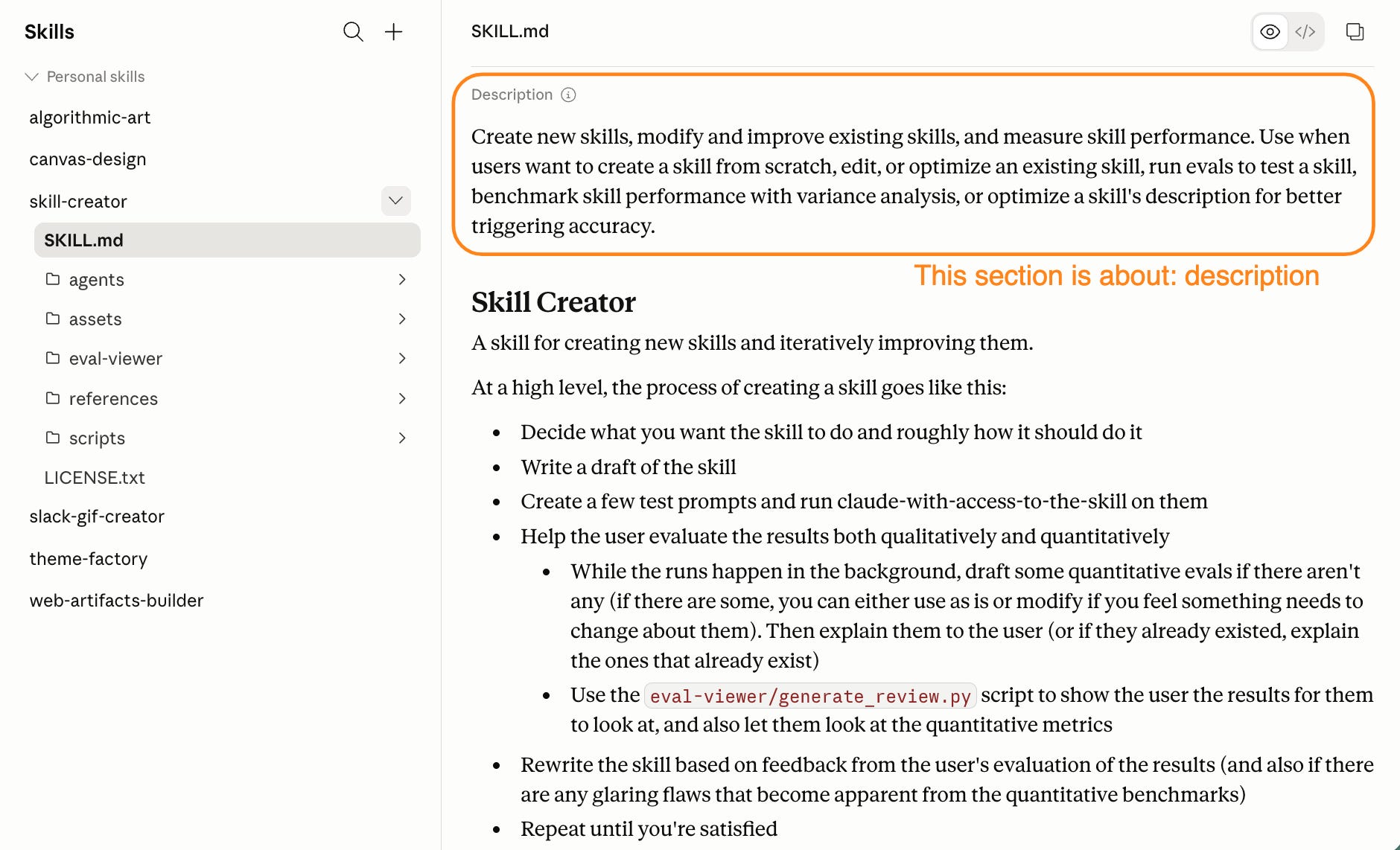
The description is the only thing Claude reads to decide whether your skill runs.
You saw the lifecycle: descriptions load at startup, the body waits for a trigger. Get this one field wrong and the skill never wakes up.
A description that fires does two things, and both decide whether the skill ever runs:
name the moment it should fire, as a condition and not an option
put that trigger first, where Claude weighs it most
Follow the right language formula
What the skill does + when to trigger it, in slightly pushy language.
“Slightly pushy” is deliberate. “Can help with X” signals optional, so Claude might invoke it, might not. “Use when Y happens” is a condition, and Claude reads conditions as instructions.
Bad and good, side by side:
❌ Vague, optional, trigger buried
   "A skill for improving writing quality. Can help with
    posts, emails, and more. Use it when writing."
   → no firing condition up front; Claude can't tell when it applies

✅ Specific, pushy, trigger first
   "[Name]'s writing voice. Use whenever you write, draft, or
    revise any prose, even if the user doesn't say the skill name."
   → the condition leads; Claude reads it as an instruction
Write it in the third person. The description talks to Claude about the skill, so “I help with writing” muddies who’s speaking.
Front-load the trigger
Put the trigger in the first sentence, because crowded sessions truncate descriptions and you can’t predict where the cut lands.
You can’t design around the limit either. Claude skills started at 250 characters, then climbed to 1,536 in v2.1.105 while Anthropic’s official guide still listed 1,024.
Mia Kiraki 🎭 flagged exactly that confusion after my previous piece on fixing skill triggers.
The number keeps moving. A trigger in the first sentence outlives every change to it.
An example is my own voice skill, the description running this article:
“Jenny Ouyang’s writing voice for Build to Launch. Use whenever Jenny asks to write, draft, revise, or edit any prose: articles, Substack notes, product pages, emails, or any section of content. Trigger proactively before generating any prose. Also trigger when output sounds generic, too polished, or AI-like. This is the universal voice layer for all Jenny’s writing.”
368 characters. It fires reliably because the trigger lands at character 51: “Use whenever Jenny asks to write.”
Two trigger conditions sit inside the first 100 characters. The last sentence is reinforcement, not load-decision material.
Cross-check the front-load part
Read the first sentence of your description. Does it say when to invoke the skill, or only what it covers?
If it’s what it covers, rewrite. Lead with the trigger.
Write the description last, after you know exactly what the skill does and when it should run. Write it as if Claude is reading with one question: should I use this right now?
The description gets the skill in the door. The body is where it earns its keep.
But the body has no single shape. It depends on the kind of skill you’re building, and the type you pick decides how the body runs.
How to Pick the Right Claude Skill Type
Build the wrong type and you’ll rewrite the body.
I rebuilt skills from scratch because the type was wrong. Not the rules, not the description. The fundamental architecture:
- A checklist skill can’t evaluate its own output.
- A guiding skill built as a checklist runs once and stops at the exact moment it should route.
That happened enough times (different skills, different failure modes, same root cause) that the actual structure became clear. Two axes, derived from Anthropic’s agentic patterns research and mapped to SKILL.md bodies: who drives the session, and how the work flows.
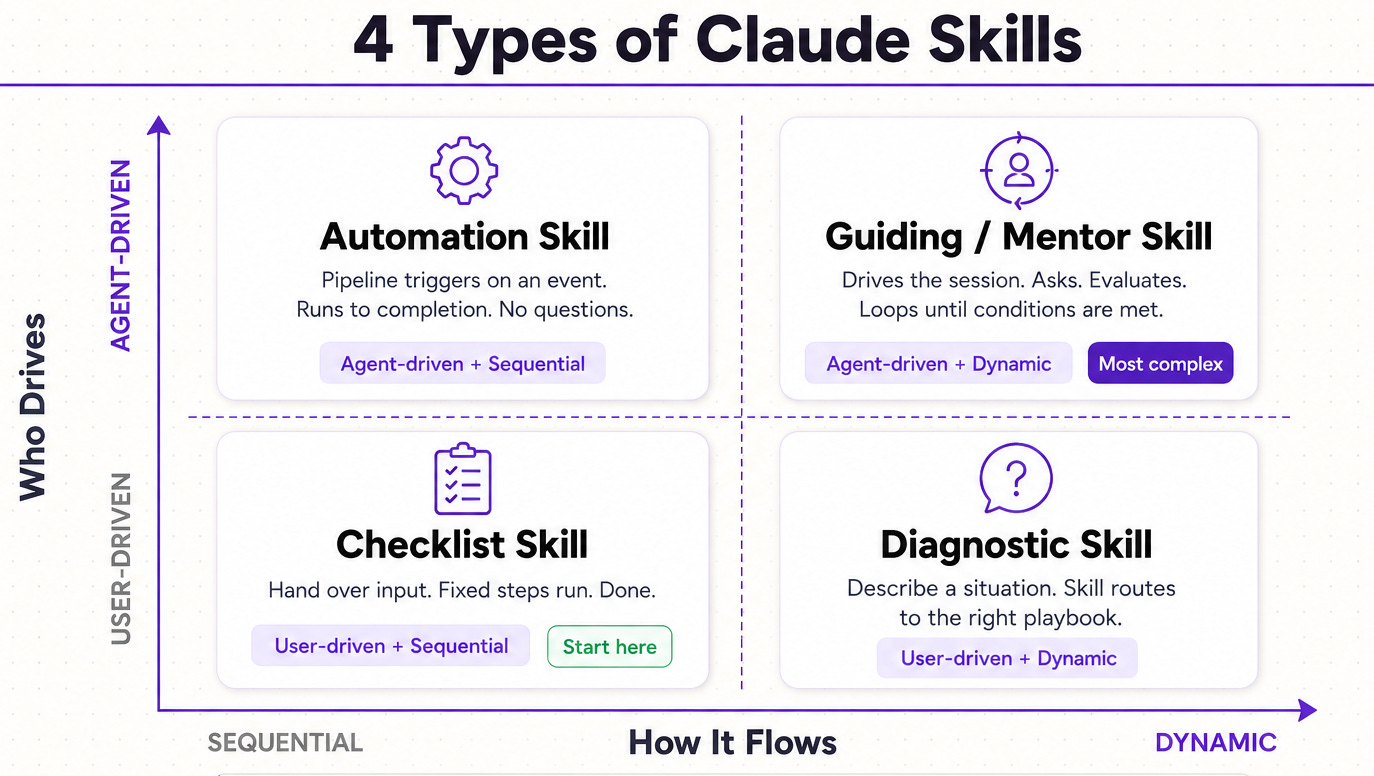
Axis 1: Who drives the session
Agent-driven:
The skill controls pacing. It asks questions. It decides when to advance. It loops on quality before finishing.
User-driven:
You ask, the skill responds. No back-and-forth unless you initiate it. The skill executes on what you give it.
Axis 2: How the work flows
Sequential:
Fixed steps, in order, predictable output.
Dynamic:
The path changes based on what you describe or what gets discovered mid-session.
Cross those axes and you get four types. The names are mine; the distinctions trace back to those sources:
Type 1: User-driven + Sequential = Checklist skill
You hand over input. The skill runs fixed steps. Done. The body looks like this:
When given an article:
1. Check title for target keyword
2. Scan for missing header structure
3. Flag sections under 150 words
4. Suggest 3 internal link opportunities
5. Output a prioritized fix list
Numbered. No branching. No questions. It works because the process is the same regardless of the input. Input varies, steps don’t. Most skills you build will be this type, and they should be. The body is simple because the path never forks.
Type 2: User-driven + Dynamic = Diagnostic skill
You describe a situation. The skill reads what you gave it and routes to the right playbook. The body looks like this:
When the user describes a decision:
- Reversible + low-stakes → run the "test fast" playbook
- Reversible + high-stakes → run the "pilot first" playbook
- Irreversible → run the "pre-mortem" playbook
If the decision type is unclear, ask one clarifying question before routing.
Conditional logic everywhere. It works because different inputs genuinely need different responses. Forcing a single fixed path applies the wrong framework to every case that doesn’t match the one you designed for.
Type 3: Agent-driven + Sequential = Automation skill
The skill kicks off a pipeline on a trigger and surfaces a result without back-and-forth. The body looks like this:
On schedule (every Monday):
1. Fetch last 7 days of channel data
2. Identify top 3 videos by retention rate
3. Extract recurring patterns from top performers
4. Write pulse report to /reports/weekly-[date].md
No interaction needed. It works because the trigger is a schedule or event, not a user question. The skill has everything it needs from the environment: a URL, a date range. The output shape is always the same. The body is a pipeline, not a conversation.
For working examples of this type, see Claude Code routines.
Type 4: Agent-driven + Dynamic = Guiding/Mentor skill
The hardest to build. The skill drives the session: it asks, evaluates, loops on quality, and only advances when conditions are met. The body looks like this:
Step 1: Ask which article this is for. Do not proceed until answered.
Step 2: Ask the reader scenario. Do not proceed until answered.
Step 3: Draft a hook. Evaluate against gate criteria.
  → Gate passes: advance to Step 4
  → Gate fails: rewrite and re-evaluate. Max 3 loops.
Step 4: Ask "Does this feel right?" Do not advance until confirmed.
It works because the quality of the output depends on things only discoverable mid-session. A checklist version runs once and produces something generic. The back-and-forth loop is what produces the output worth using. Explicit advance conditions and quality gates aren’t optional. Without them, the skill runs through all steps regardless of whether each one actually worked.
Pick your type before you write the body. If you're unsure which you have, ask one question: does the skill need to ask follow-ups to know what to do? Yes is agent-driven, no is user-driven.
You know the structure and trigger layer. What's left is the build, and the build is where skills actually break.
The rest of this guide builds one skill: jenny-voice, the one assisting my article writing.
It's the guiding type, the hardest of the four, and it leans on every part still ahead: a body that executes, a stack of references, and constraints it has to hold the whole way through.
If the sequence holds here, it holds on anything smaller.
I spent months fixing and evolving this one. The build runs in order from here:
how to build the body so your rules still fire deep into a task
how to structure the references so Claude loads them on demand
how to test it so you know whether a change helped or broke something
how to maintain it so it holds up months later
Two resources at the end.
The build sequence, a one-page checklist you can run on any skill.
The voice skill template, this exact jenny-voice folder emptied to fill-in markers you complete from your own writing.
Watch it on jenny-voice. Then run it on yours.
How to Build a Claude Skill Body That Executes
The body is the instructions block inside SKILL.md. Everything Claude runs once the description triggers the skill.
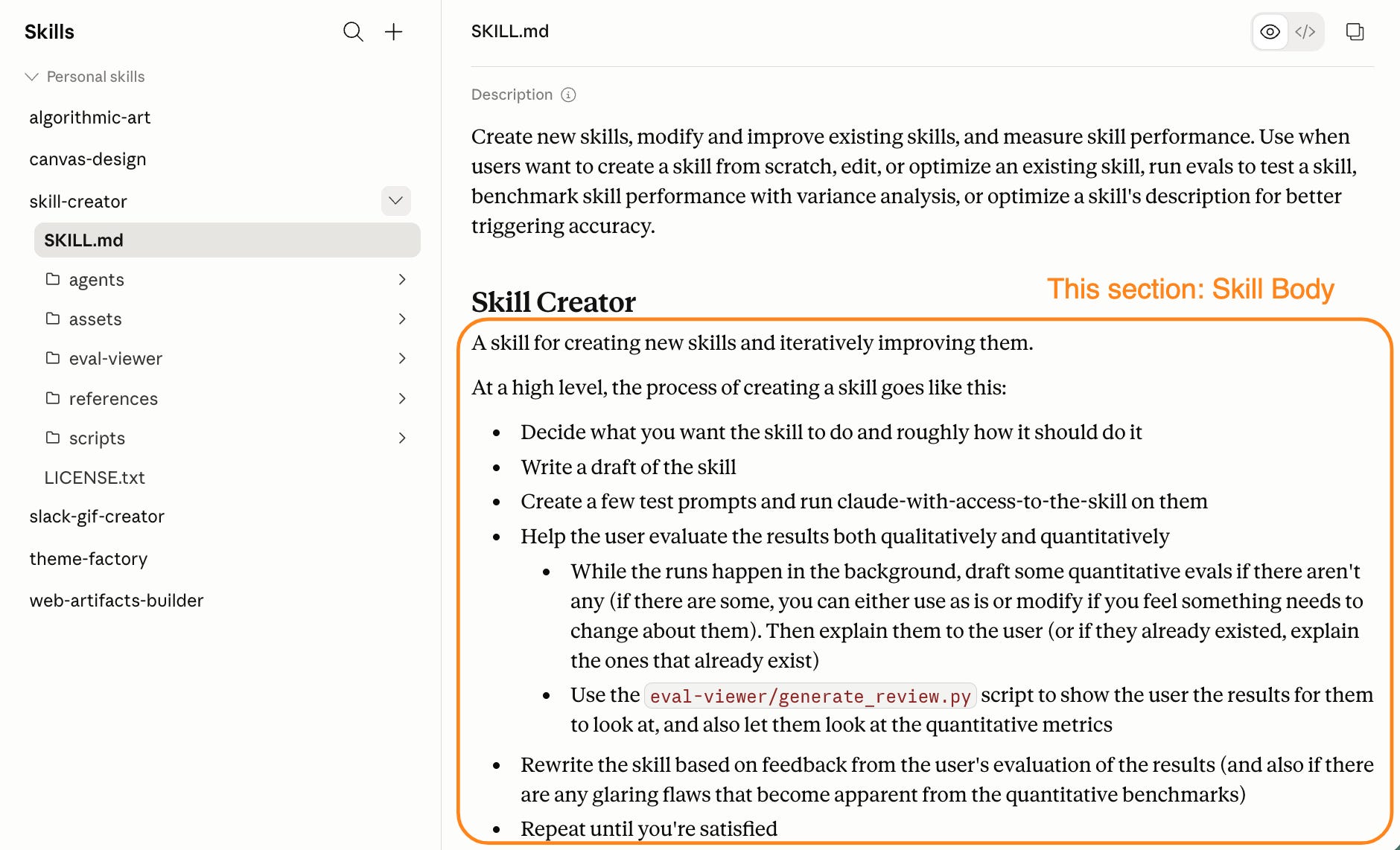
A skill body that executes does three jobs: