
How Two Prompting Strategies Made My AI Code Production-Ready
Most AI code breaks because there’s no prompting strategy. Here’s how to guide AI to ship code that actually works in production.

Have you ever shipped AI‑generated code… only to watch it break in production?
Or stared at security vulnerabilities you didn’t write, wondering how they got there?
You’re not alone. The internet’s full of the same horror stories:
SQL injections from auto-generated queries
API keys exposed in config files
N+1 database calls tanking performance
Missing error handling that crashes prod
Spaghetti code no one can debug
…
I’ve shipped code with all of these problems. For months, I blamed the tools. Cursor wasn’t careful enough. Claude Code wasn’t thorough enough. Replit wasn’t production-ready.
But the more I built with AI, the clearer the pattern became: AI wasn’t intentionally writing bad code.
It was me hadn’t given it enough direction.
Without proper prompts at the beginning, every step down becomes more vulnerable and less patchable. The code compounds problems instead of preventing them. The fix isn’t more AI tools or better models. It’s better prompting, and asking the right questions before a single line of code is written.
After months of trial and error, I landed on two prompting strategies that changed how I build with AI, and finally got my code production-ready.
In this article, you’ll learn the two core prompting strategies that solve 90% of AI coding problems:
Top-Down Prompting — how to guide AI from the very beginning, so it builds clean, scalable apps with minimal rework
Bottom-Up Prompting — how to debug and improve AI-generated code using fast, multi-modal techniques
These two strategies have become my go-to system for building with AI, and by the end of this article, they’ll be yours too.

Table of Contents:
The Universal Problem I Want to Resolve
I wanted to build an AI digest app that could handle the information chaos I was drowning in.
YouTube videos, podcasts, newsletters, GitHub repos, research papers, reddit channels... valuable information scattered everywhere in every format imaginable. I wanted AI to gather everything, process it, score what matters, summarize the key insights, and categorize it all. Not just another RSS-to-email pipeline built in n8n, but something with a UI that matched how I actually consume information. Click, scan, dive deeper when something catches my attention.
This kind of app is in massive demand right now. Not just for AI content, because every field is experiencing information overload. Finance, marketing, research, product development. Master building one, and you’ve mastered building them all. The pattern works for general-purpose tools and highly personalized use cases.
In the past, I’d open Cursor and typed: “Build me a daily AI digest app.”
The result? Half-working code that broke as soon as I try to add a second data source. No deduping strategy. No error handling for failed API calls. The database schema couldn’t handle updates to existing articles. I’d spend more time fixing bugs than I would’ve spent building it properly from scratch.
The problem wasn’t that AI generated bad code. The problem was that I asked AI to write code before I’d designed the system.
Here’s what actually worked: a conversation that happened before AI wrote a single line of code. Five rounds. Each round built on the previous one. By the time we got to implementation, AI had the complete picture of what I was building and why.
Strategy 1: Top-Down Prompting - The Systematic Build Conversation
Most people open an AI coding tool and type: “Build me an app that does X.”
That’s the fastest way to get half-working code and a lost context window.
Instead, I use a conversation chain to help me go from a vague idea to a fully runnable prototype with coherent architecture. You can reuse this for any AI-assisted build: an automation tool, a data dashboard, a writing agent, anything.
Think of it as your pre-build system design ritual.

Round 1: Problem Statement
The Formula
Your prompt template:
I want to build a web app that does [goal in one sentence].
The core workflow is [one-line flow].
I’ll likely host on [platform] later.
I need you to recommend the tech stack and outline the plan.
Keep it practical and concise.
What AI should respond with:
1-2 viable stack options with clear recommendation
Brief justification (fit-for-purpose, simplicity, time)
Minimal product flow
Key uncertainties to resolve
Decision checkpoint: Pick your stack direction so the rest stays coherent.
How I Use It
I started by asking ChatGPT to recommend a stack before writing any code.
I want to build a web app using Replit. The goal is to fetch articles from URLs—either via RSS or other useful methods—summarize them with an AI model, and display the summaries on a webpage. Since I’m using Replit, what tech stack would you recommend? What are your considerations behind that choice?
ChatGPT came back with FastAPI + Python for backend-heavy workflows. Python has better-maintained AI libraries (feedparser, newspaper3k, OpenAI SDK). FastAPI handles async well. Minimal setup for Replit.
But I pushed back.
I’ve used Next.js extensively. Most AI platforms use React or Next.js. Staying in JavaScript seems more convenient. Why expand into Python?
ChatGPT explained: The core workload isn’t frontend interactivity—it’s data ingestion and AI orchestration. Python handles that better. Less time debugging text extraction. Native async in FastAPI fits Replit’s single-process model. Tighter control over AI prompt templates and rate limiting.
I chose Next.js anyway. Because I planned to host on Vercel later. Better to stay in one ecosystem.
Sure, I didn’t follow ChatGPT’s suggestion completely, but here is why Round 1 matters so much.
I didn’t want to be halfway through development only to realize my stack couldn’t handle the workload, or that I’d need to rebuild the entire ingestion layer just to add a new source type.
This round forced me to map my deployment path (Vercel) against my real workflow needs (data ingestion + AI orchestration). It exposed platform constraints I hadn’t considered, like where cron jobs should live when Vercel can’t run background tasks, or how different source types (APIs vs RSS vs scraping) would need different handling strategies.
ChatGPT asked questions I wouldn’t have asked myself until it was too late. “What’s your core workload: frontend interactivity or data processing?” That single question revealed whether JavaScript tooling would be sufficient or frustrating.
Round 2: Requirements Interview
The Formula
Your prompt template:
Ask me the minimum number of questions you need to be 90-95% confident about the architecture.What AI should ask:
Data & Volume – What are you storing, how often does it update, and how much of it will there be?
User & Workflow Model – Who’s using it (now and later), and how should the system behave day-to-day?
AI & Timing – What models are involved, and when should they process data—on demand or in advance?
Infrastructure & Constraints – Where will it run, what platform limits matter, and how will it scale or break?
Decision checkpoint: Answer each in one line. You’re locking direction, data shape, and operational systems.
How I Use It
Once ChatGPT understood the stack, I asked it to interview me about the actual requirements.
ChatGPT came back with six key questions:
Article persistence: Keep historical records or regenerate every session? If history, what fields matter for search?
User interaction: Single user or multiple users? Authentication needed?
Source update frequency: Poll feeds periodically or manual trigger only? If periodic, where does cron run since Vercel can’t handle background jobs?
Volume: How many articles per feed per day/week?
AI summarization: On-demand when visiting an article, or batch process everything when fetched?
Future features: Planning search, tagging, or analytics? That affects whether we need structured storage (Postgres) or simple JSON.
Here is why Round 2 matters so much:
These questions felt tedious. “Do I want historical records?” “Single user or multi-user?” They seemed obvious.
But each answer was locking in infrastructure decisions. “Historical records” meant SQL, not key-value stores. “Daily updates” meant external scheduling since Vercel can’t run cron. “100 articles per day” meant Supabase free tier works—but 10,000 would need different architecture.
Without this round, I would’ve built with assumptions. “On-demand summarization” sounds cheaper until users wait 30 seconds every dashboard load. Switching to immediate summarization after the data flow is built means refactoring how fetching works, when AI calls happen, what gets stored.
I changed my mind on several constraints later (Round 3). But because I’d answered these questions upfront, I knew exactly what shifting from “store raw content” to “summaries only” would affect. The decision points were already mapped.
Without this conversation, those choices get buried in your first implementation. You don’t realize you made them until they break.
Round 3: Architecture Design & Iteration
The Formula
Your prompt template:
Given my answers, propose the architecture and data flow.
Call out tradeoffs.
Be specific about components, but don’t write code.
What AI should deliver:
System diagram in text (sources → API routes → AI calls → DB → UI)
Database tables with names and columns
Fetching and deduping strategy
Scheduling approach (where cron runs)
Justification for stack choices given your scale
Decision checkpoint: Confirm the data flow and tables. Then iterate if seeing the architecture reveals constraints you hadn’t considered.
You’re designing the system before implementing it. Database schema, API flow, and scheduling decisions happen here.
How I Use It
I asked ChatGPT:
Given my answers, propose the architecture and data flow. Call out tradeoffs. Be specific about components, but don’t write code.
ChatGPT proposed: Next.js frontend with Supabase for database and cron scheduling. Text diagram: RSS URLs → `/api/fetch` (Next.js route) → rss-parser + trafilatura → save to Supabase → summarize via OpenAI → store summaries back → display on `/feed` page.
For the database, two tables: feeds (id, url, title, last_checked) and articles (id, feed_id, title, link, content, published_at, summary, summarized_at). Index on articles.link for uniqueness.
It also flagged that Vercel has no persistent runtime, no native cron. I’d need external scheduling or Supabase’s built-in scheduler.

Then I saw the schema and realized I needed to change constraints.
Actually, I’d prefer not to store raw article data. Instead, fetch and summarize immediately, then save only the summary and URL. That means it’s no longer on-demand summarization. Also, I want AI to automatically assign categories.
ChatGPT redesigned the flow, updated database schema, and extended the OpenAI prompt to return both summary and category in one call using JSON format.
Why Round 3 matters so much?
I used to skip architecture design. It felt like overhead. Then I spent 10 hours refactoring a database I’d designed wrong in 20 minutes.
Round 3 caught those problems before they existed. ChatGPT proposed the data flow with specific table fields, flagged Vercel’s cron limitations, caught potential N+1 query patterns. Same URL appearing twice because no deduping strategy. Queries slowing at 500 articles because no indexes.
But here’s what matters more: seeing the architecture revealed constraints I hadn’t thought about. “Wait, I don’t want to store raw content.” That realization came from seeing the schema, not from abstract requirements. The iteration happened naturally because the design was visible before implementation.
Architecture decisions are expensive to change. Wrong database schema means migrations. Missing indexes mean slow queries. Storing everything means storage costs balloon and features depend on that data, refactoring backward is painful.
This round lets you fix those issues in 20 minutes of conversation instead of 10 hours of refactoring.
Round 4: Master Initialization Prompt
The Formula
Your prompt template:
Generate a single ‘Master Initialization Prompt’ that I’ll paste into [AI coding tool] first.

It should:
- Describe the complete app behavior and stack.
- Specify the database schema with names/columns.
- Define the workflow, UI, and AI behaviors.
- Tell the AI not to start coding yet—just acknowledge comprehension.
What AI should deliver:
Complete system overview with clear section headings (Goal, Stack, Schema, Workflow, UI, AI)
Every decision from Rounds 1-3 documented in one place
Instruction for AI IDE to acknowledge understanding, not generate code
Future extension notes for context
Decision checkpoint: Paste this into your AI IDE. Wait for acknowledgment before moving to implementation.
How I Use It
I told ChatGPT:
I don’t want to start with coding phases yet. First, I want Replit to understand the complete picture of what this app should do—the full vision. Then we can break it down into phases to maintain continuity and avoid losing context. So please write a complete summary of the app’s overall concept first.
ChatGPT generated a master prompt covering:
Goal: Fetch articles from RSS, summarize with AI, assign categories, display in dashboard
Stack: Next.js App Router (TypeScript), TailwindCSS, Supabase, OpenAI
Schema: articles table with 7 fields (id, title, url, summary, category, published_at, created_at)
Workflow: 7-step flow from dashboard open to auto-fetch
UI: Category sections with summary cards, color-coded badges, “Read Original” links
AI: 2-3 sentence summaries + category assignment via OpenAI
It ended with: “Acknowledge that you understand this entire system. Do not start coding yet—only confirm full comprehension and readiness.”
When I pasted this into Replit, it acknowledged the complete system before generating any code.
Why Round 4 matters so much:
AI IDEs lose context fast. Phase 1 sets up the project. Phase 3 builds the API. But by Phase 4, the AI has forgotten what database schema you mentioned in Phase 2.
Without this master prompt, you end up re-explaining requirements mid-build. “Wait, what fields does the articles table have again?” Code gets inconsistent. Table names don’t match between phases. API routes expect different data shapes than the database provides.
This round documents everything in one comprehensive prompt. When Replit reads it, the entire system lives in context. No guessing. No making up requirements. No “wait, what was this supposed to do?”
The acknowledgment step matters too. You’re confirming comprehension before execution. If the AI misunderstood something, you catch it here, not after 500 lines of wrong code.
Round 5: Phased Build Prompts
The Formula
Your prompt template:
Now generate Phases 1-N as separate prompts.
High-level, no code.
Each phase must state: scope, success criteria, and what artifacts should exist at the end.
What AI should deliver:
4-6 phases breaking the build into logical checkpoints
Each phase with clear scope (what gets built)
Success criteria for each (how you know it worked)
Expected artifacts (files, endpoints, working features)
High-level instructions AI IDE can execute, not code
Decision checkpoint: Run each phase in order. Confirm success criteria before moving to the next phase.
How I Use It
With the master prompt loaded in Replit, I asked ChatGPT:
Now generate Phases 1-N as separate prompts. High-level, no code. Each phase must state: scope, success criteria, and what artifacts should exist at the end.
ChatGPT generated 5 phases:
Phase 1: Initialize project—Next.js App Router (TypeScript), TailwindCSS, Supabase SDK, OpenAI API support, environment variables, development server confirmed working with default landing page.
Phase 2: Connect Supabase and define schema—articles table with 7 fields (id, title, url, summary, category, published_at, created_at), helper functions to insert/retrieve articles grouped by category.
Phase 3: Create fetching and summarization logic—/api/fetch route that accepts RSS URLs, parses articles, extracts text, calls OpenAI for 2-3 sentence summary + category assignment, saves to Supabase with duplicate prevention.
Phase 4: Build dashboard UI—TailwindCSS dashboard displaying articles grouped by category, color-coded badges, “Read Original” external links, form to add feeds, “Refresh Feeds” button.
Phase 5: Automate and test workflow—manual refresh button calling /api/fetch, optional simulated daily cron, end-to-end tests (add feed → fetch → summarize → categorize → store → display), confirmation message when operational.
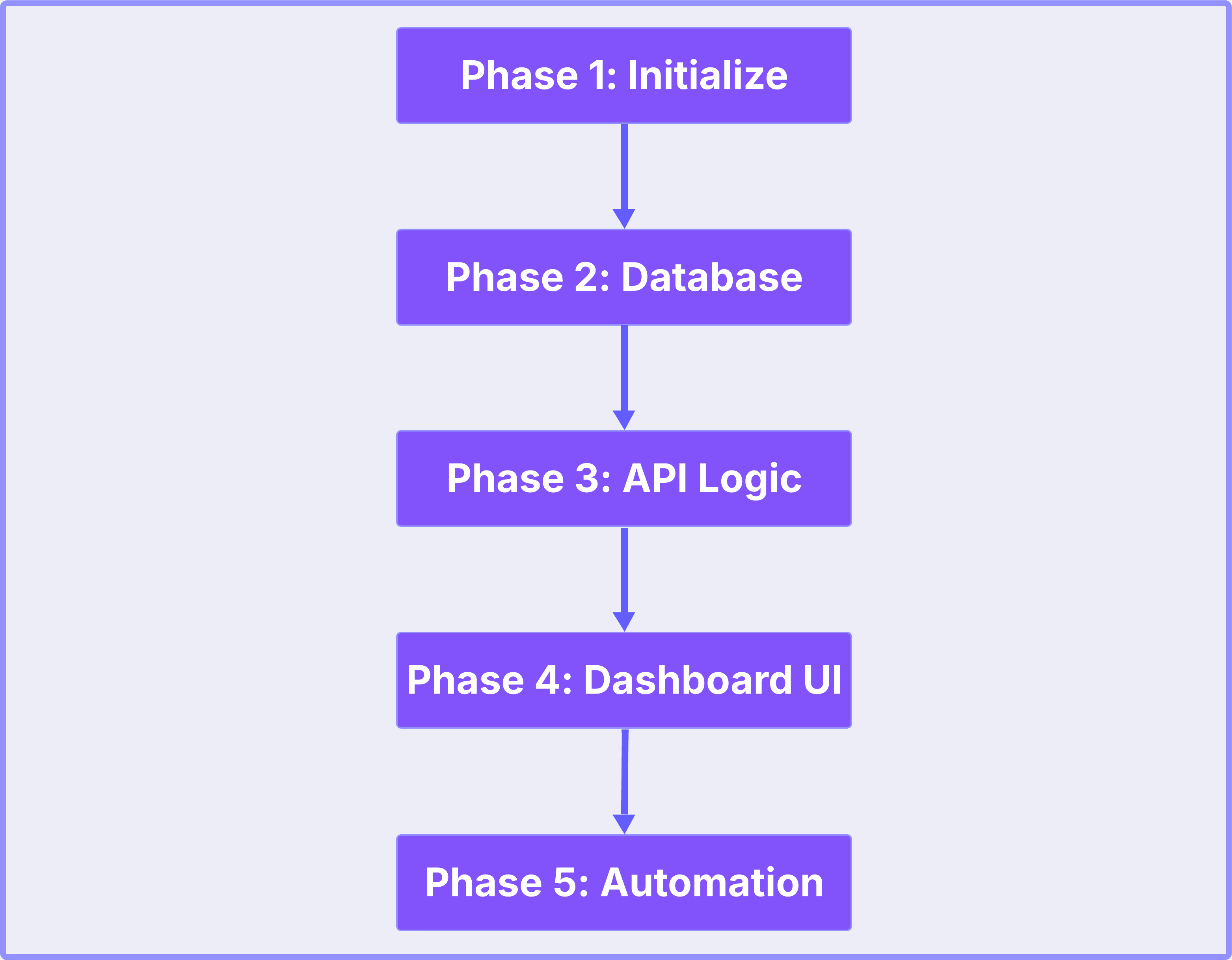
(Note: I’m showing skeleton versions here for space. The complete unfiltered chat history and full prompt generation process from this workshop are captured in the AI Builders Resources.)
Each phase ended with clear success criteria: “app runs locally,” “can write and read records,” “fetch endpoint returns processed articles,” “UI displays categorized content,” “complete flow works autonomously.”
Why Round 5 matters so much
Big-bang implementations are where unmaintainable code comes from. You build everything at once. When something breaks, you don’t know which layer failed… fetching? AI calls? Database writes? UI rendering?
Phases create clean boundaries. Each is independently testable. Phase 2 confirms database operations work before Phase 3 tries to use them. Phase 3 confirms the API returns data before Phase 4 tries to display it.
Bugs get caught at boundaries instead of buried in integrated mess. When Phase 3’s API returns empty data, you know the problem is fetching or AI calls—not the database or UI. Debugging takes minutes instead of hours because you have isolation.
Without this round, you’re debugging 500 lines of interconnected code trying to figure out where the break is. With phases, you’re debugging 100 lines in a layer you just added, knowing the previous layers already worked.
When to Use This Framework
Use this when you’re building new features from scratch, starting new projects, or redesigning major components—anytime you need production-ready code from the start.
How strictly you follow it depends on complexity.
Simple apps (landing page, basic CRUD) might only need Rounds 1, 2, 3, 5.
Medium apps (dashboard with auth) use all rounds with light iteration.
Complex apps (multi-tenant SaaS, real-time features) need deep iteration on every round.
The framework is a guide, not a prison. Sometimes Round 2 takes three back-and-forths. Sometimes Round 3 surfaces constraints that loop you back to Round 1. Use as needed.
Bonus: Top-down prompting uses 60-70% fewer AI credits than iterative fixing. When AI generates code with full context upfront, success rate is much higher.
There is a complete workshop resource about it.
This framework came from the part 3 of the workshop series where I walked AI builders through building the AI Daily Digest app from scratch using this exact process.
If you want the complete, unfiltered version:
Complete Chat History - Every prompt, every response, every iteration from the actual ChatGPT conversation that built the digest app
System Prompt Template - The full master initialization prompt and phased build prompts ready to copy-paste
Workshop Recording & Notes - The live session where we debugged, refined, and shipped together
All available in the AI Builders Resources workshops section.
Strategy 2: Bottom-Up Prompting: Multi-Modal Debugging
Top-down prompting builds production-ready code from scratch. But even with perfect rounds, things break.
A user reports the summary feed isn’t loading. OpenAI times out on long articles. The category badges render wrong on mobile. Someone wants to add a new source type you didn’t plan for.
This is where bottom-up prompting takes over. You’re not building a system, you’re fixing, tweaking, iterating. The prompting strategy changes completely.
Instead of conversation rounds and architecture design, you’re using images, raw console output, and standalone testing. Speed matters more than systematic planning. You need the bug fixed in 5 minutes, not 5 rounds.
These techniques work with any AI coding tool — Cursor, Claude Code, Replit, Windsurf, whatever you’re using. The prompting principles stay the same.
Here’s how I debug and iterate fast when AI-generated code breaks or needs changes.
Technique 1: Raw Output Prompting
The digest app deployed fine on Replit. But in production, the feed wasn’t loading. No obvious error. Just... nothing.
I checked the Resources tab. Nothing indicated environment variable issues. The overview looked fine. But something was breaking.
I fed the problem and the production logs into Replit.
Replit responded: “Perfect! Now I can see the exact issue from your logs!”
It read through the error output, and concluded:
“This is a DNS/database connection error! The hostname ‘helium’ can’t be resolved in production. This means your DATABASE_URL environment variable either: 1. Isn’t set in production, OR 2. Contains a hostname that only works in development.”
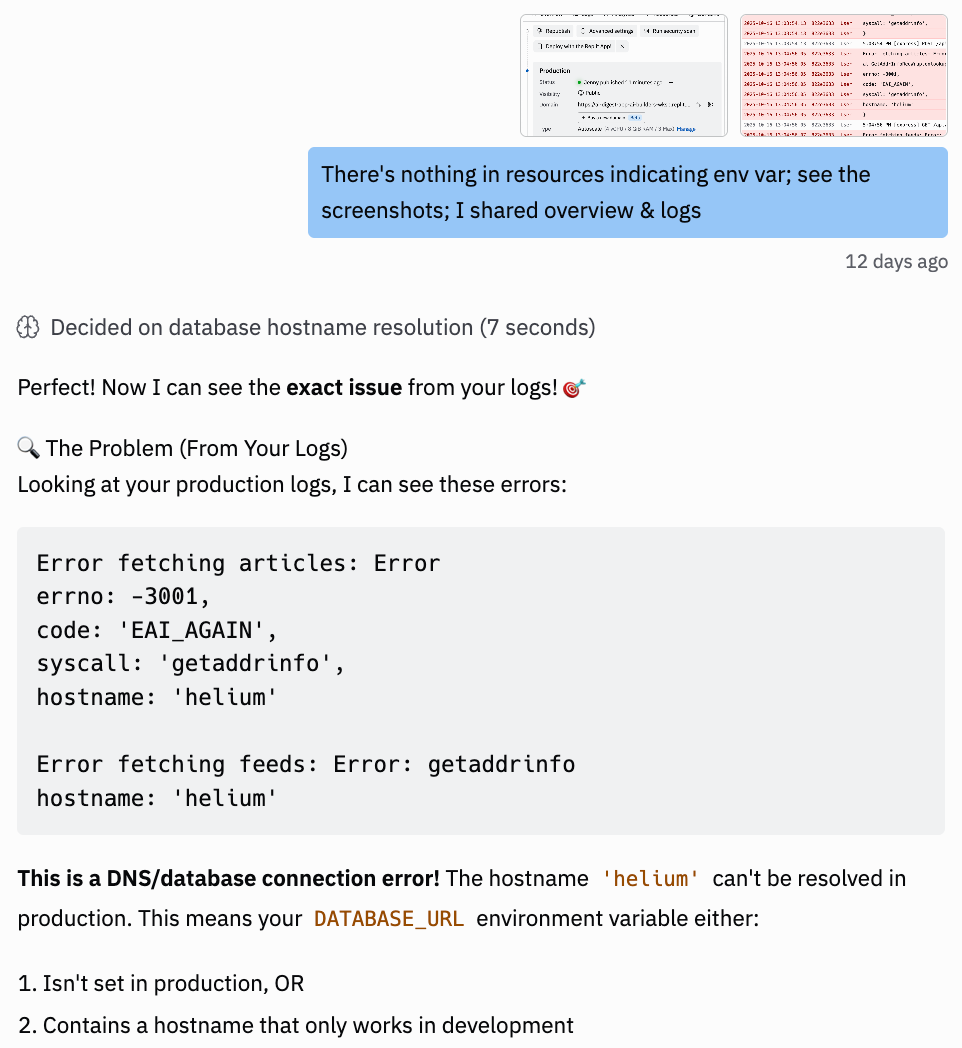
I’d been using a local database hostname that worked in dev but didn’t exist in production. Fixed the environment variable. App worked.
Total debug time: 2 minutes.
This works because raw logs show the actual execution path. Error codes (EAI_AGAIN), system calls (getaddrinfo), exact hostnames (helium). Details you’d never think to mention if describing the problem in text.
Without the logs, I would’ve said “the feed isn’t loading” and Claude would’ve guessed at 20 possible causes. With the logs, Claude saw the exact breaking point.
Copy the full console output. Paste it. Let AI trace the execution.
You can also ask AI to instrument your code first. “Add console.log at every step where the feed might break, fetch start, content extraction, AI call, database write.”
AI adds the outputs, you run the code, paste the results back. AI traces through and pinpoints the break. This works especially well for silent failures where no error gets thrown but something’s clearly wrong.
Use it for: Silent failures, connection errors, environment variable issues, API call problems, database errors, anything that logs error codes.
Technique 2: Image-Based Prompting
After fixing the production error, I was deploying another update to Replit. Hit publish, couldn’t find where to add the new environment variables. The interface looked different from tutorials.
Instead of typing paragraphs describing what I was seeing, I screenshot the entire publishing screen and pasted it into Replit.
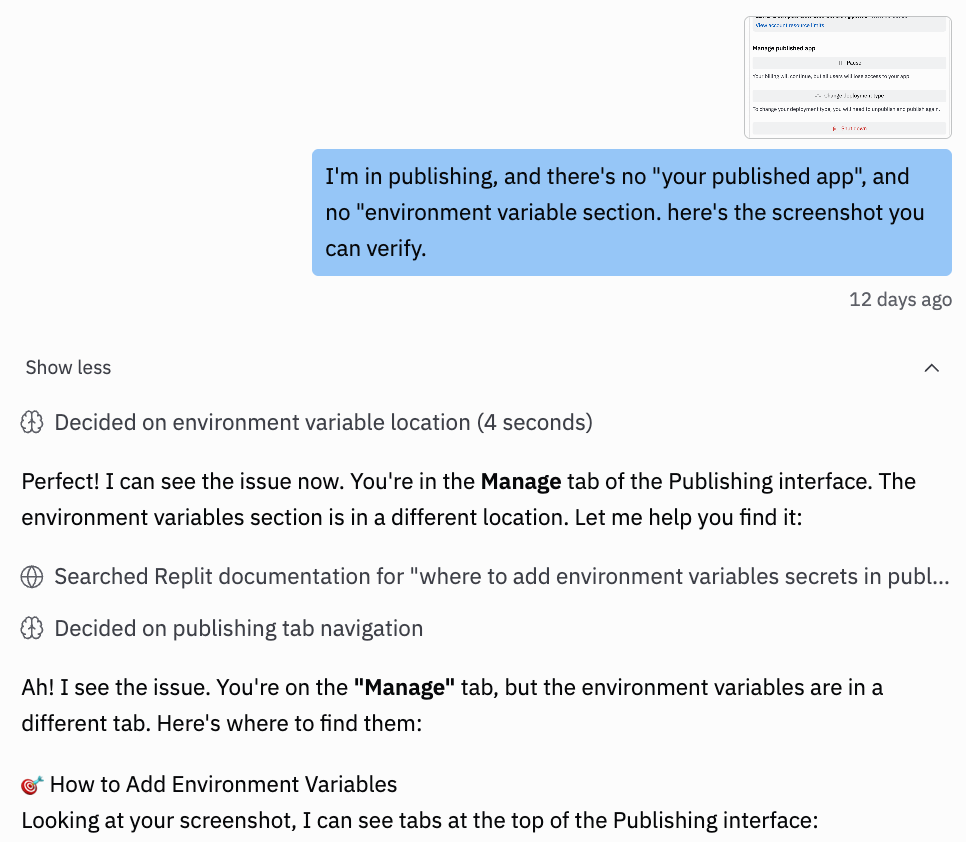
“I’m in publishing and there’s no environment variable section. Here’s the screenshot you can verify.”
Replit responded immediately: “Perfect! I can see the issue now. You’re in the Manage tab of the Publishing interface. The environment variables section is in a different location.”
It searched Replit docs and told me exactly which tab to click.
30 seconds. Done.
This works because screenshots capture everything text loses. Which tab you’re on. What buttons are visible. The interface layout. I didn’t even mention I was on the Manage tab specifically, Replit (any AI) saw it in the image.
Without the screenshot, I would’ve spent 10 minutes typing “There’s tabs at the top... I’m looking at something called Manage...” and Replit would still be guessing.
Screenshot the error. Paste it. Ask “What’s wrong here?” Let AI see what you see.
The prompt pattern:
Screenshot the error at the exact position
Paste into AI chatbox
Prompt: “What’s wrong here?” or “Fix this error”
No need to describe, the image IS the prompt
Use it for: UI navigation issues, deployment problems, interface confusion, linter errors, runtime errors in console.
Technique 3: Prompting with Playwright MCP
I’d built an app called Quick Viral Notes — a Substack note-generating app with password reset functionality. Tested the pw reset manually once. Seemed fine. But I wanted to make sure it actually worked end-to-end before shipping.
Instead of clicking through the flow again myself, I asked Claude:
“Test the login page at localhost:5000. Password reset functionality?”
Cursor responded: “Perfect! Let me test the password reset functionality using Playwright.”
It autonomously:
Navigated to localhost:5000
Found the “Forgot your password?” link
Clicked it (first tried /forgot-password, then corrected to /reset-password when that didn’t work)
Opened a new browser session to verify the flow
Navigated back to signin
Clicked “Forgot your password?” again
Captured the success message screenshot showing: “Password reset instructions have been sent to your email if it exists in our system”
Closed the browser
Reported: “✅ Password Reset Functionality Test Complete!”
Total time: Under a minute. Verified the entire flow without me touching the browser.
This works because Playwright MCP lets AI interact with your UI autonomously. It clicks, navigates, types, screenshots—whatever’s needed to test the flow. You’re not describing what to test or manually reproducing steps. AI executes the entire user journey and reports back.
Without this, I would’ve manually clicked through the reset flow every time I wanted to verify it worked. With Playwright, Claude tests it in seconds and shows me exactly what the user sees.
Ask AI to test a specific flow. Let it navigate and verify autonomously.
Use it for: UI flow testing, form submissions, multi-step workflows, authentication flows, state changes that require interaction.
Technique 4: UI Mockup Prompting
I was redesigning the dashboard for Quick Viral Notes. The existing layout worked, but I wanted to test different sidebar configurations. Should the controls be 1/3 of the screen or 1/4? Should future features like saved presets and AI suggestions live in the sidebar or separate sections?
Building these variations directly into the React codebase would mean touching routing, state management, component structure. Every test would risk breaking working features.
Instead, I asked Claude:
“Create three standalone HTML mockups for Quick Viral Notes sidebar layouts. No React, no integration—just static HTML I can open in a browser. First mockup: clean 4/8 split with basic controls. Second: narrow 3/9 split, more article space. Third: advanced with future features like credits banner, presets, AI suggestions, batch actions. Make them fully functional with real interactions.”
Claude generated three complete HTML files. Each one had:
Full styling (inline CSS, no external dependencies)
Interactive controls (segmented buttons, radio options, checkboxes)
Realistic content (article cards, stats, metadata)
Visual labels showing which mockup I was viewing
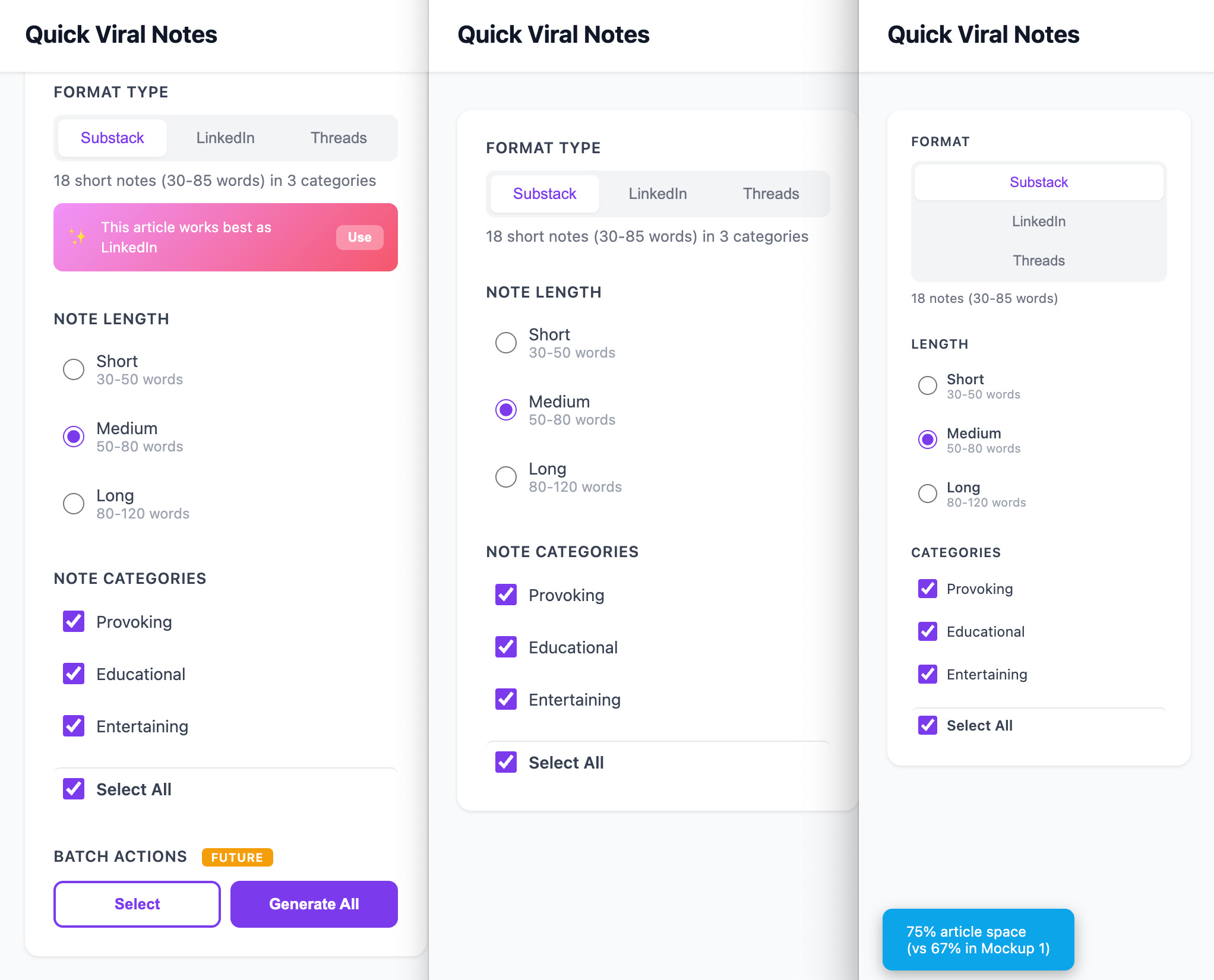
I opened all three in separate browser tabs. Clicked through the interactions. Compared how much article space each layout gave. Saw immediately that the advanced features crowded the sidebar too much. The clean 4/8 split felt right.
Total time: 15 minutes to generate, test, and decide. Zero risk to production code.
This works because standalone mockups let you validate UI decisions before touching your codebase. No state management. No component refactoring. No “let me revert this commit.” You see the design, test the interactions, confirm it works, then prompt for integration.
Without this, I would’ve built the advanced sidebar into React, realized it was too crowded, then spent hours removing features and rebalancing the layout. With mockups, I killed bad designs in the browser before they touched code.
Build it standalone. Test it visually. Integrate only after confirmation.
Use it for: UI redesigns, layout comparisons, new interactive features, responsive testing, accessibility improvements, anything where seeing it matters more than connecting it.
Which Strategy When?
Building from scratch? Use Top-Down. Five rounds of conversation before code.
Debugging or iterating? Use Bottom-Up. Screenshots, logs, mockups, fast tactical fixes.
The strategies complement each other. Top-down prevents problems. Bottom-up solves them. Together, they cover the full lifecycle of AI-assisted development.
These strategies don’t guarantee perfect code. AI still makes mistakes, generates inefficient loops, misunderstands requirements, introduces subtle bugs. Good prompting improves your odds dramatically, but it doesn’t make AI infallible.
What changes: You catch problems earlier. Bugs happen in isolated phases instead of tangled codebases. When AI generates questionable code, your architecture already constrains the damage. The framework doesn’t prevent all mistakes, it makes mistakes cheaper to fix.
What You Can’t Prompt Away
Even when your prompts are perfect and AI writes clean code, external factors can still break everything.
I followed every round building a custom Claude MCP connector. Clean architecture. Phased implementation. Verified each step. AI generated solid code. Still wouldn’t connect.
I debugged for an hour before checking GitHub issues. Turns out, the problem was Claude’s platform had an authentication bug. Multiple developers reported it. My code was fine. My prompts were fine. The external dependency was broken.
When to investigate externally instead of debugging:
Your code looks right, other developers report similar issues, recent version updates happened, or library behavior doesn’t match docs.
The investigation prompt:
Look online about [specific integration/error].
What are other people experiencing?
How did they address it?
Was it resolved yet or is this a known issue?
Check:
- GitHub issues for [library name]
- Recent Reddit/Stack Overflow discussions
- Library changelog/release notes
- Official documentation updates
AI searches, summarizes findings, tells you whether to downgrade versions, wait for patches, or implement workarounds.
Knowing when to stop debugging your code and start investigating dependencies saves hours of wasted effort.
Why This Actually Changes How You Build Anything
Zoom out for a second.
These strategies aren’t just “prompting tricks for AI coding.” They’re how you think about building anything with AI.
I use this exact mental model when drafting articles.
Round 1: What’s my core argument? Round 2: What questions will readers have? Round 3: How should this structure flow? I don’t type “write me an article about X” and hope. Same conversation framework, different domain.
Same for workflow automation.
Top-down defines the trigger, maps the data flow, identifies failure modes before connecting tools. Bottom-up tests the integration, screenshots errors when Zapier breaks, iterates the output format. Different tactics, same model.
When I build anything else, the pattern repeats. Building a Chrome extension, automating a newsletter publishing, prototyping a SaaS dashboard. Different projects. Same thinking:
Architecture before implementation.
Phases, not one-shot.
Evidence, not guesses.
The tactics change. Coding has database schemas. Articles have argument structure. Workflows have trigger conditions. But the prompting strategies stay the same: conversation rounds that build context before asking for output, evidence-based debugging when things break.
Once you internalize how these strategies work, building gets easier. Not because the steps are simpler. Because your thinking is clearer. You’re not fighting AI to fix what breaks. You’re directing AI like any collaborator. With context. With constraints. With verification checkpoints.
These prompting strategies embody a thinking model. When you see how top-down and bottom-up work, you recognize the pattern everywhere and apply it instinctively.
Your Next Steps
Now that you see the strategies, here’s how to apply it:
If you’re starting a new project:
Use the 5-round framework
Spend 20-30 minutes on the conversation
Let AI generate code only after Round 4
If you’re debugging existing code:
Screenshot the error (image-based prompting)
Add debug outputs if the error is silent (raw output prompting)
Investigate external issues if your code looks correct
If you’re changing UI:
Build standalone mockup first
Verify in browser
Integrate only after confirmation
Resources to help you apply these strategies:
Top-Down Prompt Templates - The 5-round framework formatted as guidance templates for any project
Unfiltered Vibe Coding Prompt Generating Process - The complete ChatGPT conversation where I designed the AI Daily Digest app, unedited with every iteration
Workshop Recording - Full session walking through these prompting strategies and building the digest app from zero to production
Master Constraint Prompts for Vibe Coding - The comprehensive initialization prompts that lock in your complete system before code generation
4-Phase Prompts for Building Your Personal Website - Real example showing how these same strategies apply to a completely different project type
All available in the AI Builders Resources section.
Community Updates
What builders are shipping:
just joined Vibe Coding Builders with MannaWord — a daily Bible word game. hosted a university-based hackathon (if you haven’t checked out his work, you should). and have something awesome coming out soon... stay tuned., our first Build to Launch Friday (BTLF) guest, just published a dim sum app. Can’t wait to hear more about it from him.
I’ve been on a short break from BTLF for two weeks recovering from illness, but I’m back now with a really interesting story from
dropping this Friday. Excited to share it.If you feel curious or ready to join the BTLF series, don’t hesitate to reach out. I’m one DM away.
Special Gifts for AI Builders:
I partnered with
to offer something really special — an exclusive lifetime deal, just for Build to Launch paid members. If you’ve been eyeing his work and debating whether to join, now’s your chance, check it out here. His writing has quietly influenced so much of my thinking, and I’m thrilled to make it more accessible to you.Not only that, we’ve got exclusive pricing for paid members to join Cozora, where 13 AI experts lead deep dives into the topics they know best. I deeply respect each of them. The kickoff session starts tomorrow (yes, Oct 30th!).
And of course, there are still ongoing offers from
, , and — who just added even more tool value to his bundle. Every one of them is someone I learn from and admire.Got someone you’d love to see added to this list? DM me. I’ll do my best to make it happen.
Guest writers joining Monday posts:
We’re gradually forming a theme of guest contributors now. Our newest guest is
, he writes about social writings and teaches builders how to systematize their processes. If you haven’t followed him, check him out.What are you building right now? And how are you prompting it?
It's truly a profound change in how you approach development.
I especially like how you used the architecture review in Round 3 to reveal constraints you hadn't considered, leading you to iterate on the schema before writing any code. That's where you save countless hours.
Great share, Jenny!
Thank you