
I Taught the Substack Author MCP to Reverse Engineer Article Covers
The multi-step agent approach to cover consistency fails at every handoff. FastMCP's Image type fixes it at the source.


TL;DR:
Multi-step agents scanning covers via API drift: each handoff loses context and prompts slip from your brand. FastMCP’s Image type keeps everything in one Claude session.
Two modes via one skill: reverse-engineer any cover style (one article or a full brand audit), generate a prompt per article.
One MCP URL that you just connect and let the skill handle the rest.

I’ve spent the past year building systems to get consistent Substack covers.
Not consistent-ish. Not “close enough.” The kind where someone scrolls your archive and sees a coherent visual identity instead of a collection of experiments.
I wrote about this in How I Create Consistent Hero Images.
The system works. Attach a reference image, document the prompt, maintain a brand template file. But since publishing that piece I started getting the same follow-up question:
What happens when the model drifts two weeks later?
When you paste in the same prompt and get something that looks slightly, subtly, wrong?
The honest answer: re-attach the image. Re-seed the context. Start over.
To make it less painful, you could write skills, connect to MCPs, and build an autonomous agent around it.
Alejandro tried the ambitious version. A multi-step agent: call Claude’s vision API on each cover, extract brand learnings per image, aggregate them, then generate a prompt to feed into DALL-E or GPT-image-2.
It worked. But each handoff between steps dropped context. The generated prompts drifted from the actual brand. The agent took more effort to maintain than just eyeballing the covers manually.
So he rebuilt it at the protocol level.
Alejandro Aboy writes The Pipe and the Line, a newsletter on AI infrastructure and data engineering.
He has written here twice before.
First in October 2025, where he built the Substack Author MCP that lets you talk to AI about any Substack author’s content, catalog, and publishing patterns.
Then again in January, when he shipped a viral year-in-review tool in 8 hours that 3,000 users signed up for and Spotify’s legal team asked him to rename.
This is his third piece. He’s extended that same MCP with two additions that turn it into a visual brand system.
What I appreciate about how Alejandro works: he treats the tool layer as real infrastructure.
We both agree on this: the setup work should happen once at the system level, not every session at the prompt level. That’s what a skill does. That’s what this piece shows.
If you want to go deeper into Alejandro’s thinking before reading:
In this piece, Alejandro walks through how FastMCP’s Image type solves the context-loss problem, how the visual-brand skill runs in two modes (reverse-engineer any publication’s style, or generate a prompt for your next article), and how to connect and use it right now from Claude Desktop, Claude Code, or Cursor.
Here’s Alejandro!
The Gap in Every Image Workflow
When I read Jenny’s article about consistent hero images, I recognized the system and the problem it’s trying to solve immediately.
Thing is, consistency becomes a manual operational process you keep repeating, praying that image generation models follow without drifting.
How do you extract your visual brand DNA and hand it to someone else? You explain it manually or use custom prompts-skills, but the image reference still needs to be attached one way or another to build the context.
That’s still manual work, moved from the creation stage to the audit stage.
I ran into this gap while building a multi-step agent to solve it for my own publication.
The setup: call Claude’s vision API on each cover, extract brand learnings per image, aggregate them, then generate a prompt to feed into DALL-E or GPT-image-2.
It worked, but each handoff between steps dropped context.
The generated prompts drifted from the actual brand. Maintaining the agent took more effort than just eyeballing the covers manually.*
Two additions to the Substack Author MCP collapsed that entire pipeline to end up with a prompt that will help you with this brand consistency pain.
Part 1: Teaching the MCP to See
Most MCP tools return text. Strings, JSON, structured data: all things the AI reads like a document.
FastMCP also has an Image type. When a tool returns it, the AI doesn’t read. It sees.
from fastmcp.utilities.types import Image

def get_article_cover_image(article_url: str) -> Image:
    ...
    return Image(data=img_resp.content, format=fmt)
Two differences from returning a URL as text:
Image(data=..., format=...)wraps the raw bytes with format metadataThe MCP client (Claude) receives it as visual input, not a string
In the multi-step agent approach, Claude received a text description of the image passed from one API call to the next. Here it processes the visual data directly in a single session without context loss between steps.
When I tested this on my most recent article, Claude returned without any prompting:
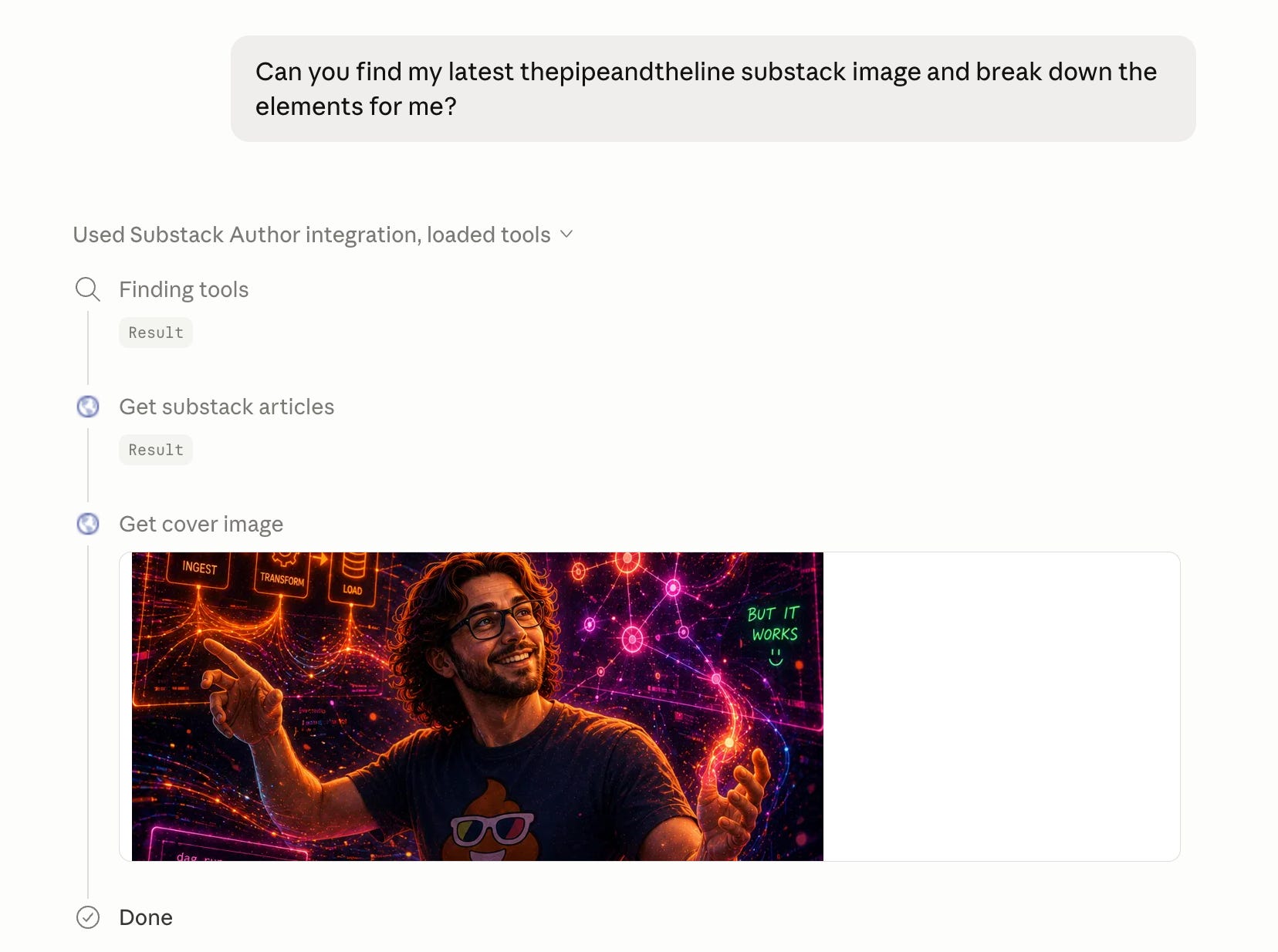
And the breakdown was quite spot on.
Subject / Focal point A person (you?) center-frame, smiling, hands raised like conducting chaos. Relaxed, confident posture. No stress despite the chaos around him. The 💩 with sunglasses on the shirt adds personality and humor.
Background / Environment Dark background (near black) with neon glowing elements. A “digital universe” aesthetic — particle streams, graph networks, floating UI panels. Orange/red on the left, pink/magenta on the right, blue/green in lower corners. High contrast, high density.
Floating UI elements Multiple neon-framed panels surrounding the figure...
Let’s see how this gets combined with skills.
Part 2: Skills and What They Do
Seeing covers is one thing. Without a workflow on top, you prompt from scratch every session, explain your intent, repeat yourself each time.
That’s where Skills come in, and this is the part most people haven’t seen yet.
The Substack Author MCP uses FastMCP’s SkillsDirectoryProvider. Two lines on the server:
from fastmcp.server.providers.skills import SkillsDirectoryProvider

if skills_path.exists():
    mcp.add_provider(SkillsDirectoryProvider(roots=skills_path))
This scans a .claude/skills/ directory, finds every SKILL.md file, and exposes each one as an MCP resource: a doc the AI can read on demand when it recognizes the right context.
The difference between a tool and a skill:
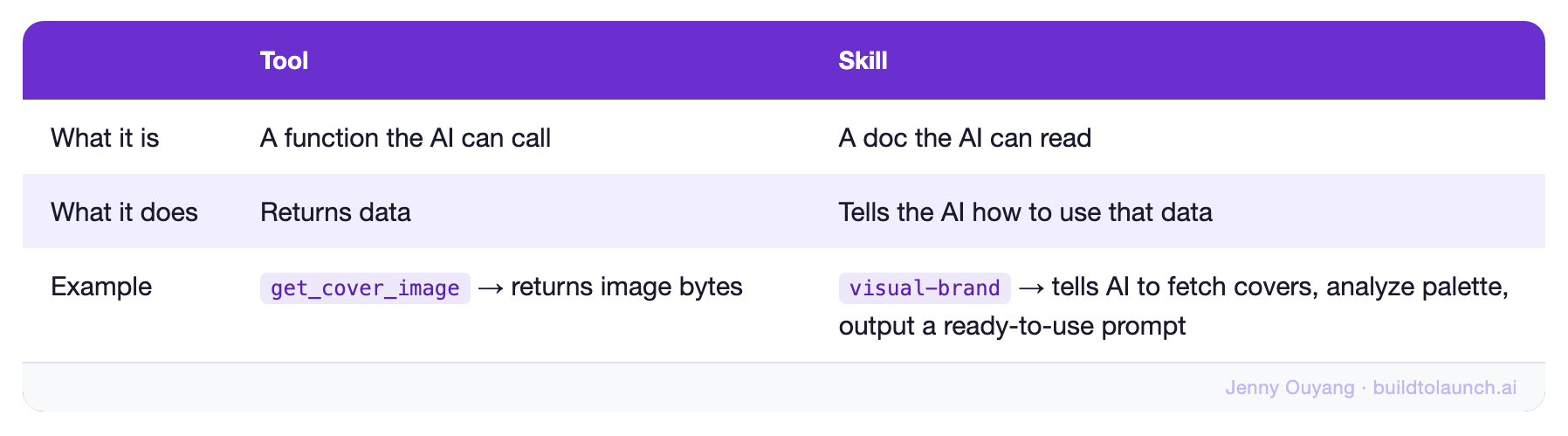
The MCP currently ships with 6 skills. One of them, visual-brand, was built specifically for what Jenny’s article was about. (I wrote a full breakdown of how Skills and MCP work together if you want to go deeper.)
The visual-brand Skill: Two Modes
When you connect to the MCP and ask about covers, the AI loads visual-brand automatically. Two modes depending on what you’re trying to do.
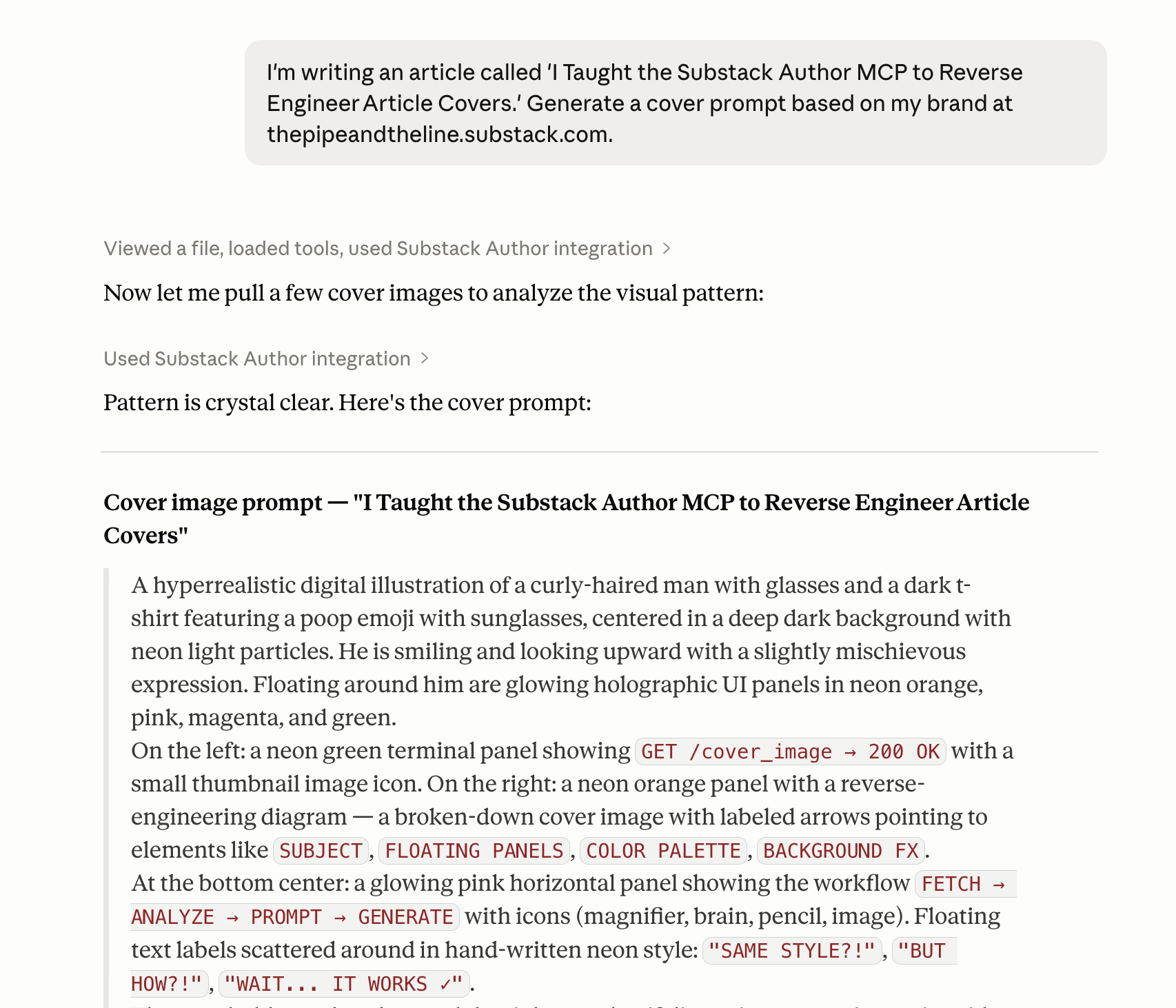
Mode 1: Generate a New Cover Prompt
“I’m writing a new article. Give me a cover prompt consistent with my brand.”
Give it your publication URL and article title. The skill fetches your recent covers, establishes your visual DNA, then composes a prompt that fits the article’s specific topic and mood while staying inside your visual system.
Output comes out with just a ready-to-paste prompt block.
Mode 2: Reverse a Style
“What’s this cover doing that makes it work?”
Give it a URL, a single article or a full publication, and tell it how many covers to scan. The skill calls get_cover_image on each, analyzes palette, layout, subject, mood, and style, then outputs a ready-to-paste prompt.
Single article gives you a bullet breakdown and a style prompt. Multiple covers flag outliers and output a brand template with [variable] placeholders for what changes per article.
This came out from my latest article on AI Observability for Data Engineers.
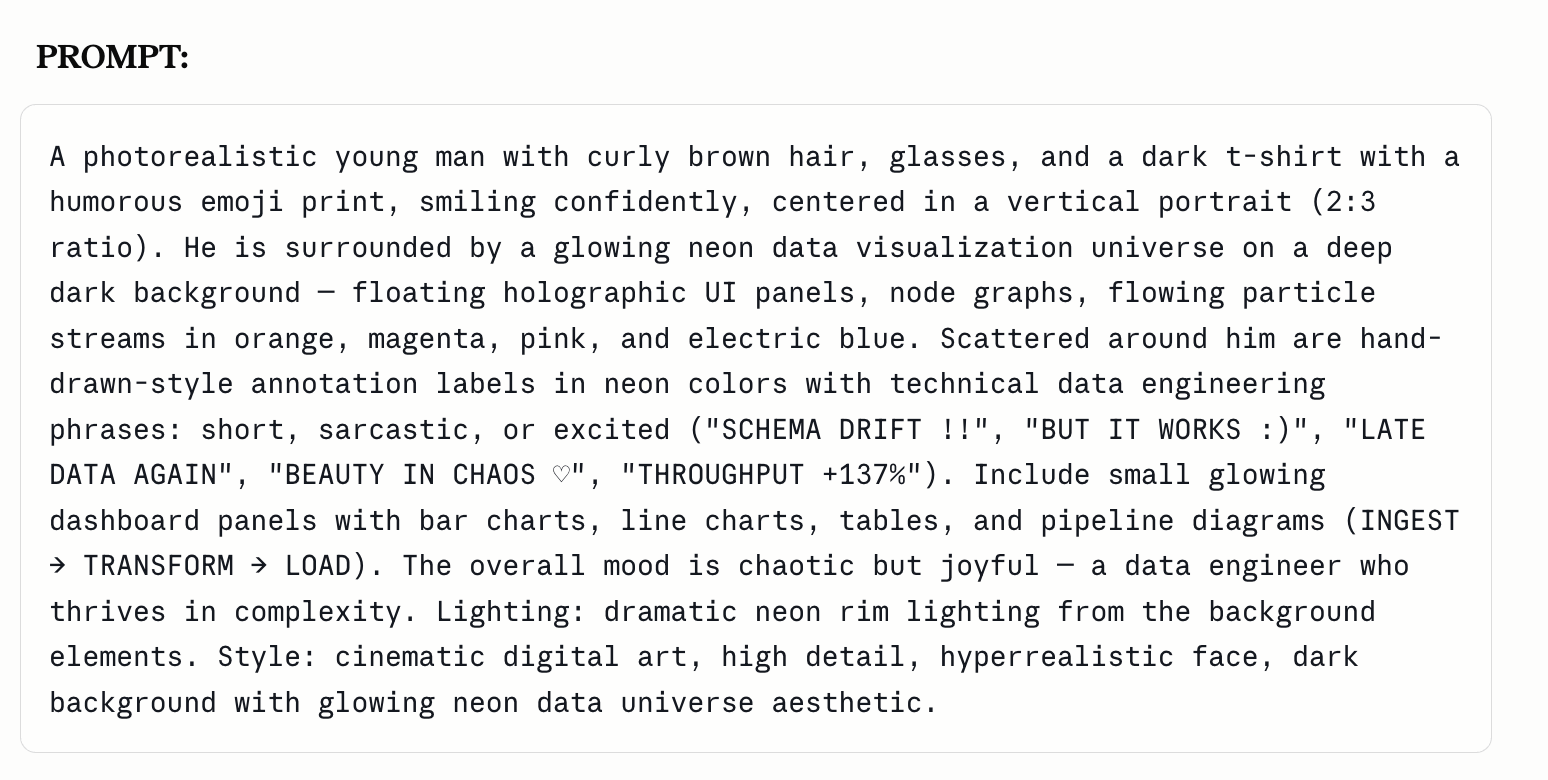
Scanning 5 covers outputs something like this:
Photorealistic digital illustration, newsletter cover, portrait 2:3, high resolution.
Subject: curly-haired man with glasses and a 💩-with-sunglasses emoji t-shirt, center-frame, [expression and gesture: smiling + open hands for approachable
topics / serious + pointing for critical topics / dynamic riding pose for architectural concepts].
Background: near-black or deep navy, dense particle field with neon light streams — orange/amber radiating from center-left, pink/magenta on the right, [accent: green for validation/success / blue for data/structure / purple for AI/LLM themes].
Floating UI elements: 2–4 neon-framed panels surrounding the subject, each labeled with [article-specific technical concept]. Border colors: orange for
process/pipeline, pink/magenta for AI or warnings, green for success states, blue for data schemas.
Style: hyperrealistic rendering, cinematic lighting, neon glow with soft bloom, dark cyberpunk aesthetic with dense technical detail.
Mood: [confident and chaotic for overview articles / focused and analytical for deep-dives / kinetic and motion-forward for architecture articles].
That’s your visual brand DNA in text form. Paste it into ChatGPT, Midjourney, Flux — any generator you’re already using. The [variables] swap per article. The DNA stays fixed.
How I Use It & You Can Use It Too
This won’t fully solve the need to attach the image on ChatGPT, but it will solve a lot of the consistent breakdown.
My current workflow relies on:
A brand template file saved to my Obsidian vault
The MCP skill to create a prompt just like the one you saw
Then I attach one image or keep reusing a ChatGPT conversation
Whenever Claude releases image models or ChatGPT allows proper MCP usage, this might become even more straightforward since the attachment won’t be needed at all.
No installation. Add this to Claude Desktop, Claude Code, Cursor, or any MCP-compatible client:
https://substack-author.fastmcp.app/mcp
In Claude Code, skills are exposed as MCP resources — the server instructions tell it which workflow to activate based on what you ask, no manual @ mention needed. Claude Desktop and Cursor work the same way.
Then try:
“Look at the last 5 covers from [your publication URL] and build me a brand template prompt.”
Or point it at any publication you admire:
“Reverse-engineer the cover style from [any public Substack URL].”
The tools, image processing, and visual-brand skill are all already there when you connect — just tell it what you want.
What's the one thing in your current image workflow that you keep redoing every session?
— Jenny
Claude Hub · Vibe Coding · AI Agents · Shipped Products · Substack Growth
 | A guest post by
|
The sharp point here is that the multi-step agent didn't drift from bad steps, it drifted because every handoff serialized the image down to a text description, and a description of a cover is a compression of the thing you're trying to keep.
Stack those and the brand DNA erodes at each boundary. Reads like a reasoning failure, it's actually a serialization failure. So the Image type fix generalizes: pass the artifact, not a description of it, anywhere the model needs to perceive the primitive directly.
The honest tradeoff is that one session swaps handoff loss for context pressure, so raw-image scanning has a cost ceiling on big audits. Right instinct going to the protocol level.