
Cursor 2.0 Is Rewriting the Future of AI Coding — And What That Means for Builders
A hands-on deep dive into the tool that’s blurring the line between coding, creation, and collaboration.

Cursor 2.0 released last week. I can’t stop using it.
Not because it makes everything easier, it doesn’t. Because it’s relentless in the way breakthrough tools are. It forces you to adapt or quit. There’s no comfortable middle ground.
My colleague called it “a productivity gun pointed at your own foot.” Dan Shipper described it as “a solid evolution of the IDE experience for 2025”. On Reddit, developers said Cursor 2.0 is amazingly well done.
commented “Once you have switched to Cursor 2.0, you won’t want to go back to the old workflow.” warned it “is turning into an agent on steroids”.Developer communities are split: evangelists and survivors. The line between the two is razor-thin.
Over the past week, I used Cursor 2.0 to audit my entire system of product building and content creation. Work that normally take months now compressed into weeks. I validated my decision trees, audited my roadmap, implemented features users have been requesting, monitored resource availability across all my tools. All in the nights of one week.
This week delivered joy, surprise, excitement, and sorrow. I’ll show you exactly what worked, what broke, and why despite the chaos, I’m never going back.

Table of Contents
Why Cursor 2.0 Matters Now — The evolution from Cursor 1.0 → Claude Code → 2.0 convergence
What I Built With Cursor 2.0 - Stress-testing my AI Tools Guide, social systems, and premium products
Cursor 2.0 vs Claude Code vs Cursor 1.0 — Feature comparison tables and decision frameworks
What Actually Breaks — The friction nobody mentions
My Honest Take — Did it 10x my productivity? Why I’m never going back despite the pain
Resources & Community — You might also enjoy and community updates
1. Why Cursor 2.0 Matters Now
Most Cursor 2.0 reviews just list features. That misses the point entirely.
To understand why Cursor 2.0 matters, you need to see where we’ve been:
The Cursor 1.0 Era: Fast But Linear
Cursor 1.0 was fast. AI-powered. Better than VS Code for coding with AI.
But it was single-threaded. You had to wait for one task to finish before starting another. If you wanted to work on multiple things simultaneously, you were stuck. And the IDE interface? Intimidating if you weren’t technical.
I used Cursor 1.0 daily. But I kept hitting the same wall: my brain moves faster than linear execution.
The Claude Code Era: Parallel But Fragmented
Then Claude Code arrived. Suddenly parallel workflows were possible. You could dispatch multiple sub-agents, work on different tasks simultaneously, collect results later.
This was transformative. Finally, an AI tool that matched how my brain actually works.
But here’s the problem: all the processes are hidden by default. You don’t know what might be running. You don’t see what’s happening. You don’t know where to stop or how to revert. The lack of visibility was brutal.
My workflow became: Cursor for deep work, Claude Code for parallel tasks. Two tools. Separate contexts. Mental overhead.
The Cursor 2.0 Era: The Convergence Moment
Cursor 2.0 isn’t an incremental update. It’s a convergence.
Everything Claude Code offered — parallel agents, multiple simultaneous tasks, autonomous workflows — now native in Cursor. But with something Claude Code never had: an interface designed for how people actually work.
The Interface Change That Matters:
Cursor 2.0 splits into two views that fundamentally change who can use it:
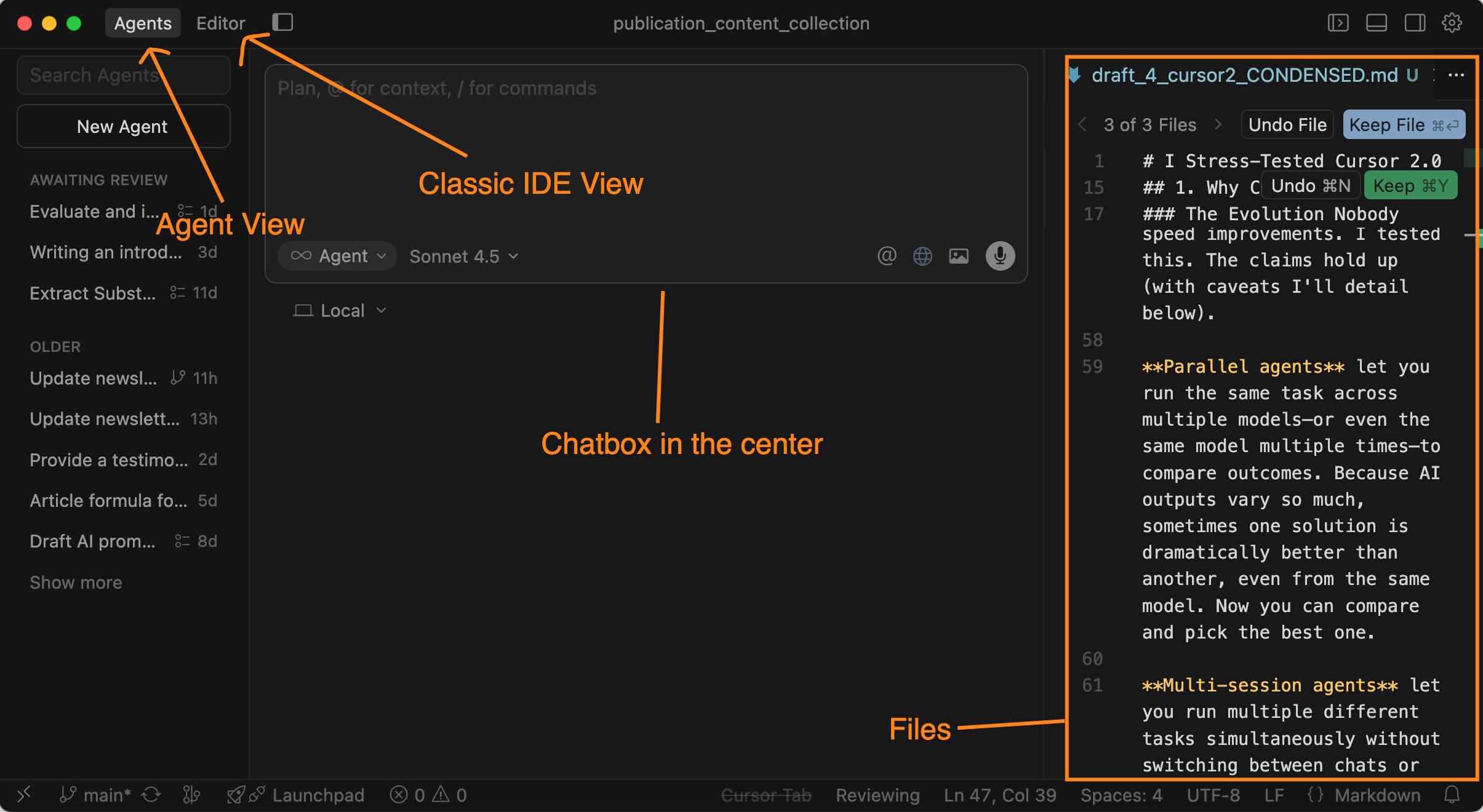
Agent View — A clean chat interface that looks like ChatGPT. No IDE intimidation. You describe what you want, AI builds it. Perfect for non-coders, creators, founders who need to ship but don’t live in code.
Editor View — The traditional IDE interface for deep technical work. For coders who want granular control.
I switch between them constantly. Agent View for high-level orchestration. Editor View when I need to see exactly what changed. This dual-interface approach makes Cursor viable for both technical and non-technical builders in the same tool.
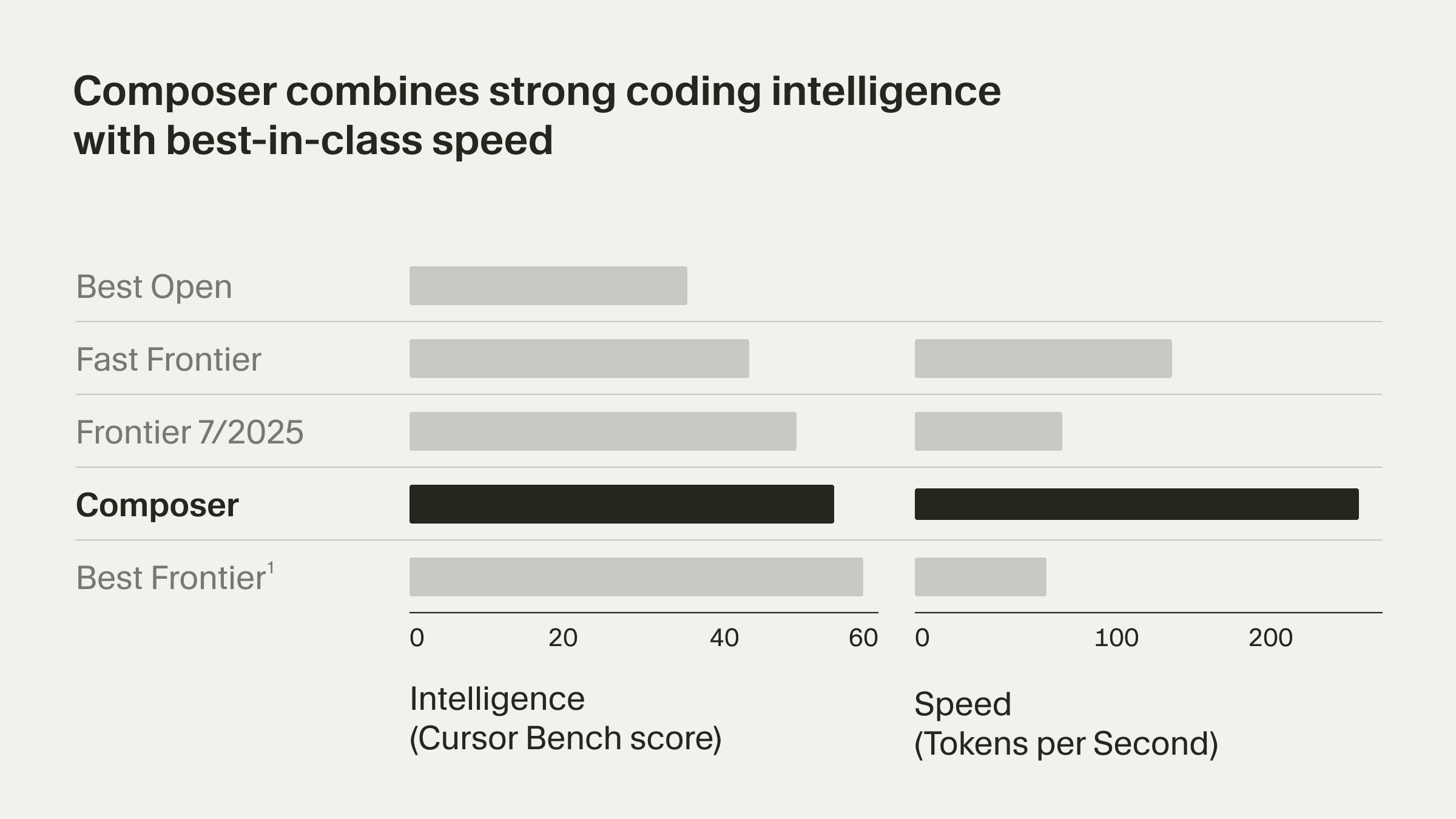
Model Composer promises 4x speed improvements. I tested this. The claims hold up (with caveats I’ll detail below).
Parallel agents let you run the same task across multiple models—or even the same model multiple times—to compare outcomes. Because AI outputs vary so much, sometimes one solution is dramatically better than another, even from the same model. Now you can compare and pick the best one.
Multi-session agents let you run multiple different tasks simultaneously without switching between chats or cutting off the chain of thought. This is what I’ve been begging for.
But it’s not just these.
Cursor 2.0 also brings features that existed across different coding platforms, now all in one place. Image attachment, voice-to-text, built-in browser tab, element selection. The advanced building process that used to require juggling multiple tools? Now it’s native.
What finally clicked for me this week:
Cursor 2.0 isn’t competing with VS Code. It’s competing with ChatGPT, Claude, Gemini, DeepSeek… your entire AI workflow stack.
The question isn’t “Is this better than other IDEs?”
It’s “Can this replace my entire AI toolchain?”
After one week of stress-testing it with my products, my answer is: Almost. With caveats. With sorrow. But also with genuine excitement about the future I can see now.
Let me show you what I built.
2. What I Built With Cursor 2.0
I tested everything Cursor 2.0 added — voice input, browser integration, image attachments… all of it. Each feature reduces friction. But these 4 features below fundamentally change how AI builders work, regardless of your tech stack or experience level.
Feature #1: Composer Speed: 4x Faster (With Critical Caveats)
What Cursor claims:
Composer is 4x faster than general models. According to their benchmark data, the new Composer model significantly outperforms Claude Sonnet on speed while maintaining quality.
How I tested it:
I have built up my second brain of newsletter management and publication. Each week, I perform my newsletter and notes retrieval to analyze what worked, what needs improvement, how I learn from others, and how I guide my next post. I already have slash commands helping me do this retrieval, and this became the perfect use case to test Composer’s speed.
So I gave Composer and three other models the exact same task of retrieving and updating my newsletter posts as my benchmark for these models.
The results:
Composer: Fastest [64 seconds]
Haiku 4.5: Second [68 seconds]
Sonnet 4.5: Third [89 seconds]
GPT-5 Codex: Slowest [97 seconds]
Composer was noticeably faster, even compared with the most efficient model Claude Haiku 4.5! The kind of speed that makes you wonder how you worked before.
But here’s the critical warning when I use it in production:
Composer is blazingly fast for low-level code issues. But for systematic problems, such as architecture decisions, complex logic flows, anything requiring careful thinking, it can go wrong FASTER than other models.
My decision rule now:
Use Composer: Quick fixes, repetitive tasks, well-defined refactoring
Use Sonnet 4.5: Systematic thinking, architectural decisions, complex logic
Composer is powerful. But power without judgment is just expensive mistakes happening faster.
How did I actually ran this test?
That’s what parallel agents let you do.
Feature #2: Parallel Agents — When You Need to Pick the Best Route
Parallel agents let you run the same task across multiple models, or even the same model multiple times, and compare outcomes side by side.
Why does this matter? Because AI outputs vary dramatically. Sometimes one solution is 10x better than another, even from the same model with the same prompt.
Use Case 1: Performance Comparison
The Composer speed test above? That’s parallel agents in action. Four models, one task, instant comparison.
All running simultaneously. All visible in real-time.
The results: Composer > Haiku > Sonnet > GPT-5 in speed. But speed isn’t everything.
Use Case 2: Picking the Best Solution
Here’s where parallel agents become strategic.
AI outputs aren’t deterministic. Ask the same question twice, you get different answers. Sometimes one solution is 10x better than another, even from the same model with the same prompt.
When I’m working on complex problems, such as architectural decisions, workflow design, I don’t want one answer. I want to see multiple approaches and pick the best one.
Recently, I was redesigning the user input and note retrieval system for Quick Viral Notes. We already have hook templates from analyzing viral notes and proven social posts. The system works. Users are paying for it.
But with AI advances, I knew it could do better. Give users more leverage. More personalized help creating their specific notes instead of just following the same formula with their own content.
I spun up 4 parallel agents, each with a different model tackling the same design problem:
Composer 1
GPT-5
o3
Sonnet 4.5
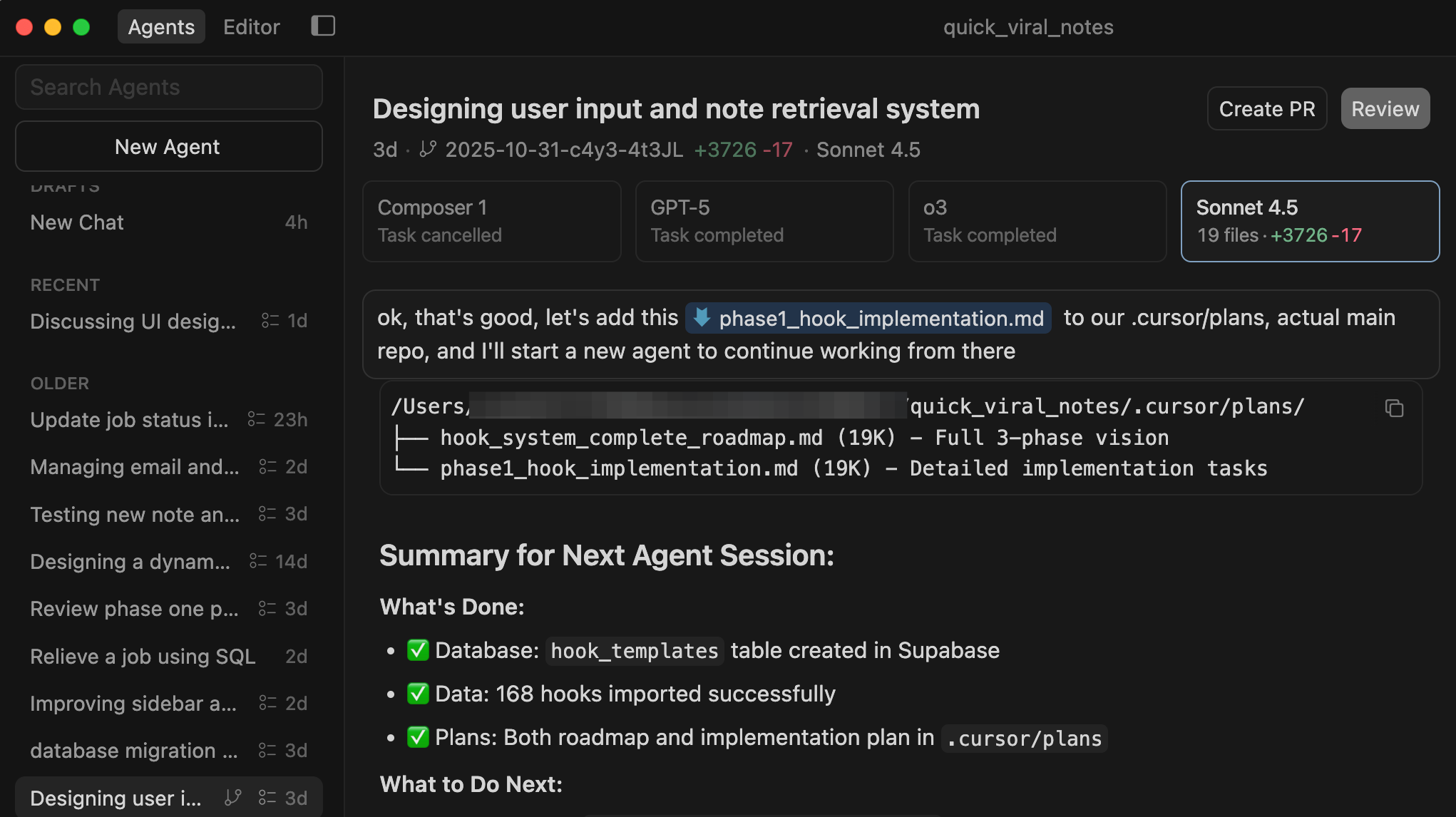
Sonnet 4.5 created the best design to my liking. The architecture was cleaner, the user flow was more intuitive, and the AI integration was more seamless.
Without parallel agents, I would have gone with the first decent solution. Now I have the best one.
This changes the workflow:
Old way: Prompt → Get answer → Accept it or try again → Repeat until satisfied
New way: Prompt → Get 3-4 answers simultaneously → Pick the best one → Move forward
You’re not iterating with AI. You’re curating from AI.
When to use parallel agents:
Speed/performance testing (like the Composer comparison)
Comparing model strengths for specific tasks
Finding the best solution when outputs vary
Strategic decisions where you need multiple perspectives
Any time you’d rather see options than commit to one approach
But watch out:
Don’t use parallel agents for deep refactoring or interconnected systems. They create separate work trees. If you go too deep and click “Apply All,” merge conflicts become catastrophic.
Parallel agents are good for exploration and comparison. Not deep execution.
When and how to get out of parallel agents:
Once I picked the Sonnet 4.5 design, I saved the plan locally. Then I spun up new agents, with each continuing the work on its own. One focused on the note-generation logic. Another built the routing system. All of them ran at the same time.
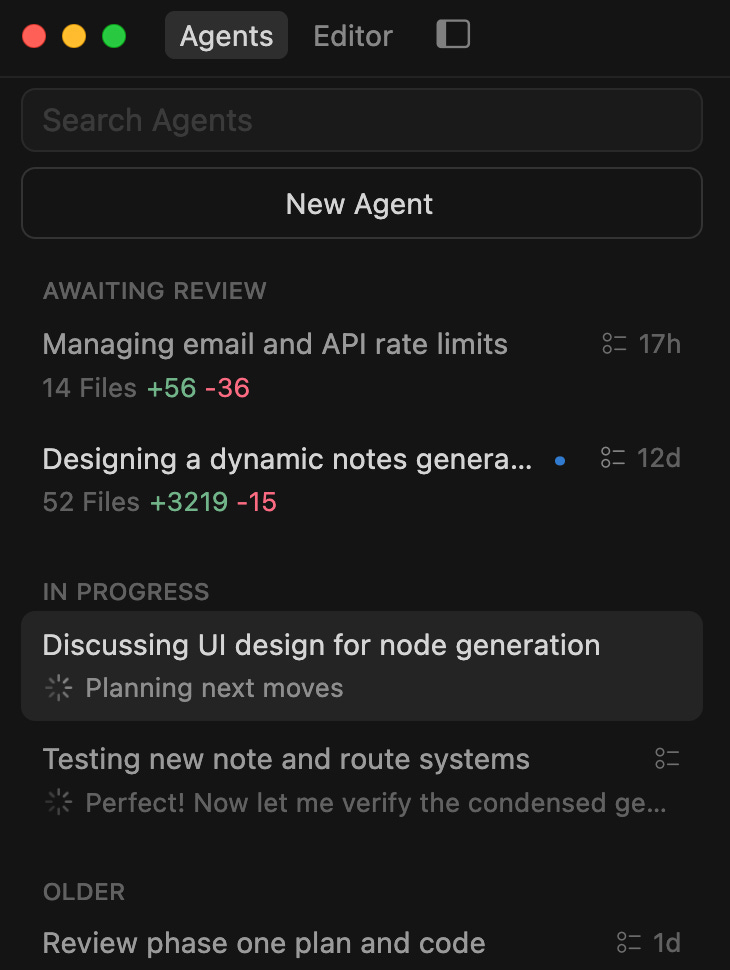
This is the bridge between parallel agents and multi-session agents: compare options first with parallel agents, then execute different tasks simultaneously with multi-session agents.
And that execution speed? That’s the feature I’ve been begging for.
Access the complete viral notes system I use in Quick Viral Notes via the AI Builders Resources, it includes every hook template, and is continuously updated with the highest-performing notes I’m tracking.
Feature #3: Multi-Session Agents — The Feature I’ve Been Begging For
Multi-session agents let you run multiple different tasks simultaneously without switching between chats or cutting off your chain of thought.
The difference from Parallel Agents:
Parallel Agents: Same task, multiple models → Compare outcomes
Multi-Session Agents: Different tasks, running simultaneously → Complete multiple projects at once
The problem Cursor finally solved:
One of my biggest complaints about Cursor vs Claude Code was that Cursor couldn’t run multiple separate jobs simultaneously. Claude Code lets you dispatch sub-agents and collect results later.
Cursor 2.0 finally has this, and it shows everything in real time.
What I actually used it for:
A member asked where they could access the AI decision trees in my AI Tools Guide. I sent them the links.

Then it reminded me: AI had been evolving brutally fast. Things that were cutting-edge two months ago might already be outdated. I needed to scrutinize every recommendation, add better insights, update the tools.
I had 4 decision trees that needed validation:
AI Project Planner
AI Tools Guide
AI-Enhanced SEO Wizard
AI Guardrail Systems
So I started 4 agents, each handling one decision tree. All running simultaneously.
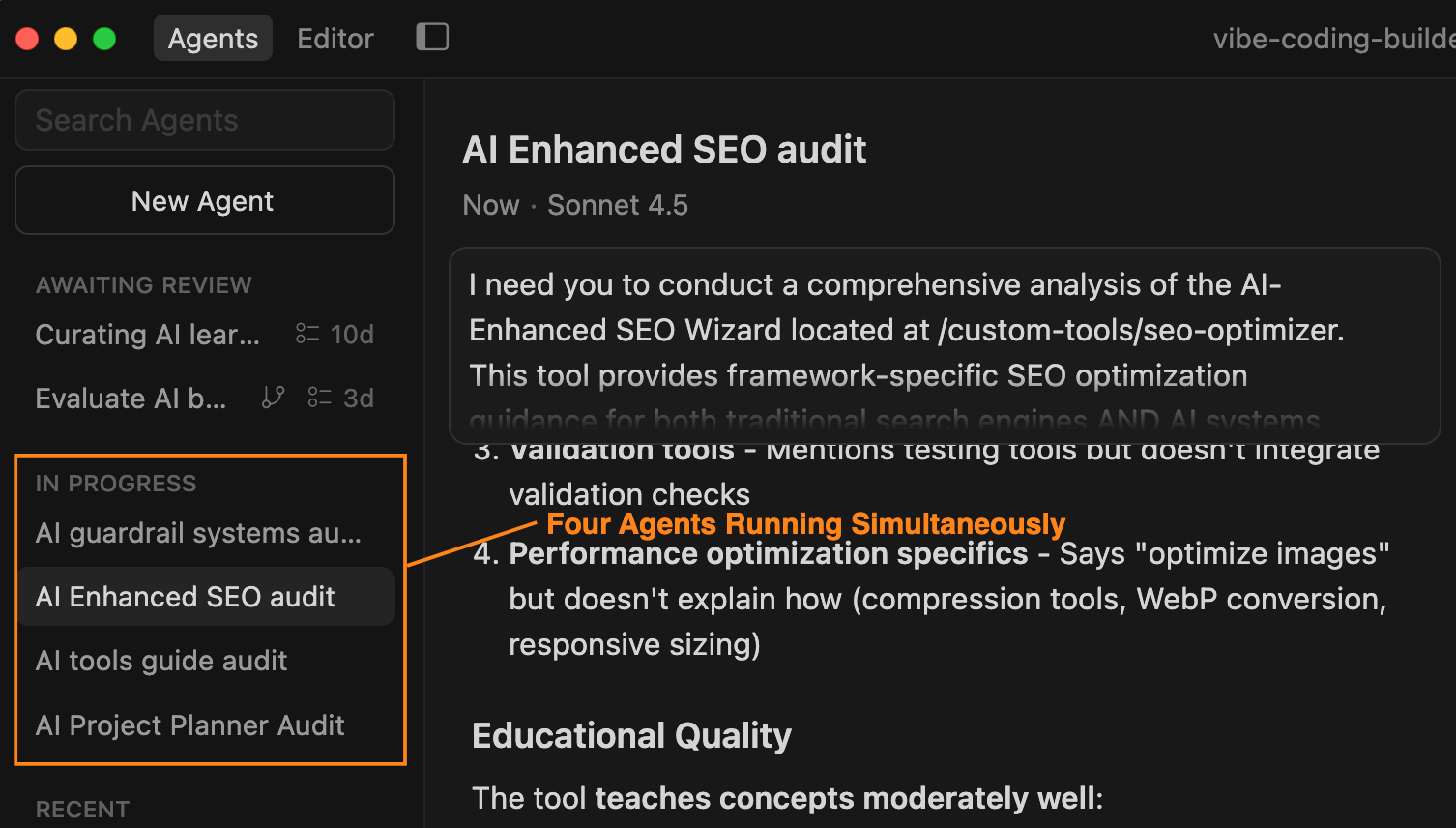
The interface shows it perfectly: some agents completed and awaiting review, others still in progress. All visible. All trackable.
The results:
Time saved: 4+ hours
Updates needed: Download pdf link needs to be fixed.
Alerts and errors are not handled properly, this would have been embarrassing if members discovered it first
This is the feature that makes Cursor feel like it’s from the future. Watching 4 agents work simultaneously while I move to the next task? That’s the productivity unlock I’ve been chasing.
All 4 decision trees: AI Project Planner, AI Tools Guide, AI-Enhanced SEO Wizard, and AI Guardrail Systems, are available in the AI Builder Journey.
Feature #4: Browser Integration — The Element Selection Unlock
I’ve always said: context switching is the silent productivity killer. Every time you switch between IDE and browser to test a change, you lose 30-60 seconds rebuilding mental context. Do this 20 times per session? You’ve lost 10-20 minutes to pure friction.
To resolve this problem, I set up browser automation MCP to eliminate it entirely. Ask Cursor to test the UI, it opens the browser, clicks through the flow, takes screenshots, reports back. No manual testing. No context switching.
But MCP required setup. Connection configuration. Technical overhead that kept most builders from using it.
Now Cursor just democratized it. Built-in browser tab. No MCP needed. No configuration. Just open the panel and start testing.
The real unlock? You can select a specific element on the webpage and share it directly to chat.
Point-and-click the part you want to debug, snapshot it, and Cursor has full context. Make a change → test in browser → see something wrong → select that element → Cursor fixes it based on the live UI.
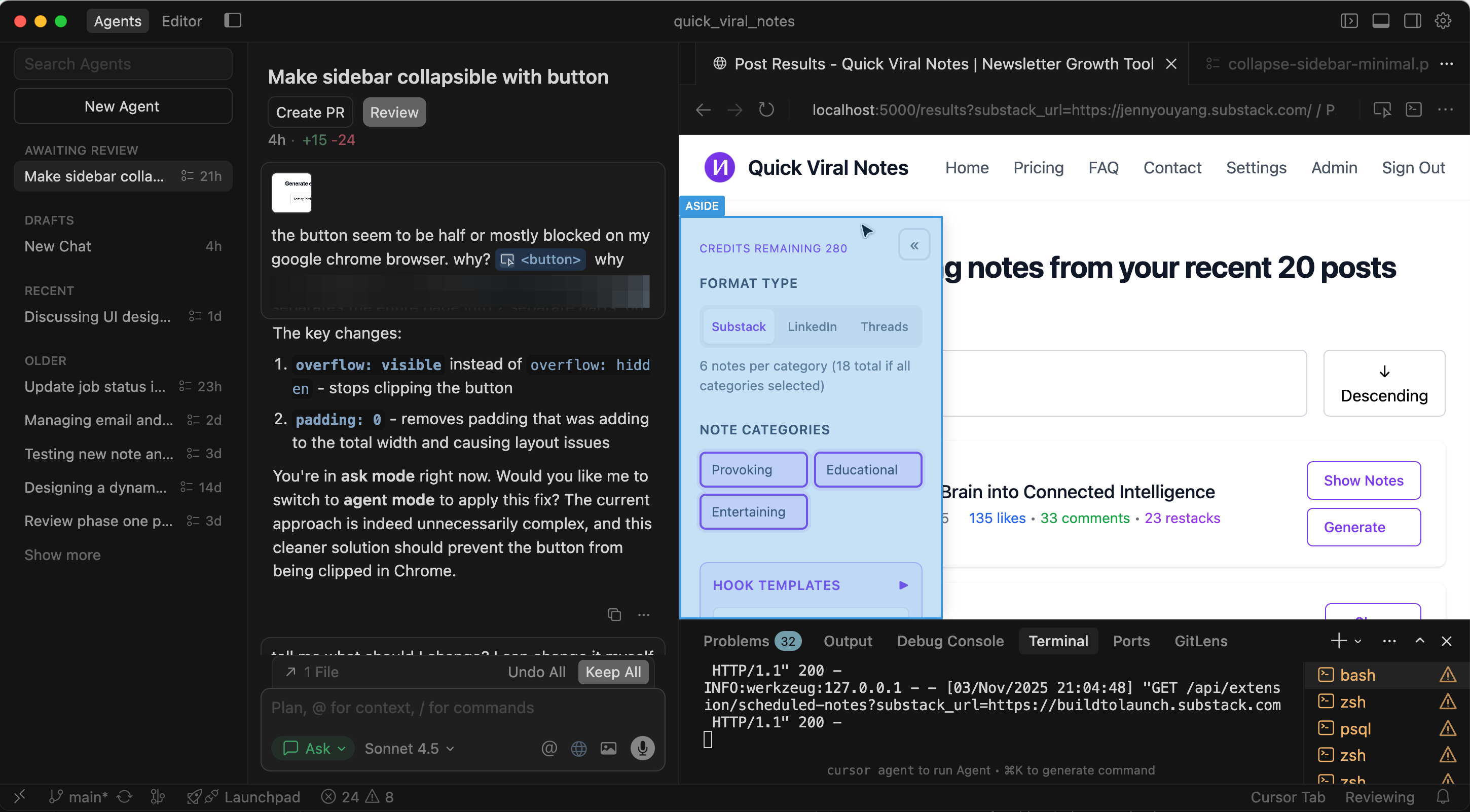
You’re vibe coding your way through features while maintaining direct access to the webpage. The friction between “build” and “test” basically disappears.
3. Cursor 2.0 vs Claude Code vs Cursor 1.0
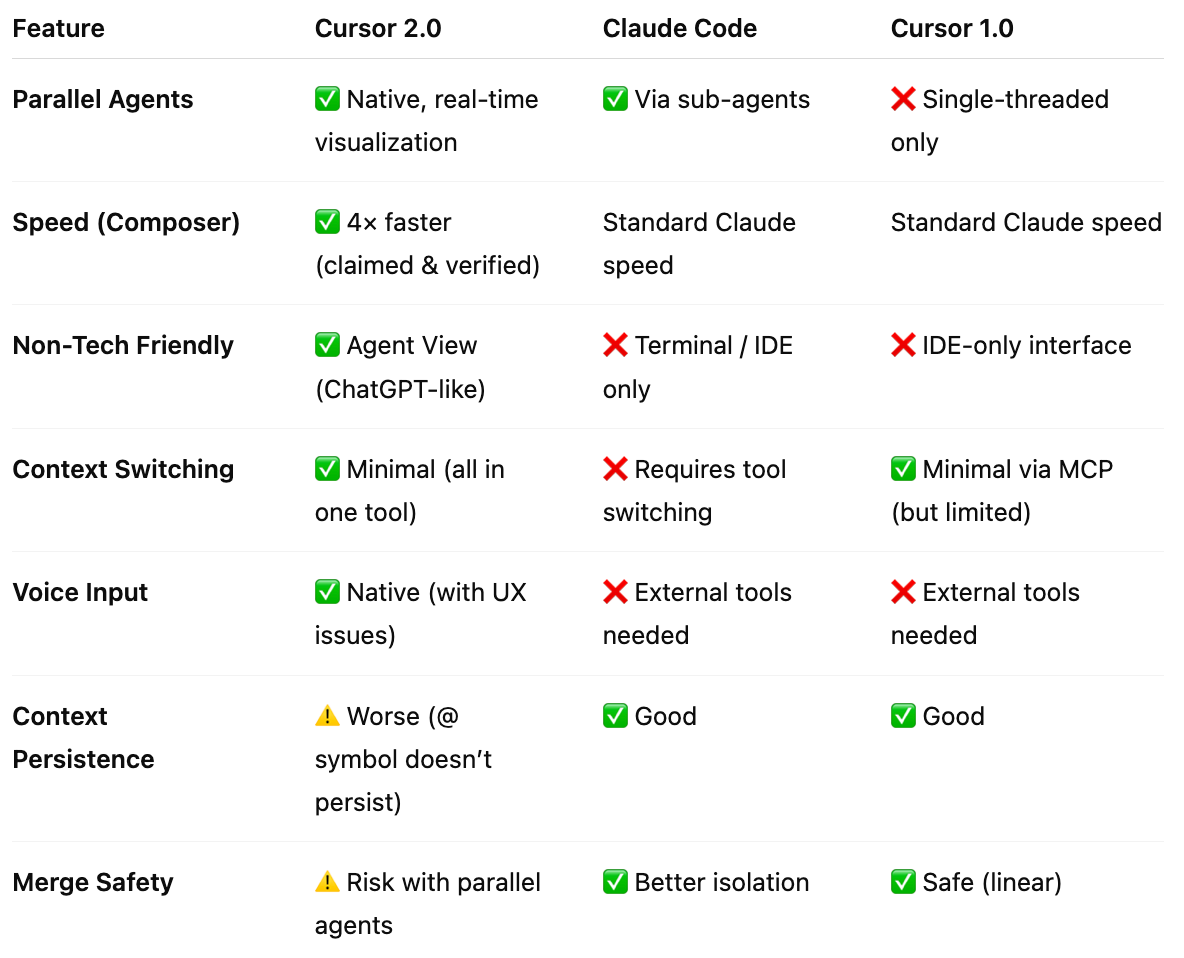
Feature Comparison: What Actually Changed
Key insight: Cursor 2.0 trades some safety and context persistence for massive capability gains. Worth it? Depends on your workflow.
Which Tool Should You Actually Use?
Use Cursor 2.0 as primary if:
You need parallel workflows within one interface
You’re a creator who needs both coding and content work
You want non-technical team members to use the same tool
You’re willing to adapt workflows for 1-2 weeks
Keep Claude Code for:
Production work where stability matters most
Complex agent orchestration (still more mature)
When you need maximum context persistence
Backup when Cursor 2.0’s rough edges bite
Stick with Cursor 1.0 if:
You can’t afford any workflow disruption
Linear workflows work fine for you
You don’t need parallel capabilities
You’re risk-averse about new features
4. What Actually Breaks
This version isn’t perfect. Fast iteration means rough edges and trade-offs to live with.
Composer breaks things faster when the direction is wrong.
Voice input scrolls the window every time you speak.
Browser testing loses the chain when you navigate away.
Image attachments don’t show visual feedback until you hit send.
Context persistence with @ symbols regressed from 1.0.
Parallel agents create merge conflicts you’ll need to resolve manually.
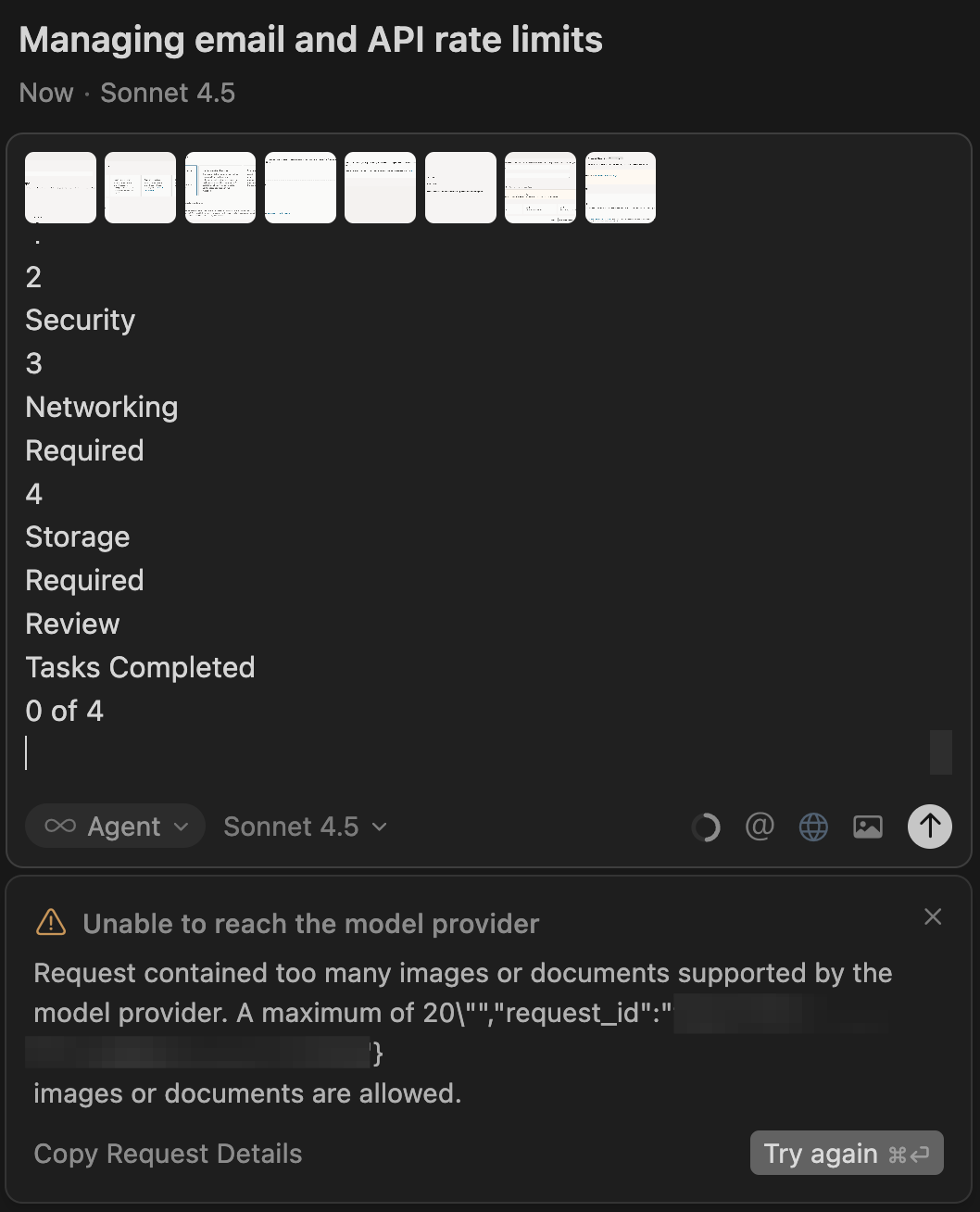
None of these are dealbreakers. They’re the cost of being on the bleeding edge of capability expansion.
Know the friction. Work around it. Keep building.
5. My Honest Take
Did It 10x My Productivity? The Honest Answer
No. Not yet.
In fact, my productivity this week was about the same as before. The added speed from new features was immediately reset by:
Unexpected edits requiring fixes
Adaptation to new UI patterns
Voice input friction
Merge conflict stress
Context re-attachment overhead
The amount of tension added was taxing. I spent more energy resolving problems than I saved from the speed improvements.
Did It Deliver What It Advertised? Absolutely.
In fact, Cursor 2.0 over-delivered on features. The problems I hit weren’t missing functionality, they were user habit mismatches and rough edges.
And honestly? In less than a week, I’m already adapting. I’m learning which features to lean on and which to avoid. I’m happily switching between Agent and Editor windows for different purposes. The workflow is smoothing out.
Why I’m Never Going Back
Despite the sorrow and the broken workflows, I’m not going back to Cursor 1.0.
Here’s why:
1. The meta-insight from testing my own products:
Those 4 decision trees I validated? I found the tools that needed major updates and new tools I needed to add.
Without parallel agents, I would have spent a full day on this manually. I would have missed tools. Members would have noticed before I did.
That’s embarrassing. That’s reputation damage.
Cursor 2.0 let me validate and update faster than the AI landscape shifts. That’s the real value for premium product creators like me.
2. The workflow unlock I didn’t know I needed:
Multiple agents matching my brain’s actual speed. This isn’t about doing more. It’s about removing the friction between thought and execution.
When I’m not waiting for AI to finish before starting the next thought, my work feels different. More fluid. More aligned with how I naturally think.
3. The future I can see now:
Agent View makes Cursor viable for non-coders. This changes who can use it. This changes what I can build.
I’m already thinking about how to integrate Cursor 2.0 into my premium products. How to teach it. How to show members what’s possible.
The tools will keep changing. The frameworks for using them intelligently? Those are worth paying for.
Your Turn
I showed you my week of joy and sorrow. Now tell me:
What’s your biggest concern about upgrading to Cursor 2.0?
Drop a comment. I’ll share exactly how I handled that issue (or if it’s still breaking me).
And if you want the complete systems I used this week, everything’s in the AI Builder Resources. Paid members get access to what we’ve talked about, and:
The 4 AI decision trees (AI Project Planner, AI Tools Guide, AI-Enhanced SEO Wizard, AI Guardrail Systems)
Complete Viral Notes System with hooks library
Plug-and-play rules & templates for AI building
Live workshop recordings and office hours
Weekly updates as tools evolve
Resources & Community
You Might Also Enjoy these Cursor Guides:
My earlier work on How AI Builders Use Cursor: The Complete Guide
The Cursor 2.0 Quick Start Guide: From Beginner to Pro in One Session by
Cursor 2.0 and Sora-2 Update: Weekly Creator AI Digest by
Cursor 2.0 Debuts With In-House Model by
Microsoft, Cursor 2.0 and the Rise of AI IDEs by
Cursor 2.0: The Interface Finally Catches Up by
How Cursor Serves Billions of AI Requests by
What’s Happening in the Community 🔥
This Friday at noon EST: We are having Build to Launch Office Hour for the month! Bring your questions, wins, or things you’re stuck on. We’ll work through it together.
’s cooking up something special for Christmas 🎄, the project really made me “WOW”. Stay tuned. is taking a pause from StackDigest 💙. Her fearless, pioneering spirit inspired so many of us. Excited to see what’s next for her. needs 10 beta testers 🧪 for her Stripe management tool. is looking for 10 beta testers on her stripe management project. I tested it, and the domain knowledge packed into this thing is wild. Read her original request from the Vibe Coding Builders platform, and try the app directly from here. is looking for a developer/vibe coder to collaborate on a mini app 🤝. Interested? Read his detailed request from the Vibe Coding Builders platform, and reach out to him straight on Substack!💡 Did you know? You can submit requests on the VCB platform for anything vibe-coding related. Submit yours and I’ll shout it out to the community.
🚀 Building with AI? Join VibeCoding.builders for free — connect with fellow builders, share your products, find collaborators.
📚 New on VCB: The platform now consolidates AI resources from GitHub and YouTube in one place. Why? Because we vibe our way to the best tools and resources, not the other way around. And yes, I built this during my Cursor 2.0 testing week. Incredibly pleased with how it turned out. Explore resources.

This week gave me joy, sorrow, excitement, and a glimpse of how fast we’re all moving now.
The tools will keep changing. The frameworks for using them intelligently? They compound.
See you in the next iteration.
— Jenny
great deep dive Jenny!
after spending few days on 2.0, I really like the agent UI, it's clear the direction they are taking. Composer is so damn fast too!
I see myself not looking the files anymore lol, but I still couldnt wrap my head around deploying multiple agents as I'm afraid it will ruin my codes.
but your idea to deploy agents to tackle same problem to see most possible solution is interesting to try!
Thanks for the shoutout much appreciated Jenny!