
Notion AI Agents: Real Examples, Limitations, and How to Build Custom Ones
Tested Notion's AI agents across real-life workflows. Here's what they actually do well, where they break, and a step-by-step guide to building your own custom agent.

Notion AI let you build AI agents that work inside your existing workspace context, no code needed. Here’s how I built real ones that saved me 30 hrs, a procedure you can follow to build yours in 30 minutes, and a kit with 5 agents to help you started.

Think about the last time you researched something expensive before buying it.
Maybe it was a shiny camera. A gaming computer. A car. Something big enough that you felt you needed to do it right, compare options, read reviews, track your notes, build a real picture before you committed.
You know what that process looks like. Thirty tabs open at once. Bookmarks you’ll never find again. A running notes document that’s already three versions out of date. Maybe an Excel sheet you started with good intentions, the kind that makes you feel slightly guilty every time you see it.
And at some point, somewhere in the middle of all that, the joy of purchasing decreased dramatically.
The hardest version of that is searching for a house.
I’m in the middle of relocating, and searching for a house is no small task. The other challenging part is, it’s not a solo decision. Your partner needs to see what you’re seeing. You need one shared, structured place, not duplicated across apps nobody’s fully maintaining.
I was scratching my head on whether I needed to build yet another disposable app just to get my partner on the same page, then the head of Notion’s BD team reached out with AI agents. What a timing.
Do you know how many things I could do with this?
Here’s what I found out. What makes Notion agents useful isn’t the feature — it’s that your workspace is already full of context. Every other AI conversation starts from zero: you re-explain yourself, your preferences, your history. Notion agents skip that. The context already lives there.
What you’ll go through with me:
What Notion agents do — why context beats features, and why Notion wins
The house search agent — the real example, what I built, and what broke
Once you build one — the pattern that emerges, and where this is heading
What to know before you start — three real beta limitations
Build your first one — 5 steps, 30 minutes, one specific task
Hi, I’m Jenny 👋
I teach non-technical people how to vibe code complete products and launch successfully. AI builder behind VibeCoding.Builders and other products with hundreds of paying customers. See all my launches →
If you’re new to Build to Launch, welcome! Here’s what you might enjoy:
AI Agents Explained: The Pattern Behind Every AI Tool You Already Use
Stop Juggling AI Tools — How to Build a Second Brain That Actually Works

What Notion AI Agents Do (and Why Your Workspace Is Already the Hard Part)
I’ve already written at length about what AI agents are conceptually. If you want that foundation, AI Agents: The Pattern Hiding in Everything You Already Use covers it. Here I want to focus on the more specific question: why does it matter where your agent lives?
A Notion AI agent is an AI that takes multi-step actions inside your workspace: read pages, search databases, cross-reference things, write updates, surface something you wrote three months ago. It works inside the same place where your actual stuff lives.
Now these are what people usually push back on: ChatGPT has memory. Claude has Projects. So why Notion?
I’ve thought about this a lot and here’s where I landed.
You still need a tidy place for structured notes — no matter how deep in AI tools you are. I’m talking to coding agents all day, writing docs, living in terminals. Doesn’t matter. Having an AI that natively talks to those notes is way easier than hacking up your own integration. The AI is already there.
Notion’s own team can optimize this better than anyone on the outside. Because of token efficiency and data structure, they know their own format best. That’s not marketing, that’s just how it works.
Some say ChatGPT has memory. My problem: what happens at 10 projects? 20? 100? Memory contamination has happened to me way too many times. The AI starts mixing things across projects in ways that are subtle enough to miss and wrong enough to matter.
Some say Claude has Projects. My problem: what if you want to cross-reference between projects? I’ve tried that too many times and always end up back in Cursor or Claude Code for that kind of thing. Projects are still siloed.
The fundamental deal: people are visual. We see things in good formats and patterns. Even living in markdown all day, I still prefer rich text for anything I need to present or share. Tables, pages — that stuff matters. Notion AI is native to exactly that.
The quality of your agent’s output is a direct function of the quality of your context. Not your prompts. Your context.
Which is exactly what I learned the hard way.
The House Search Agent: What I Built and Why This Was the Perfect Test
I have two personal criteria when deciding whether a new tool is worth my time. One: does it actually automate something meaningful, not just look productive? Two: does it improve how I think about the problem — not just save me clicks, but sharpen my understanding?
If it doesn’t hit both, it’s a no.
House search hit both. Hard. And here’s why it’s actually one of the harder problems to automate well.
Criteria that keep changing. I just relocated from the northeast coast to the southwest. Different market, different community patterns, different climate entirely. All my previous house rules were irrelevant the moment I landed. I needed to establish new criteria fast, from scratch, based on impressions I hadn’t fully processed yet.
Multiple types of input. Links, personal voice notes, photos, open house observations, even feelings after a walkthrough. Not all of it is text. Not all of it is structured.
Two decision-makers. My partner and I both need to agree — and our evolving agreement changes as we see more houses.
Emotional memory that’s hard to extract. After viewing houses, I had impressions in my head — this feeling about the light, this reaction to the layout. The moment I tried to type them out I’d start losing the actual memory trying to find the right words. I needed something that could capture the feeling without making me stop and write.
This is exactly the kind of problem I would have tried to build a custom app for before.
Instead, I started talking to Notion AI.
Not to build an agent right away. First I just asked it to help me establish some criteria. I told Notion I was searching for a house on the western coast, described what I’d seen so far, and asked it to help me build a rough anchoring framework.
Within a few minutes it had a structure roughed out, including community factors I hadn’t consciously thought about yet. Reading those suggestions reinforced things I was carrying around in my head without realizing it. Oh right, that’s why I liked that neighborhood. I started adding things in. Mostly via my custom voice taking tool (for free), I just talked, and Notion captured it.
Then we set up the database.
I asked Notion AI to help figure out the right format, shared a few real estate links to test it, and it immediately knew what to pull. We set up automations: whenever a new page is added with a URL, it automatically retrieves room count, school district, year built, solar panels (owned or leased), battery storage. The things I actually care about. No manual input from me.
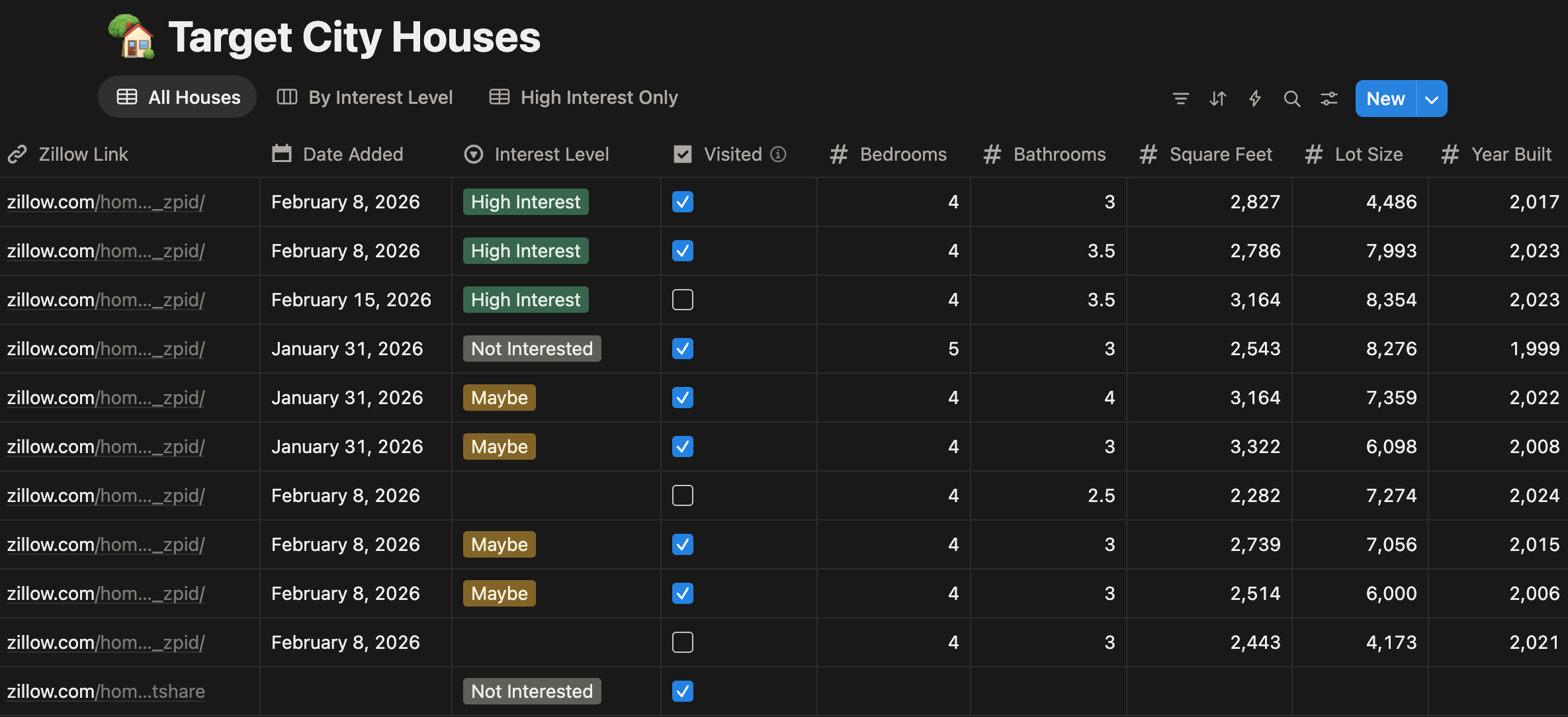
My partner shared the page. He added a link. It populated for him too — even though he doesn’t have a Notion AI subscription. That was the moment I knew this was going to work for both of us.
Now we just talk to Notion when we come back from a viewing. No typing, no trying to remember everything at once. We say what we found, what we felt, what stood out, and Notion fills the database. It sends an inbox notification when it’s done.
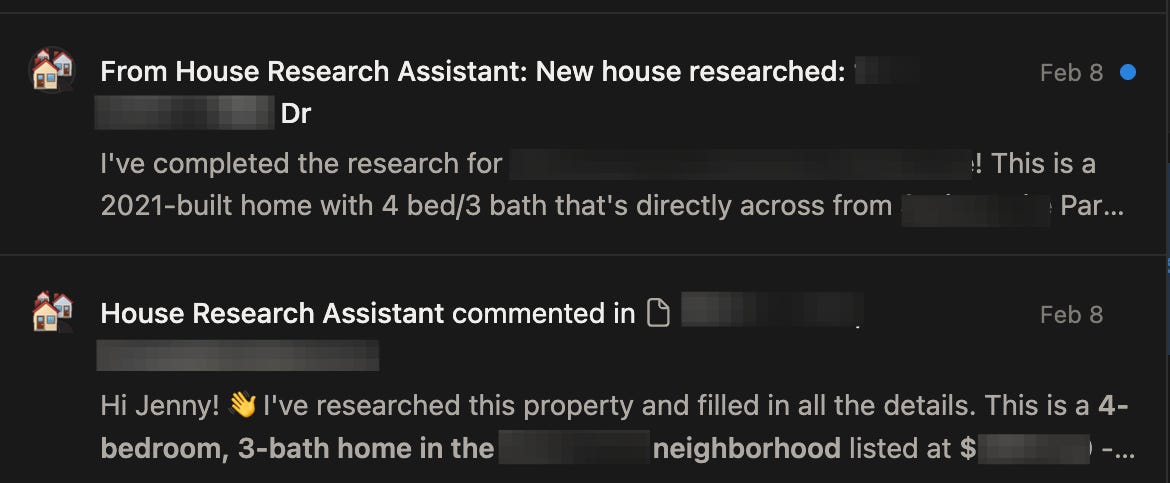
I’ve done this before, pre-AI. In a previous house search, we built a Google Sheet manually, pulling listing details ourselves, checking fields by hand, consolidating notes from three different places. That took weeks. Now it happens in snapshots.
The time saving is real. The mental burden relief is bigger.
You’re not training the model. You’re training the documentation. The model reads the documentation.
One thing I learned quickly: the agent is a precision instrument, not a smart interpreter. I wrote “near good schools”, it surfaced a listing near a school with a 4.2-star Google review. Technically correct. I wrote “good commute”, it reported under 45 minutes, by public transit at 2pm on a Tuesday.
The agent wasn’t wrong. My instructions were vague.
“Good schools” became “school district rated 7/10 or above on GreatSchools.” “Good commute” became “under 25 minutes by car, 8:30am weekday via Google Maps.” After 30 min of tightening the criteria, the next session was a completely different experience, not because anything technical changed, but because the documentation got sharper.
Once You Build One, You Start Seeing Them Everywhere
After the house search, I went back through my existing Notion workspace.
Some of my paid subscribers had been flagging it: broken links inside my Vibe Coding Builder’s Playbook and the Viral Notes System pages, where the plug-n-play checklists weren’t resolving correctly. Empty pages, content that existed somewhere but wasn’t placed right. I’d created those pages locally and imported them, the structure never quite translated cleanly.
I gave a Notion agent one job: find every broken or empty link in the packets and either locate the right content or flag it for me to fix manually. It worked cleanly, and crucially, it could work across the whole workspace, not just the page I was sitting on. I didn’t have to navigate page by page. I pointed it at the problem and let it go.
That’s when I picked up the pattern. Whenever I found myself doing the same thing repeatedly inside a Notion AI conversation, the same search, the same kind of cleanup, the same structure, I started asking Notion to package it as a custom agent.
This sounds like prompt management. It’s related, but with slight different terms and use cases. In Cursor, that’s a slash command or a rule. In Claude, it’s a skill or plugin. In Notion, it’s a custom agent, stored in Notion’s agent cluster, attached to whatever project or page you’re working in. You build it once from a pattern you noticed. You use it anywhere after that.
You’re not just building agents. You’re building a library of specialized agents that already knows your whole workspace.
And the beautiful part: you’re not onboarding a new tool to store these. They live in Notion. They work across any page or project. They don’t cross-contaminate because you can set exactly what context each agent is allowed to touch.
Here’s the mental unlock I want to leave you with before we get to the how-to.
When Notion connects via MCP to tools like Claude Desktop or Cursor, it stops being just a note-taking app or even an agent platform. It becomes your personal AI operating system. Your prompts, your agents, your criteria, your project context — all in one place, accessible from whatever tool you’re working in. Instead of setting up separate memory in separate tools, Notion is the system. The hub all your agents report back to.
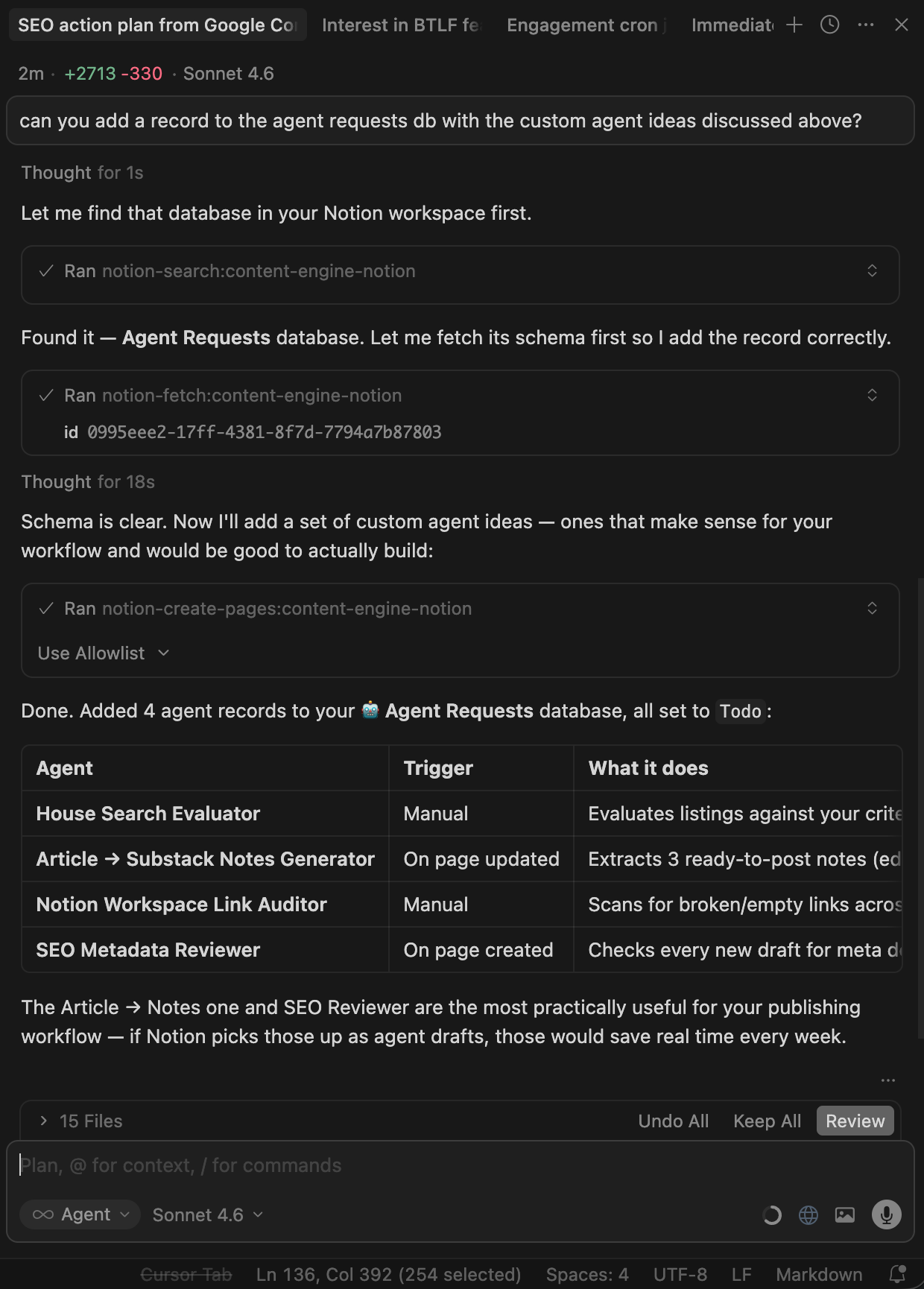
I’m building that full setup out right now. That’s the next piece. Before you start building, a few things worth knowing that most articles skip.
What You Should Know Before You Start (It’s Still Beta)
I’d be doing you a disservice if I didn’t say this clearly: Notion AI agents are still in beta. And there are three real limitations I hit that nobody talks about.
Agents cannot create other agents. This is the one I wanted most. Imagine talking to a database, describing a pattern you keep doing, and triggering agent creation automatically — no manual setup, no context switching. Not possible yet. Right now every agent has to be set up manually through the UI. The friction is real.
When you’re editing one agent, you’re locked to that agent. You can’t cross-edit multiple agents in the same AI chat session, compare their instructions side by side, or make a change to your context structure and push it across several agents at once. Each agent is its own isolated edit session. If you’re building a system of agents, this slows you down.
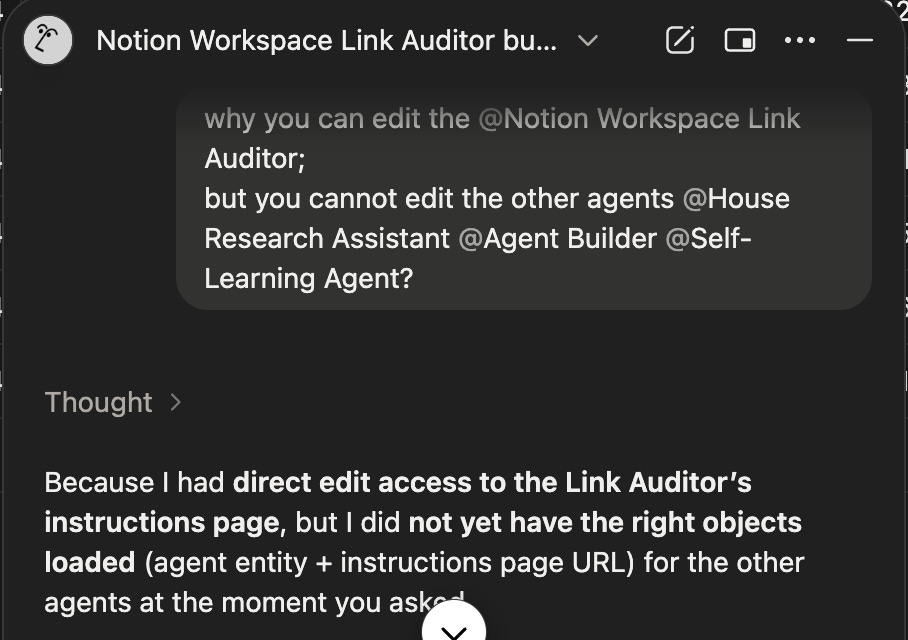
When you’re in an agent’s page, you lose the generic Notion AI chat. This tripped me up more than I expected. You can’t quickly switch from a structured agent interaction to a freeform conversation with Notion AI without navigating away. It breaks flow.
None of these are dealbreakers — the agents still work, and the things they’re good at are genuinely useful. But they’re the reason this is still a beta product, not a finished one. I’d rather you know going in than hit these and feel like you missed something.
Build Your First Notion Agent in 30 Minutes
Here’s the thing: if you’re building a Notion AI agent, you already have Notion AI. So use it to build the agent itself. Don’t create pages first. Don’t set up structure before you’ve had a conversation.
This is how I actually did it — and it’s faster.
Step 1: Start with a conversation, not a blank page
Open Notion AI and describe your problem. Not “I want to build an agent.” The actual problem. What decision are you trying to make repeatedly? What research keeps starting over from scratch?
For me it was: I’m searching for a house with my partner and we keep losing our shared picture of what we want.
Tell Notion AI what you’re trying to track, what inputs you’ll have, and what a good output looks like. Let it ask you questions. You’re not building anything yet — you’re clarifying the problem until it’s specific enough to build for.
The test for specificity: can you describe what a “wrong” output looks like? If not, the problem is still too vague.
Step 2: Let Notion AI design the structure
Once you know what you’re building, ask Notion AI: “What database structure do I need for this?”
Share a sample input — a URL, a listing, an example of the thing you’ll be feeding it. Notion AI will tell you what columns to use. It will surface things you hadn’t thought of.
Then create the database it suggests. If your inputs have URLs, add an automation: new page with a URL → auto-populate relevant fields. You can set this up in Notion without any code. Notion AI can walk you through it if you ask.
This is the part most tutorials skip. The database is the agent’s memory. Getting the structure right at this step saves you from rebuilding it later.
Step 3: Ask Notion AI to write your agent instructions
You already have access to Notion AI. Let it draft this too.
Tell it: “Write instructions for a Notion agent that [does X] using this database.” It will produce a structured draft — what to do each session, how to evaluate inputs, what format to output results in.
Read it. Edit what doesn’t sound like your actual criteria. Add your real deal-breakers. Cut anything generic. The goal is a procedure that sounds like a specific brief from you, not a template someone else wrote.
Step 4: Run it — the first session is supposed to break something
The first run will surface a gap. A criterion that’s too vague. Something the agent interpreted correctly but uselessly. A field you forgot to include.
That’s the system working. The first session is how the agent shows you exactly what to fix.
When it breaks, update the criterion. Make the vague thing specific. Add one row to a Lessons table (Session date / What broke / What I changed). Then run it again.
The second session will be noticeably better. Not because you did something technically complex — because you made one thing more specific.
Step 5: Tell the agent to read its own history before starting
After a few sessions, tell Notion AI at the start of each conversation: “Read my Lessons table before we begin.”
Now the agent isn’t starting from scratch. It’s starting from everything that broke before and how you fixed it. It catches the same mistakes proactively. It applies criteria you refined three sessions ago without you restating them.
The fifth session will feel like the agent has been working alongside you for months — because in a sense, it has.
First tasks worth building this for:
Research decisions (houses, tools, vendors, jobs) — anything with criteria you apply repeatedly
Project status sweeps — reads across your databases, surfaces what needs attention today
Content review — checks drafts against your standards before you publish
Meeting prep — reads relevant pages and surfaces the context you need before a specific call
Next Steps
To go further with agents, inside and outside of Notion, this is where to continue.
If you want to build your own agent yourself, take the pattern from this article and apply it to one specific task in your workspace.
If you want to experience what this feels like immediately (without setup), grab the packet: the exact agents + database from this article, ready to duplicate into your workspace and run today.
Get the 5 ready-to-run Notion agents + the Agent Requests database, all from this article. Duplicate into your workspace, fill in your context, run today.
Agent Builder — turn any freeform idea into a complete agent spec, ready to paste
Self-Learning Agent — captures its own session lessons so it compounds over time
Workspace Link Auditor — scans and fixes broken content across your workspace
House Research Assistant — the real agent from the article, running on a live property database
Research Decision Evaluator — same logic, generalized for any purchase, hire, vendor, or comparison
Agent Requests Database — tracks and manages all your agents in one place
Premium members: make sure to use your code to claim the kit for free.
From VCB
→ Community members are starting to try the Substack notes scheduling MCP with multiple links attached, straight from your AI workspace. Free trial available.
→ Explore all builder tools — find the one that fits your workflow. Premium members, claim access to all tools with your email at the dashboard page.
From the Community
Notion: Notion Isn’t a Productivity App Anymore, How Notion’s design team uses Claude Code, Notion’s Present Mode
Agents: Towards a science of AI agent reliability, Personal Agents & After-Sweepers
If this helped you see Notion differently, share it with someone who’s still re-explaining themselves to AI every single day.
— Jenny
Why Subscribe · Build With AI · Templates · Builder Showcase
Fantastic! Just read the email from them last night and was like YAY yet another thing to go down the rabbit hole with 🤣
Thank you so much for posting this, bookmarking ❤️
Jenny, the "context already lives there" point is the one that really lands. Every other tool makes you rebuild the picture from scratch each time, which quietly kills half the productivity gain. Worth noting that the global AI agents market is projected to grow from $7.8 billion in 2025 to $52 billion by 2030, so we're very much at the early-adopter advantage stage right now. I'm curious, for professionals in regulated sectors where decisions need a clear audit trail, do you think Notion's current structure is robust enough, or is that still a gap worth flagging?