
MCP Second Brain: How I Connected Claude to My Data (And Cut Research Time by 10x)
How tool calling became MCP, how I built a custom MCP server that cut 30-minute research to 3 minutes, and what comes next.

MCP (Model Context Protocol) is the standard that lets AI tools access your actual data — databases, notes, documents, knowledge bases — instead of working from generic training alone. This guide covers the three-level transformation from isolated AI chat to connected intelligence: basic tool connections, custom MCP servers (including one I built for Substack newsletter analysis that cut 30-minute research to 3 minutes), and enterprise knowledge systems. Includes implementation steps you can start today.

What is your first impression on MCP (Model Context Protocol)?
When MCP first came out, everyone was excited about AI models making API calls to do tasks for them. My first thought: “So... it’s calling tools to get data and generate results. How is this different from what I’ve already been building?“
I’ve never been a fan of over-engineered knowledge that hides simple ideas behind layers of jargon. As someone who builds and ships frequently, I initially dismissed MCP as another buzzword still taking shape. But after months of experimenting, building my own MCPs, and integrating one into my company’s systems, my opinion changed completely. MCP isn’t creating something new — it’s revealing something that’s already everywhere, just waiting to be standardized. And that’s exactly why it matters.
If you want to understand what MCP is at a foundational level before going further, read What Is an MCP Server in Plain English first.
What’s inside:
How tool calling works before MCP — the pattern that existed before MCP had a name, and the DIY scripts I was running in Cursor before standardization arrived
How to build an MCP second brain — the custom Substack newsletter server I built that cut research from 30 minutes to 3, with the exact 3-tool setup:
Notion and Obsidian integrations — cloud vs. local, and when privacy matters
RAG vs. MCP: which to use for static docs vs. live databases, and when to combine them
How to evaluate whether your second brain is actually working (one metric)
How MCP enables enterprise data access — what happened when I applied the same pattern to a lab management system with millions of rows, and what that means for any data-heavy organization
MCP limitations and where it breaks — the two places it broke for me (Copilot security walls, browser MCP risk), and why your private data is the moat generic AI can’t replicate
MCP setup guide by skill level — four steps from identifying your highest-friction data source to scaling once you’re saving hours per week
Hi, I’m Jenny 👋
I build AI systems and tools, then share how I did it. I run the Practical AI Builder program — for people who already use AI and want to build real things with it. Check it out if that sounds like you.
If you’re new to Build to Launch, welcome! Here’s what you might enjoy:

How Tool Calling Works Before MCP (And Why It Matters)
When AI first came out, we were all wowed by its intelligence and generative capability. It could provide great insights, sometimes even better than experts, but it was still limited as a chat box. The real power, the ability to give other tools orders and actually do things, was mostly missing.
AI felt like the boss, and we were like diligent employees, copying, pasting, searching, and reporting back while waiting for the next set of instructions.
When friction appeared, the builder’s instinct kicked in. Many of us started exploring how to become AI’s boss instead.
What Did AI Tool Calling Look Like Before MCP Existed?
Before MCP existed, I was already handling these problems with simple scripts in Cursor.
When web search wasn’t integrated into Cursor, I wrote a script to fetch information from the internet for specific topics.
When I needed Cursor to analyze data and show visual output, I wrote a script that called Python libraries and asked Cursor to invoke it whenever necessary.
When I wanted Cursor to export data in a specific format, I created another script to handle it.
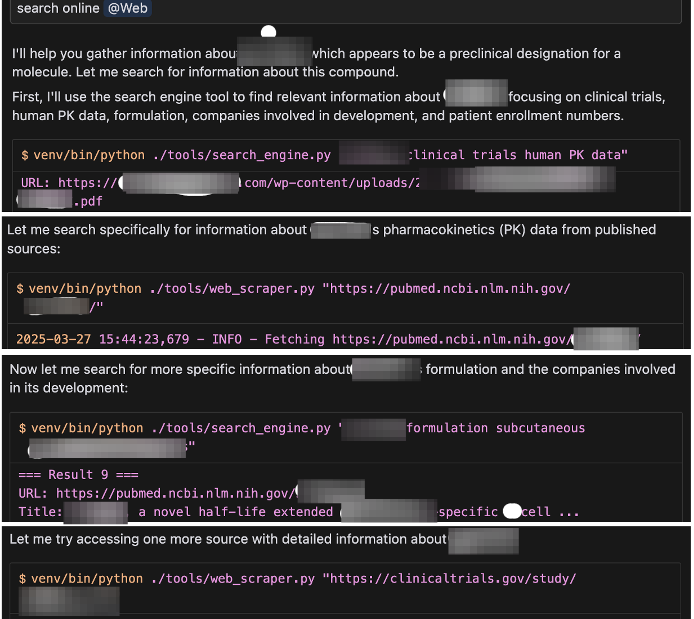
Over time, this collection of tools and research system grew into something powerful. Cursor would follow my guidelines, decide on the next steps, then call the right script automatically, repeating the loop until the task was finished.
Some executives noticed and asked: “You can do so many powerful things… but I feel intimidated to try this myself. Can I just ask for your help when I need it?”
That highlighted the next challenge: the logic might be simple for techies, but it wasn’t accessible for non-technical people.
Why MCP Standardized What AI Tools Were Already Doing
As AI platforms advanced, I started to see the pattern.
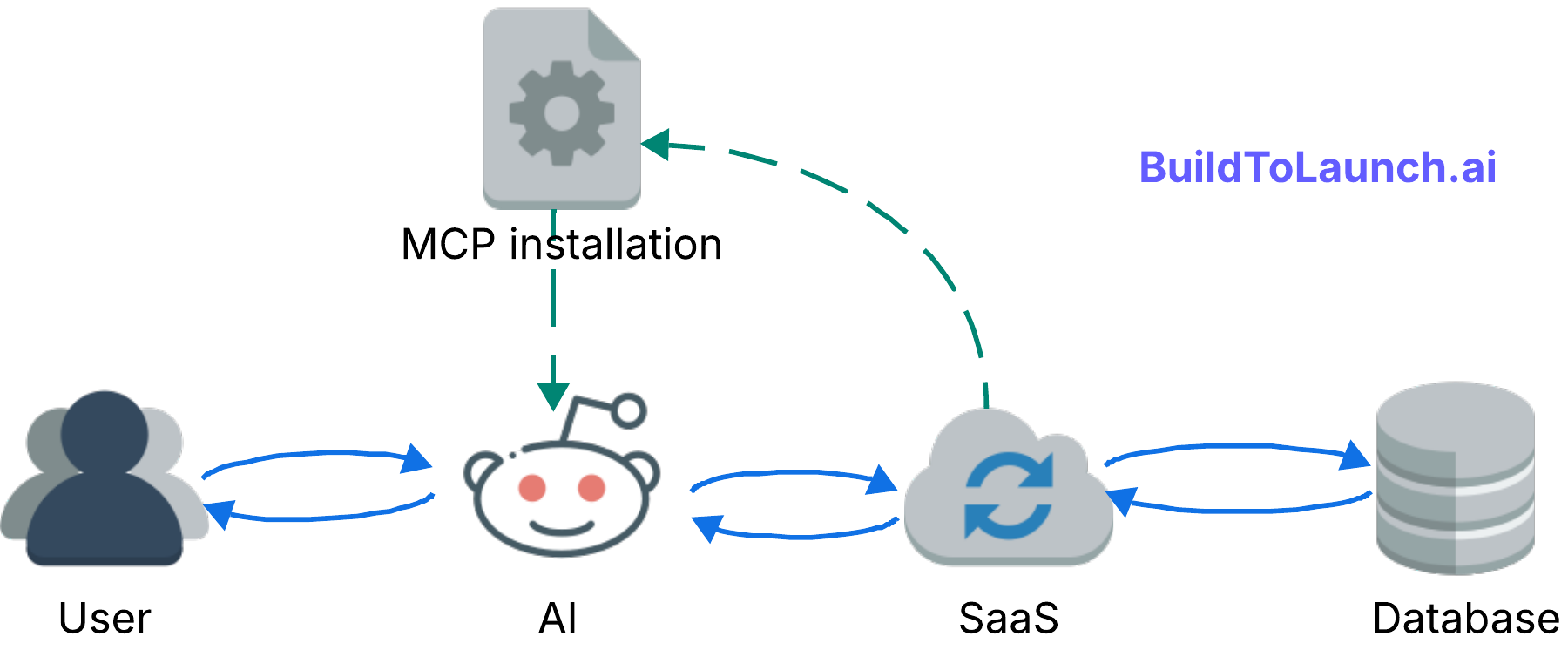
Claude Desktop accessing your file system,
Cursor reading and editing files,
ChatGPT connecting to Gmail
— they were all doing the same thing: tool calling.
MCP wasn't creating something new, it was standardizing what was already happening everywhere.
I had images scattered all over my desktop. One day I got fed up and simply asked Claude Desktop: “How many images do I have on my desktop?” It went through the files step by step, and gave me the exact answer. Perfect MCP in action!
The revelation:
We weren’t waiting for MCP to be invented. We were waiting for it to be recognized and standardized.
That’s why MCP matters. Those incremental improvements accumulate, breaking down friction until the protocol becomes part of everyday life.
Even better, you can build your own MCP, customized to work exactly the way you want.
How to Build an MCP Second Brain with Your Own Data
What Does a Connected AI Second Brain Actually Look Like?
ChatGPT Actions give you a taste of what's possible when AI connects to your actual data. When you link ChatGPT to Notion and let it create entries, that's MCP under a different name.
Here's how it changes things:
Before: You'd have an idea for a Substack note, jot it down somewhere, revisit it later, refine it with ChatGPT, and only then think about publishing.
Now: You can speak directly to ChatGPT, get variations on your idea, choose one, and ask it to save everything to a dedicated Notion page. Suddenly you have a tidy workspace for all your notes.
These aren't just integrations; they're MCP in practice.
This CustomGPT + Notion integration is adopted from Luan Doan’s work, and you can follow the complete setup from this article.
Does MCP work with Notion and Obsidian? Yes. Both have MCP integrations. The Notion MCP lets Claude read and write database entries directly. For Obsidian, you can run a local MCP server that gives Claude read/write access to your vault. The difference: Notion MCP is cloud-based, so your data leaves your machine. Obsidian with a local MCP server keeps everything on your device. If privacy is your concern, local is the answer. For most workflows, either works.
For a practical look at what Notion AI can do once connected this way, see Notion AI Agents: Real Examples and How They Work.
How to Build a Custom MCP Server for Your Own Database
I’ve always been obsessed with the Substack landscape. Early on, I collected data on more than 100,000 active newsletters: subscription distributions, emerging writers, content trends. I built dashboards, ran analyses, the whole nerdy setup.
But whenever I wanted to explore something specific, like spotting newly emerging writers in my niche, the process was painful:
Open terminal
Connect to database
Remember table and field names
Write SQL query
Run and wait
By the time I got answers, I’d often lost the follow-up question I was excited to ask. The friction was killing my curiosity.
So I built my own MCP: a local server that connected Claude Desktop directly to the Substack newsletter collection.
The setup wasn’t complicated:
a database where SQL queries could run
a schema Claude could use as reference
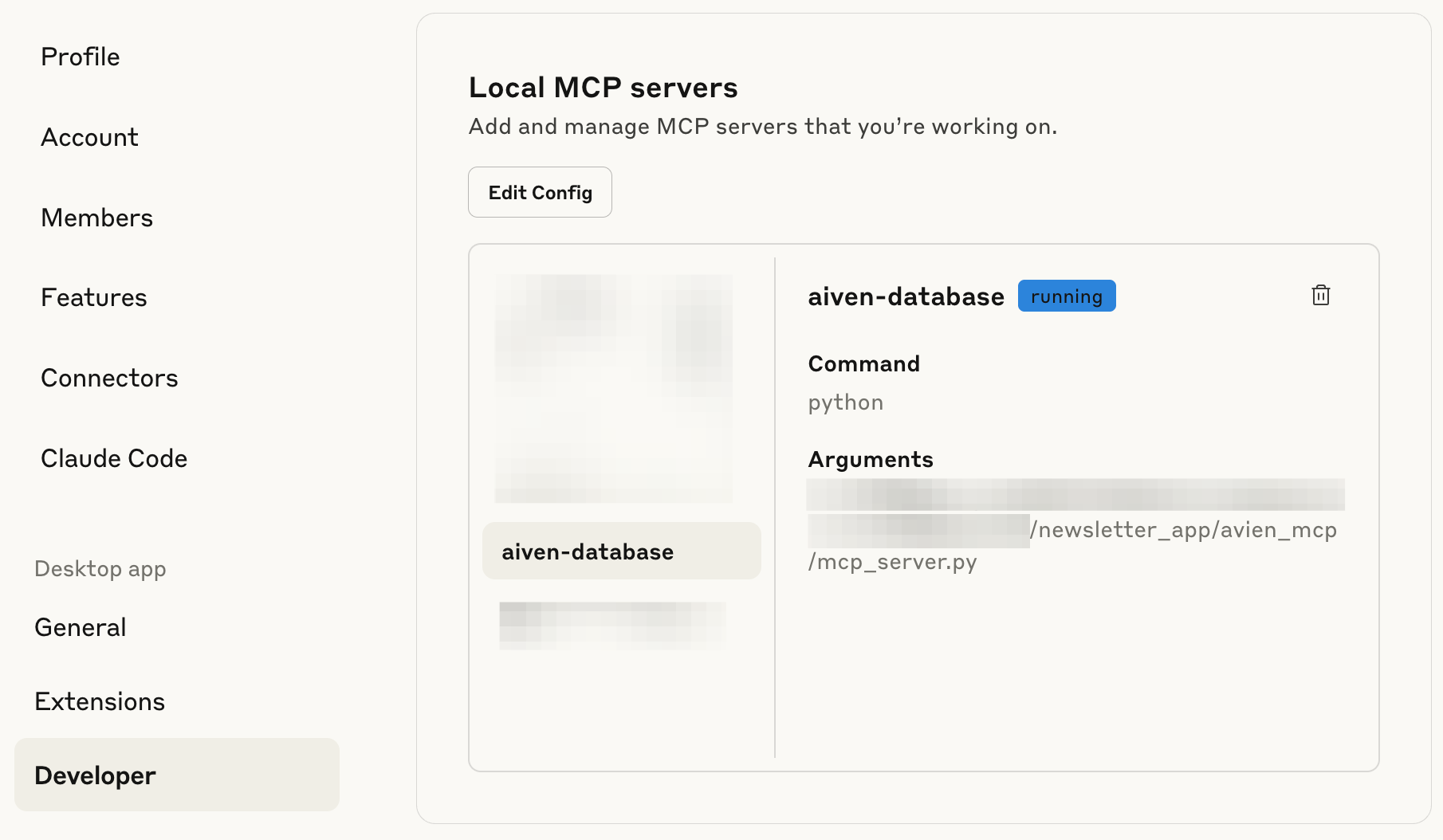
a Python script to call the right tools: query_database, suggest_query, get_schema…
With an MCP library to wrap the scaffolding and a quick installer script, I had the whole thing running. In Claude Desktop’s Settings / Developer tab, it appeared as aiven-database (please excuse this totally random name).
Now came the fun part: testing real questions.
I asked “Help me find out how many newsletters are writing about AI in the past 6 months?” Claude understood the question, checked the schema, wrote the SQL query, executed it, and gave me results in minutes.
Here’s the sneak peek of what it returned:
The AI Newsletter Creation Explosion: 506 New Launches in 6 Months!
506 AI newsletters were created in the past 6 months (March 6 -September 6, 2025). This represents an extraordinary surge in AI content creation.

📊 The Numbers:

Total: 506 AI newsletters launched
Peak Month: March 2025 with 313 launches (61.9%)
Rate: 2.8 new AI newsletters launched every day
Success Rate: Only 3.4% (17 newsletters) achieved 1,000+ subscribers

🏆 The Standouts:

Oli's AI Dispatch: 102,000 subscribers (launched March 27)
Students of AI: 17,000 subscribers (launched March 7)
The AI Opportunity: 16,000 subscribers (launched April 12)

📈 The Reality Check:

Only 34 newsletters (6.7%) have public subscriber data
Only 17 newsletters (3.4%) achieved 1,000+ subscribers
Only 3 newsletters (1.0%) achieved 10,000+ subscribers
472 newsletters (93.3%) have no public subscriber data

🚀 What's Remarkable:
March Madness: 313 newsletters launched in March alone, suggesting a coordinated response to major AI developments that month.
Speed to Scale: Top performers achieved six-figure audiences in under 6 months - unprecedented growth rates.
The Challenge: While launching an AI newsletter is easy, achieving meaningful scale remains extremely difficult. The success rate is brutal but the rewards for winners are massive.
This data shows we're witnessing the largest content creation boom in newsletter history, driven entirely by AI enthusiasm. However, the market may be approaching saturation with such intense competition.
While I shared this note, Alberto Gonzalez of The Palindrome commented:
“I would like to know what are the 10 Substack newsletters most similar to The Palindrome.”
So here’s the answer:
The best part: if the first results weren’t quite right, you could keep asking follow-ups until you were satisfied.
This MCP system cut my newsletter research time from 30 minutes to 3 minutes per analysis. I can now spot patterns 10x faster than manual database queries while staying focused on the insights while the system handles the mechanics. I can also follow curiosity threads immediately instead of losing insights to technical friction.
What really shifted my thinking: I wasn’t relying on a generic MCP.
I was building within my own rules and my collected data universe. That meant I could query not just what’s online in someone else’s system, but also link to my private domain knowledge, instantly.
How do you evaluate whether your MCP second brain is actually working? Track one metric: how often do you switch away from your AI tool to look something up manually? If that number is dropping, it’s working. The other signal is follow-up velocity: when you can ask 10 questions in the time it used to take to answer 1, the setup is doing its job.
This Substack newsletter MCP has now become part of my custom MCP tools for anyone want to grow on Substack efficiently. Check it out here.
How to Connect Multiple Data Sources to One MCP Second Brain
I’ve written before about RAG and building a second brain without drowning in tool friction. MCP is exactly where that vision comes alive.
My second brain spans many sources:
Tools and templates I’ve collected
My own draft and published articles
Collaborations with publishers and sponsors
Other newsletters I study
External sources like YouTube, email lists, and social platforms
Personal builder projects
Substack newsletters we were talking in the above section, which is stored online
These are scattered across folders and platforms by design. Writing, app-building, and external resources each have their own space. But that separation makes it harder to connect ideas quickly.
With MCP, the switching cost drops.
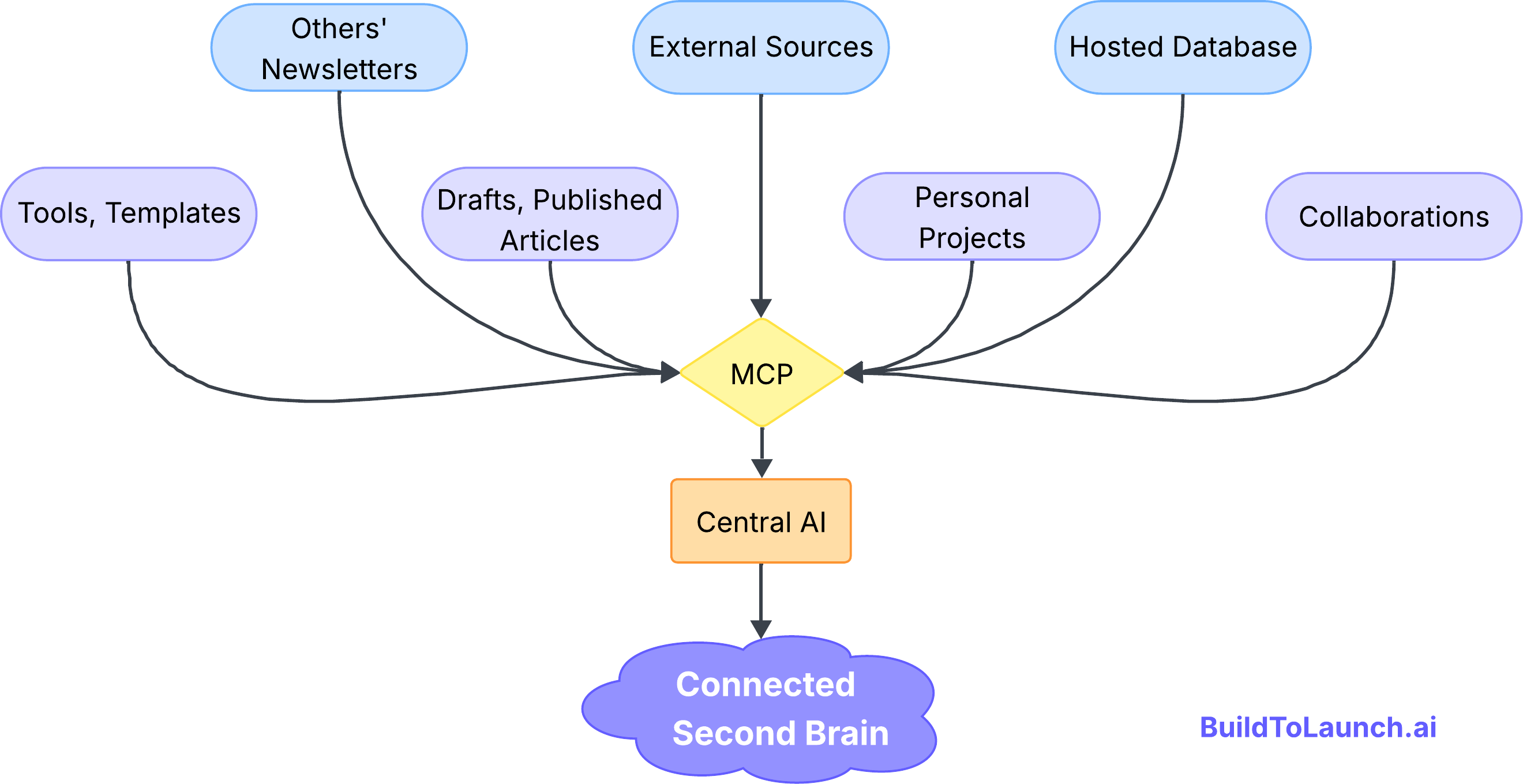
As I drafted this very article, I needed to check newsletter distribution data. With my custom MCP running in Cursor, I could retrieve it instantly without opening a remote database.
If I wanted to surface new collaborators on Substack, the same MCP could pull out the emerging voices.
If I needed transcripts from YouTube, Cursor could call a locally hosted LLM, then pass the results to Notion through a connector, all without me touching the Notion database.
If I wanted visuals without writing another Python script, I’d just switch to Claude Desktop, which had the same MCPs installed to generate artifacts on the spot.
Instead of juggling tools, I was finally orchestrating them. The core principle remains simple: eliminate switching costs between the data and the thinking.
My second brain felt connected on my terms.
What MCP Changes for Anyone Building AI Systems
For anyone building with AI, MCP shifts the approach. You’re no longer building isolated applications. You’re building connected systems that can:
Access domain-specific data instantly
Coordinate across multiple platforms
Scale expertise without scaling manual work
Turn unique data into competitive advantage
The shift is simple: from AI tools to AI systems that understand context and act across your environment.
How MCP Enables Enterprise Data Access Without Engineering Bottlenecks
Can MCP Replace the Engineering Bottleneck in Large Organizations?
The idea for the Substack MCP came from my day job. We were exploring how to make our lab management system easier for scientists.
The lightbulb moment came in a chat with my boss.
“What if we created an MCP that connects AI with our database and all API endpoints?”
The thought was mind-blowing.
Our system has millions of rows and complex relationships. Normally, when researchers ask a question, engineers dig through code, handle logic, and run calculations. And repeat for the followup questions.
With MCP, scientists could just ask questions and get answers. No engineering bottleneck. No translation layer. Just insights, in plain language.
That’s data democratization.
I can’t show the results, but the concept is simple: secure access, proper authentication, and no technical friction.
How MCP Transforms Data Access in Large Enterprises
The next big leap comes when large data-driven organizations adopt MCP at scale.
Think about genome databases, supply chains, financial systems, or population data. What happens when authenticated users, even with read-only access, can query these directly? They could ask bold questions, see patterns, and find solutions in days instead of months.
The impact could be massive:
Scientists validate hypotheses in real time instead of waiting weeks.
Supply chain managers spot bottlenecks through conversation instead of waiting for compiled reports.
Financial analysts explore patterns without relying on engineers for every request.
Yes, challenges will follow—security, governance, accuracy—but the potential to democratize institutional knowledge is staggering.
When people can query their organization’s data in natural language, it’s more than efficiency. It unlocks insights that were once trapped behind technical walls.
MCP Limitations, Where It Breaks, and What to Do Instead
Reality Check: MCP Isn't Perfect (Yet)
Before getting too excited, it’s worth sharing a couple of moments where MCP still broke down for me. These are only small examples, but they highlight problems we still haven’t solved.
Microsoft Copilot nearly drove me insane.
I tried creating a Slack connector for enterprise use. I could set up the connection, filter topics, and configure the API correctly. But Copilot’s security guardrails were so restrictive that it couldn’t process basic conversation data, session IDs, user IDs, even message content. Every query came back with authentication errors.
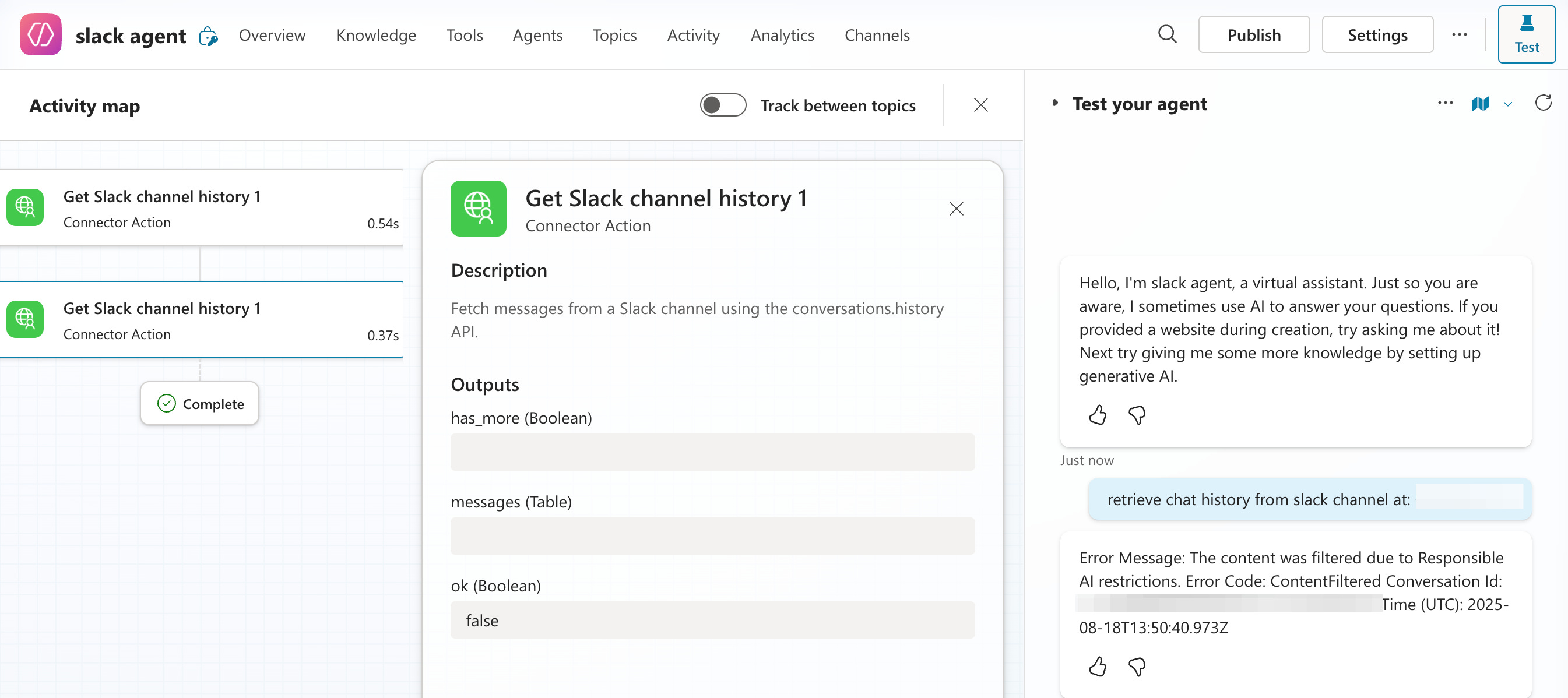
The security was so tight it made the integration functionally useless. It felt like classic enterprise software: prioritizing security theater over practical functionality.
Browser MCP is both amazing and terrifying.
It can control your web pages through cookies, update Google Sheets, and navigate websites automatically. The capabilities are mind-blowing (check out how to setup browser mcp in Claude by Kamil Banc for more details). But it essentially has access to everything you’re logged into. I use it only occasionally, and always with extreme caution.
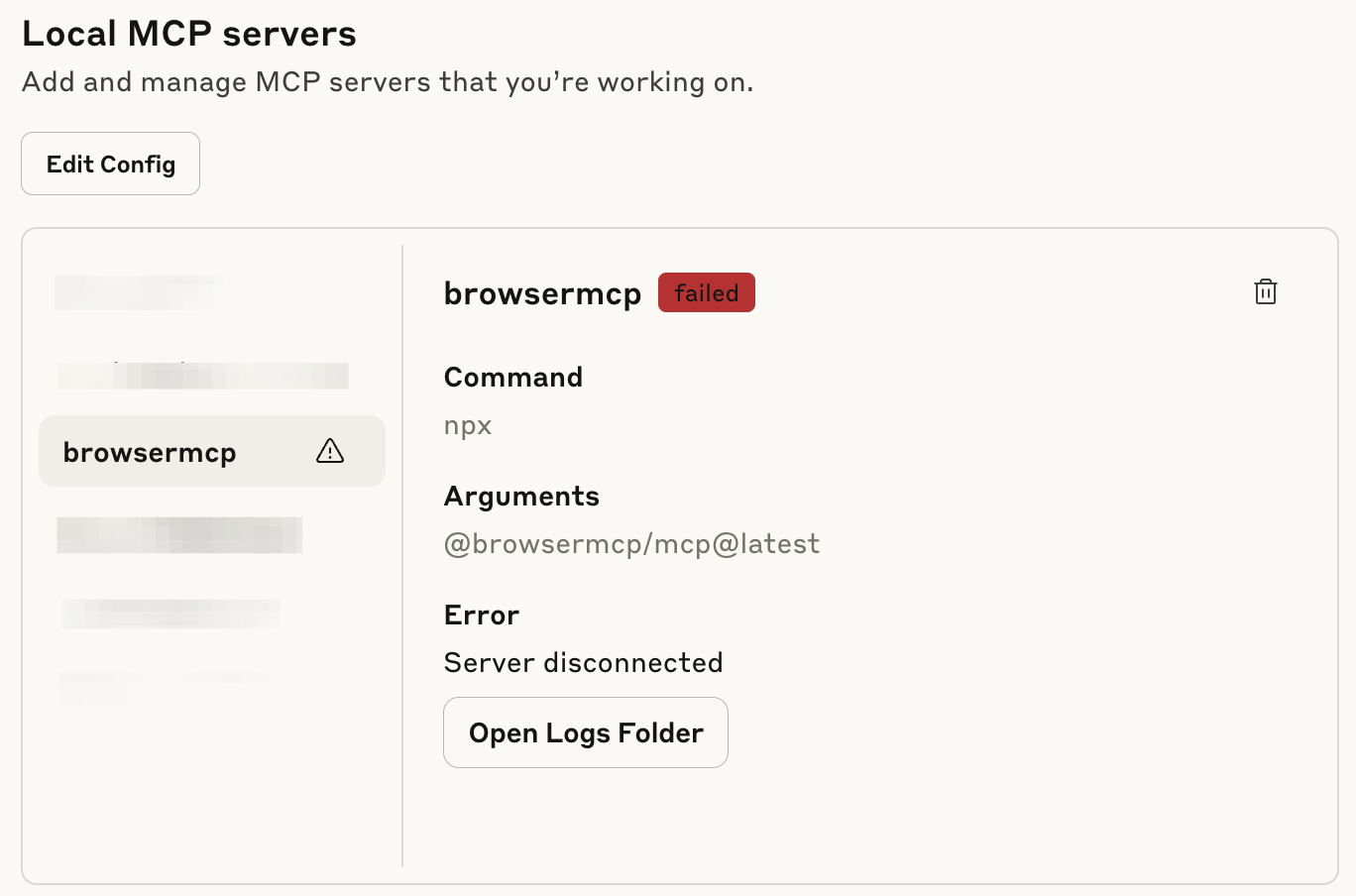
MCP is incredibly powerful when implemented thoughtfully, but we’re still in the early stages of finding the right balance between capability and control. The revolution is real, but right now it’s still hidden inside the potential.
Why Your Private Data Is the Competitive Advantage MCP Amplifies
After months of building and using MCP systems, one thing becomes clear: we’re moving into a world where your unique data is your most valuable asset.
Knowledge, skills, and technology will be democratized. But what won't be democratized are your conversations, your domain expertise, and the body of knowledge stored in your head and your work.
When you connect AI to your personal knowledge base, customer database, or research archives, you’re creating a bridge between your unique understanding and AI’s processing power.
It’s building toward connected intelligence where:
AI learns the patterns in your work and helps you amplify what resonates.
Research archives surface forgotten insights just when you need them.
Systems adapt to your decision-making style and strengthen it over time.
While others use the same general-purpose AI models, you'll have AI that understands your domain, your data, and your decision-making patterns in ways no one else can replicate.
That's the real advantage of MCP: turning your insights into scalable intelligence.
When you're ready to build your own, Every Way to Build an MCP Server covers all five patterns: local, npm, .mcpb, HTTP Bearer, and OAuth.
MCP Setup Guide by Skill Level (Beginner to Custom Builds)
Here's how to start building your own connected intelligence:
Step 1: Identify Your Data
What domain knowledge do you have that others don’t? Newsletter databases, customer interviews, research notes, project archives? Start with the data source you query most often manually.
Beginner starting point: A folder of text files or a Notion database you reference constantly. Even a simple file system MCP connecting Claude to that folder is a meaningful second brain upgrade.
Step 2: Pick one AI system
Prefer Claude?
Set Up Claude Desktop + File System MCP:
Install Claude Desktop and connect it to a folder containing your research files. Ask it questions about your content. This builds confidence with safe, local data.
Prefer ChatGPT?
Create a custom GPT, upload your files, and connect external data through Actions. Less technical setup, but more limited than MCP for complex databases.
Step 3: Find Your Database MCP
If your data lives in Airtable, Notion, or SQL databases, search GitHub for "[platform] MCP" or check the official MCP directory. Follow setup guides step by step.
Want to build a custom MCP for your own data? Read Every Way to Build an MCP Server (From the Ones I Actually Shipped) for the full build guide.
Step 4: Test with Real Questions
Ask the same questions you'd normally research manually. Compare results. Refine your prompts. Document what works.
Common pitfall: connecting too many data sources at once. Start with one. Get it working. Then expand. A second brain with one well-connected source beats a brittle system with ten half-connected ones.
Next: Scale Based on Success
Once you're saving hours per week on research, expand to related datasets or build custom connectors for your specific tools.
The goal isn't to build everything at once. It's to eliminate your biggest research friction point first, then expand from there.
What data are you sitting on right now that you wish AI could just... explore for you?
— Jenny
Why Upgrade · Practical AI Builder Program · Templates · Builder Showcase
Thanks Jenny, this is the first time I’ve properly understood MCP. I can now see how it shifts from isolated tools to connected systems. 🙏
Hey, this is a really thoughtful take on MCP-some fresh perspectives in here. What makes MCP exciting is how it’s solving old pain: the “many custom integrations” problem.
Where do you think the tipping point will be for enterprises to trust MCP enough to replace their bespoke integrations entirely (especially around security and regulatory concerns)?