
How to Build an AI Digest App with Replit: Complete Step-by-Step Guide
From idea to live web app — the ChatGPT planning system, phased build prompts, real costs, and the production fix every first deploy needs

This is the complete how-to for building an AI-powered information digest app — an RSS aggregator that fetches newsletters, summarizes each article with OpenAI, auto-categorizes, and displays everything in a filterable dashboard. Built in Replit, hosted on Vercel, database on Supabase. Zero to live URL in two hours. Real costs, real code patterns, real production fix. Everything you need to ship your own version — with Replit, Cursor, Claude Code, or whatever AI coding tool you use.
Vibe coding changed what “anyone can build” means. Generating code isn’t the hard part anymore.
Shipping it end-to-end is. A live URL that holds up when someone actually visits it. A database that doesn’t break under real data. Environment variables that work in production, not just dev. An AI integration that doesn’t silently fail the moment you combine it with an RSS fetch.
That’s where most first builds die, not in the idea, not even in the code, but in the gap between “it runs in preview” and “it’s actually deployed.”
This guide covers that gap completely. ChatGPT to lock the architecture before you write a single line. Replit to build in five structured phases. Supabase for the database. OpenAI for summarization. Vercel for hosting. And the one production fix that every Replit deploy needs and that no tutorial mentions.
Build this once, and you have a reusable system. The same planning process, the same prompt structure, the same deployment pattern applies to the next project too, a newsletter CRM, a content gap finder, a job tracker, a link archive. Different apps. Same bones.
What You’ll Get:
This is the finished app, live URL, real articles, AI summaries, categories filtering correctly. The build takes one focused session using the system in this guide.
Everything in this guide:
The setup
What this actually costs — Replit billing from a real screen, the $100/month hosting trap, and why Vercel changes the math
Why opening Replit first is the #1 mistake — the sequencing that determines whether you ship in one session or three
Step 1: The ChatGPT planning session
The one prompt that changes output quality — how to make ChatGPT ask you questions instead of jumping to answers
Round 0–1: Problem statement + the 12 questions that lock your architecture — what you’re building, what it stores, how it flows
Round 2–4: Architecture, constraints, final details — locking the data model before any code is written
Round 5: The Master Initialization Prompt — the single prompt you paste into Replit first
Round 6: Phased build prompts — what a real Phase 1 prompt looks like (screenshot included)
Round 7: Verification and hardening — the test checklist that catches integration failures
Step 2: Building in Replit
Agent mode vs Assistant mode — when to use which and what each actually costs per task
What each phase looks like on screen — the 404 that’s expected, the empty state that confirms Phase 3 worked
The categorization prompt that actually works — why the default fails (95% “Technical”) and the exact prompt fix
Database patterns: duplicate detection, indexes, transaction safety — the code that prevents the three most common production data bugs
Step 3: Production deployment
One-click publish and what to do right after — what the Publishing tab shows, what to add before you share the URL
The ENOTFOUND error — why it happens every time — Replit’s workspace-scoped secrets explained, with the log screenshot
The exact fix: Advanced Settings → Secrets — the four variables, where to find them, in two minutes
What comes next
4 projects to build with the same stack — newsletter CRM, content gap finder, job tracker, link archive
All templates — 7-round conversation prompts, schema, deployment checklist, copy-paste ready
Stack: Next.js App Router + TypeScript + TailwindCSS + Supabase + OpenAI + Replit (build) + Vercel (host)
Hi, I’m Jenny 👋
I help non-technical people ship real products with AI. AI builder behind VibeCoding.Builders and other products with hundreds of paying customers. See all my launches →
If you’re new to Build to Launch, welcome! Here’s what you might enjoy:

Before You Open Replit
Most first builds fail the same way. Someone opens Replit, types “build me an RSS reader app with AI summaries,” watches the agent start generating, then hits a wall around Phase 3 when the database connection breaks or the AI categorizes everything wrong. They spend the rest of their credits trying to undo decisions the AI made for them.
The fix is sequencing. Spend 30–45 minutes resolving the hard decisions in a free tool (ChatGPT) before touching Replit. By the time you open Replit you should have a complete spec: tech stack, data model, what to store, how data flows, what the AI does at each step, and a phased prompt chain ready to paste in order.
The result: a coherent build in one pass rather than three sessions of undoing.

Real Costs Upfront
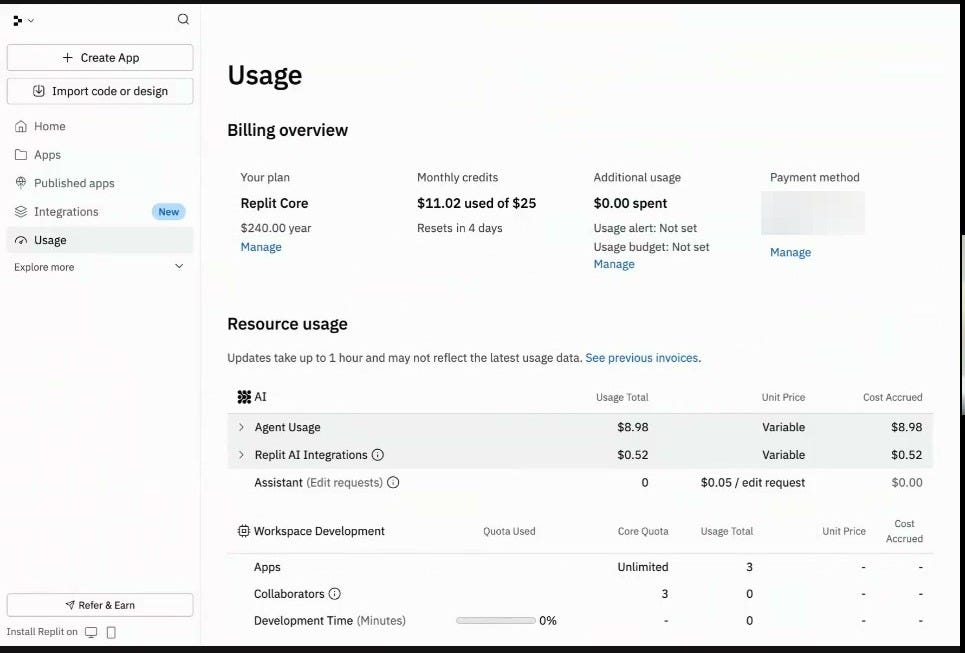
This is a real billing screen from one build session, not a screenshot from a pricing page.
What you’re actually paying for:
Replit Core plan: $240/year ($20/month). Includes $25/month in credits that reset monthly and do not roll over.
Agent usage: Variable. One focused Agent-mode build session consumed $8.98 of a $25 credit allocation. Complex sessions can consume half your monthly credits in an afternoon.
Assistant (edit requests): $0.05/edit. Flat rate, predictable. Use this for targeted tweaks once the core build is complete.
The hosting number that catches everyone: Running a deployed app on Replit’s Autoscale infrastructure costs roughly $1/compute hour. 730 hours a month = ~$100/month for continuous uptime. That’s not viable for a personal project.
The move: Build in Replit, then host on Vercel (free tier handles most small apps; paid from $5–10/month), Render, or Railway. You lose nothing in functionality.
Critical timing: Tell the AI before it starts building that the code should be Vercel-compatible. If you wait until after, you may have Replit-specific dependencies to untangle.
Step 1: ChatGPT Architecture Session
Do not open Replit yet. Open ChatGPT or Claude instead.
ChatGPT and Claude aren’t credit-based for planning conversations. You can spend an hour changing your stack twice and it costs nothing beyond your subscription. Replit charges per edit. Use the free tool until you have a complete picture.
The One Prompt That Changes Output Quality
Before asking for any spec or architecture, send this first: