
How to Know If Your App Is Worth Building — Before You Build It
The methodology, the data collection, the app building, and a framework you can steal

Most vibe coders skip validation and go straight to building, then wonder why nobody uses their app. Here’s a faster approach: use AI to research your market in under 2 hours, test whether data sources are actually accessible, and validate demand before writing a single line of code. This is the exact 70-minute methodology I used with Perplexity, Notion, and Claude Code to research 16 sites, find 7 usable data sources, and build a working aggregator app.

“How do you validate your app ideas?”
People often ask me during vibe coding sessions. Honestly? I usually just build. The things I build are things I want, they either don’t exist, or they’re too far from my needs. Validation happens naturally when you’re the target user.
But this time, I realized I was validating before building, without even calling it that.
After relocating cross-country, I needed to buy everything. And as someone who spent years clipping coupons, I knew savings were out there, I just couldn’t find them efficiently. Deal sites meant tab after tab, scrolling walls of text, clicking posts to find codes buried three paragraphs down. The best aggregators? All in Chinese. I was the family middleman — translating, explaining, sending screenshots.
I needed an app that:
Shows deals from multiple sources in one interface
Displays coupon codes directly, no clicking required
Works in English
Lets me browse and discover, not just wait for alerts
Rakuten assumes you know what to buy. Honey only kicks in at checkout. CamelCamelCamel is Amazon-only. Nothing did all four. So I decided to build it.
But first: I had to understand the ecosystem. Where do deals come from? Which sites have accessible data? What are the business models? This research was my validation—if I found what I needed, no building required. If data was locked down, not worth the effort.
I’ve done this kind of AI research before with Cursor. The methodology works for any industry. This time: deal-finding sites.
Using Perplexity, Notion, and Claude Code in parallel, I mapped the ecosystem in about an hour. The result confirmed: accessible data, a clear gap, proven models in other languages. Three green lights. Then I built it.
What you’ll get from this article:
The research methodology — how I compressed weeks of work into 70 minutes and found 7 goldmines among 16 sites
Building the app — the problems I hit (deduplication, translation, timezones) so you don’t have to
What surprised me — counterintuitive findings about RSS, WordPress, and why human curation still wins
A framework you can steal — apply this to research any ecosystem yourself (and build your custom app)
Hey, I’m Jenny 👋 I teach non-technical people how to vibe code complete products and launch successfully. AI builder behind VibeCoding.Builders and other products with hundreds of paying customers. See all my launches →
If you’re new to Build to Launch, welcome! Here’s what you might enjoy:

How I Researched Deal Sites in Minutes
Here’s exactly how I did it, three AI tools, each for what it does best:
1. Perplexity
— For industry research, competitor discovery, and current facts.
I used it to find what solutions already existed, which deal aggregators were popular, and how they worked. When I asked “How do deal aggregator websites like Slickdeals source their deals?”—it gave me cited answers about user submissions, editorial curation, and affiliate relationships. Real information with sources I could verify.
2. Notion
— For organizing everything into a structured database. I had Notion AI create a research database with fields for RSS availability, API access, scraping difficulty, business model, and data quality. Then I filled it in as I learned.
3. Claude Code
— For the heavy lifting, actually testing whether sites had working APIs, RSS feeds, or were blocking scrapers.
Here’s the part that still amazes me each time I do it: I launched 9 parallel Claude Code agents to research 16 sites simultaneously. Not one at a time. Nine agents, all working at once.
Three agents did technical audits: checking robots.txt files, testing RSS feed URLs, probing WordPress API endpoints.
Four agents researched business models by category: aggregators, cashback platforms, coupon sites, and price trackers.
Two agents did deep API testing, actually fetching feeds and analyzing what data fields were available.
The actual time breakdown:
- Define schema — 10 min
- Map landscape (Perplexity) — 15 min
- Technical audit (3 parallel agents) — 5 min
- Business research (4 parallel agents) — 20 min
- Deep testing (2 parallel agents) — 5 min
- Synthesis — 15 min
- Total~70 min
What would have taken me a week of evenings, AI compressed into a lunch break.
The Four Categories of Deal Sites
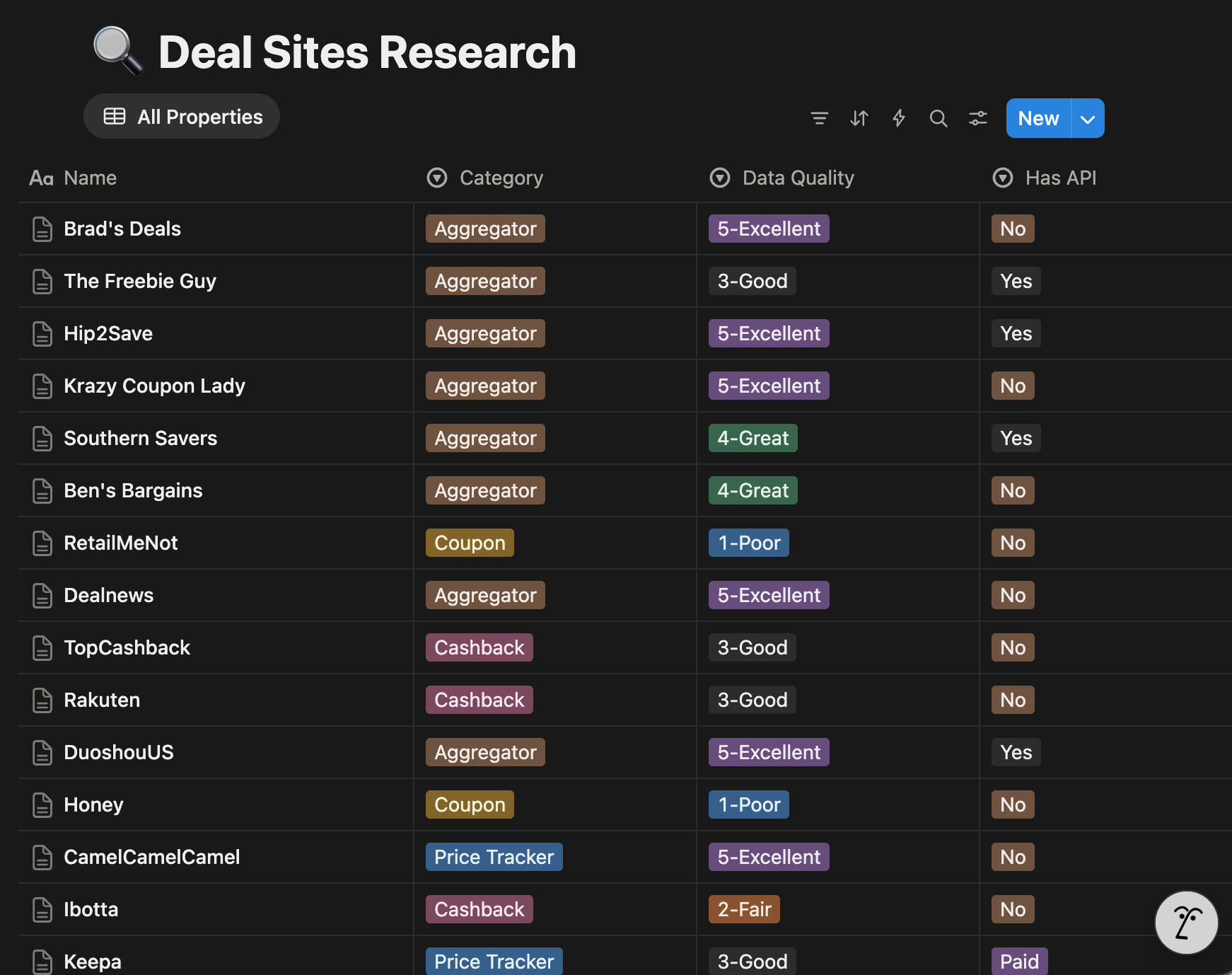
The deal-finding world breaks down into four distinct categories, each with different business models and (critically for builders) different levels of data accessibility.
1. Deal Aggregators
They are the sites that actually curate deals.
Slickdeals, Hip2Save, Ben’s Bargains, Dealnews, Southern Savers, Duoshou, and Dealmoon. Some are community-driven (Slickdeals), others are editorial (Ben’s Bargains proudly claims “100% human-sourced”). Duoshou and Dealmoon target Chinese-speaking shoppers in the US with deals from American retailers.
The surprise?
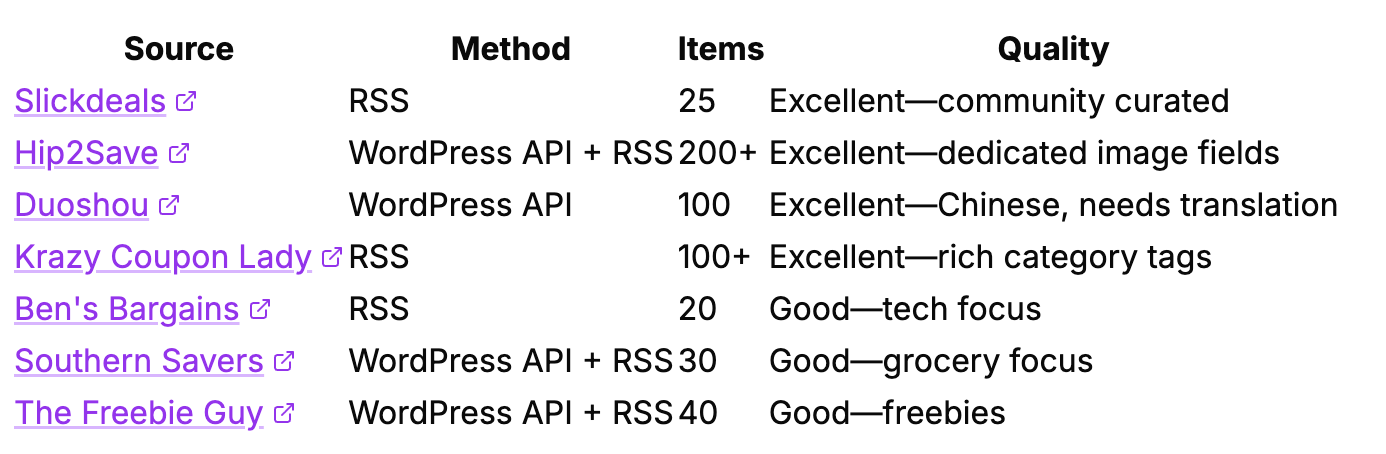
Most of these run on WordPress and expose their content through RSS feeds or REST APIs. Hip2Save’s WordPress API returns structured JSON with titles, prices, images, and categories. Slickdeals has an RSS feed with 25 curated deals, including their famous “thumb score” ratings.
This was the goldmine I was looking for.
2. Cashback Platforms
Rakuten, TopCashback, and Ibotta negotiate commission splits with retailers—getting 5-15% on purchases—and share a portion with users. For builders, these are essentially closed ecosystems. No public APIs, no RSS feeds.
They guard their retailer relationships carefully.
3. Coupon Extensions
Sites like Honey (owned by PayPal) and RetailMeNot auto-apply coupon codes at checkout. These sites are increasingly hostile to scrapers. RetailMeNot has extensive anti-bot measures. Honey is facing class-action lawsuits over affiliate commission attribution—allegedly replacing creators’ tracking tags with its own.
The browser extension model seems to be hitting some turbulence.
4. Price Trackers
Such as CamelCamelCamel and Keepa focus specifically on Amazon price history. CamelCamelCamel is free but now has Cloudflare protection on its RSS feeds. Keepa has a paid API starting at €19/month.
These are complementary to deal aggregators, not competitors—they track prices over time; aggregators find current deals.
What Actually Works (And What’s Blocked)
Here’s the practical breakdown for anyone thinking about building in this space:
Working Sources (7 RSS feeds + 5 WordPress APIs)
Blocked or Inaccessible (6 sites)
RetailMeNot: Extensive anti-bot measures, legal warnings in robots.txt
Honey: No public data access, anti-bot measures
Brad’s Deals: No feeds, extensive blocking rules
Dealnews: RSS endpoint returns JavaScript instead of XML
CamelCamelCamel: RSS feeds protected by Cloudflare
Dealmoon: Explicitly blocks AI crawlers in robots.txt, no public API
The takeaway: Plenty of high-quality sources are open and accessible. You don’t need to scrape protected sites. The deal blogs want you to access their data, it drives affiliate revenue for them.
Building the App: Key Decisions and Challenges
With the ecosystem mapped, building the actual app became straightforward. Below is what mattered most:
Multi-Source Aggregation
I pull deals from 6 sources simultaneously: Hip2Save, Southern Savers, The Freebie Guy, Ben’s Bargains, Slickdeals, and Duoshou. Each source has different strengths. Together, they cover Amazon, Target, Walmart, Macy’s, Costco, and dozens of other retailers.
The Deduplication Problem
Same Amazon product. Posted by Slickdeals at 2pm. Posted by Hip2Save at 2:30pm. Posted by Duoshou at 3pm. Three different sources, three different external IDs, but the same $15.99 Tide pods.
The solution: ASIN-based deduplication. Every Amazon URL contains a 10-character product identifier. I extract it, store it, and before saving any Amazon deal, check if we’ve seen that ASIN in the last 48 hours. Same product from different sources? Skip it. Same product in a new sale cycle two weeks later? Let it through.
Translation Challenges
Duoshou posts deals in Chinese. My app needed English. I built a translation layer that converts Chinese product descriptions while preserving the important parts: prices, coupon codes, store names. The price pattern 【折后$XX.XX】 becomes the deal’s actual price.
Timezone Handling
Different sources report timestamps in different timezones. Some sites use Pacific time but doesn’t include timezone info in their API responses. A deal posted at 3:49 PM PST was showing up as 7:49 AM in my dashboard, an 8-hour difference.
Fix: Parse timestamps as Pacific time when they come from sources that don’t specify.
The Result
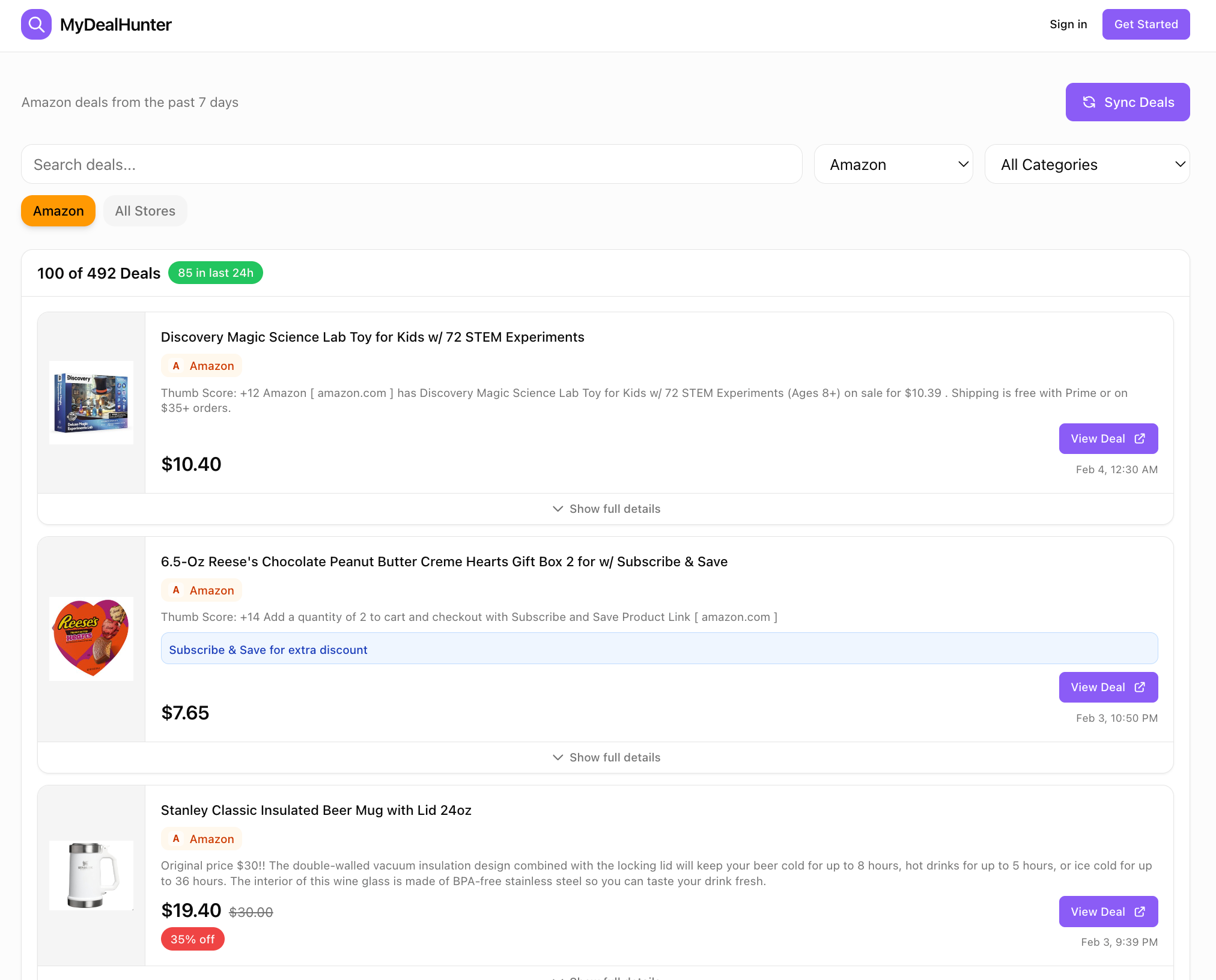
A clean dashboard at dealist.space where I can:
See all deals in one place, sorted by newest
Filter by store (Amazon, Target, Walmart, etc.)
See coupon codes right on the card—no clicking required
Tap once to go directly to the purchase page
Browse and discover rather than just wait for alerts
The app is free for everyone to use. There’s a login option, but that’s mainly for my own experiments with personalization, you don’t need an account to browse deals. If you try it and have feedback, I’d love to hear it.
What This Taught Me
After researching 16 sites and building this app, a few things stood out:
RSS feeds still work. I expected to need complex scraping, browser automation, maybe even proxy rotation. Nope. Good old RSS feeds, a technology from 1999, power most of my data collection. The deal world hasn’t moved on because RSS works perfectly fine.
WordPress APIs are everywhere. Deal blogs love WordPress. And WordPress exposes a REST API by default. This is why Hip2Save, Southern Savers, and The Freebie Guy are all trivially easy to access, they’re running the same CMS with the same API structure.
The Honey scandal is a warning. PayPal paid $4 billion for Honey in 2020. By 2024, they’re facing class-action lawsuits over how the extension handles affiliate commission attribution. The browser extension model, inserting yourself between shoppers and checkout, creates complex incentive problems.
Human curation still matters. Ben’s Bargains proudly advertises “100% human-sourced.” Slickdeals has a community voting system that surfaces the best deals. Even in an age of AI, human judgment remains valuable, deciding “Is this actually a good deal?” is something algorithms still struggle with.
Anti-bot measures are increasing. Sites like RetailMeNot have extensive blocking rules. But here’s the thing, plenty of other sites are wide open. You don’t need to fight the ones that don’t want you. Build with the ones that do.
The research was validation, not just preparation. If I’d found exactly what I needed, I wouldn’t have to build. If data access was locked down, it wouldn’t be worth the effort. Instead: 7 open sources, nearly no English-language solution, clear gap. Even if only my family uses it, saving myself time every week is worth it.
Apply This to Your Next Project
Here’s what you can take from this and use immediately:
The AI Research Stack
Perplexity → Industry facts and business models (cited sources you can verify)
Notion AI → Structured database to organize findings
Claude Code → Parallel agents to test technical access at scale
This combination lets you research any ecosystem in under 2 hours instead of 2 weeks.
The Data Access Hierarchy
When evaluating sites for aggregation, check in this order:
RSS feeds — Try
domain.com/feed/ordomain.com/rss/. If it works, you’re done.WordPress API — Try
domain.com/wp-json/wp/v2/posts. Many blogs expose this by default.robots.txt — Check
domain.com/robots.txtfor explicit blocks. If you see extensive Disallow rules or legal warnings, move on.Skip hostile sites — Don’t waste time on Cloudflare-protected or anti-bot sites. Plenty of others welcome your traffic.
Your 30-Minute Action Plan
If you want to build an aggregator in any niche:
List 10-15 pronounced sites in your target space (with the help of Perplexity)
Set up a Notion database with fields: Site, RSS URL, API Access, Business Model, Data Quality
Launch 3-5 Claude Code agents to test technical access in parallel
Start with the 3-4 best sources — you don’t need all of them to ship something useful
Try It: Deal-Finding Edition
dealist.space — The app I built using this exact process. Free to use.
To be fully transparent: The deal links for Amazon include my affiliate tags. Prices stay exactly the same for you, but I get a small commission if you purchase through them. I figured if my husband and family are already using it to get deals, I might as well earn a few cents along the way.
Get the Complete Research Kit
Want to skip the setup and start researching immediately? I’ve packaged everything:
Notion Database Template — The exact schema with copy-paste prompts
Perplexity Prompt Library — 15+ prompts for business model and technical research
Claude Code Parallel Agent Prompts — Launch 9 agents simultaneously
Complete Research Results — All 16 sites with technical access ratings
Get the App Idea Validation Kit → — Use limited-time code FBV1Q61 to claim your free validation kit.
Next Steps
Beginner: Try the AI Research Stack on one idea
Pick a niche you’re curious about. Use Perplexity to list 10 sites, then check 3 of them for RSS feeds by visiting domain.com/feed/. You’ll know within 15 minutes if data is accessible.
Intermediate: Build a single-source aggregator
Pick the best source from your research and build a simple app that pulls its RSS feed and displays the results. One source, one page, one afternoon. This is how dealist.space started.
Advanced: Grab the complete research kit
Want to skip the setup? I’ve packaged the exact Notion template, 15+ Perplexity prompts, Claude Code parallel agent prompts, and complete research results for all 16 sites. Get the App Idea Validation Kit and start your building journey.
To be fully transparent: The deal links on dealist.space for Amazon include my affiliate tags. Prices stay exactly the same for you, but I get a small commission if you purchase through them.
If this research framework saves you from building the wrong thing, share it with a builder friend who’s about to start a project.
If you’re turning your expertise into products, building with AI, or helping others do the same, you belong here. Join the vibe coding builders community and get featured on Build to Launch Friday.
What’s the niche you’d research first if you had 70 minutes and 9 parallel AI agents?
— Jenny
Why Subscribe · Build With AI · Templates · Builder Showcase
Yes, human judgement will always and always be there. Great write up! Thanks, Jenny!
Smart move here...Jenny.