
15 Best Claude Code Prompts That Earn Me 30 Hours a Week
Every prompt shows how much time it earns back. Copy-paste the ones worth your time.

Most “best Claude Code prompts” lists give you 50 developer templates organized by task. These 15 are organized by what you’re actually doing: writing, research, coding, systems… with before/after time comparisons for each one. 30+ hours earned back per week, built from 55 production slash commands running daily.

How many “best AI prompts” lists have you bookmarked? At least one. Probably three.
I have way too many. Browser tabs, local repos, Notion pages… everywhere. I created hundreds and shared dozens to paid members, clients, coworkers, friends, family.
Some of them came back:
Too many prompts. It’s overwhelming. I’m losing track of what to use.
They’re all good but I don’t know which one to reach for.
Fair. I was overwhelmed too. So I went deeper, learned the core principles underneath, shared the methodology. I thought that would fix it.
Different questions started coming back:
What prompt did you actually use for that?
Why am I not getting the same output?
I’m tired of having conversations with AI that bring up more problems than I have the bandwidth to resolve.
Not which prompt should I use. But this whole process is exhausting.
That made me I realize, the best prompt isn’t the cleverest one. It’s the one that earns you time back, so quietly you stop noticing it’s running.
So I stopped sharing more prompts and started tracking the ones I actually reach for every day. 15 of them. Across writing, research, coding, and systems. I’m surprised at how much time each one earns back. And especially when Claude Code already has your context: your articles, your codebase, your files; the process can’t be smoother.
Full-time job. Two toddlers. Maybe 4 hours a day for everything else — and I’m building products, running a newsletter, taking on clients. That math only works if something is doing the heavy lifting.
Here’s every prompt and what it earns me per week:
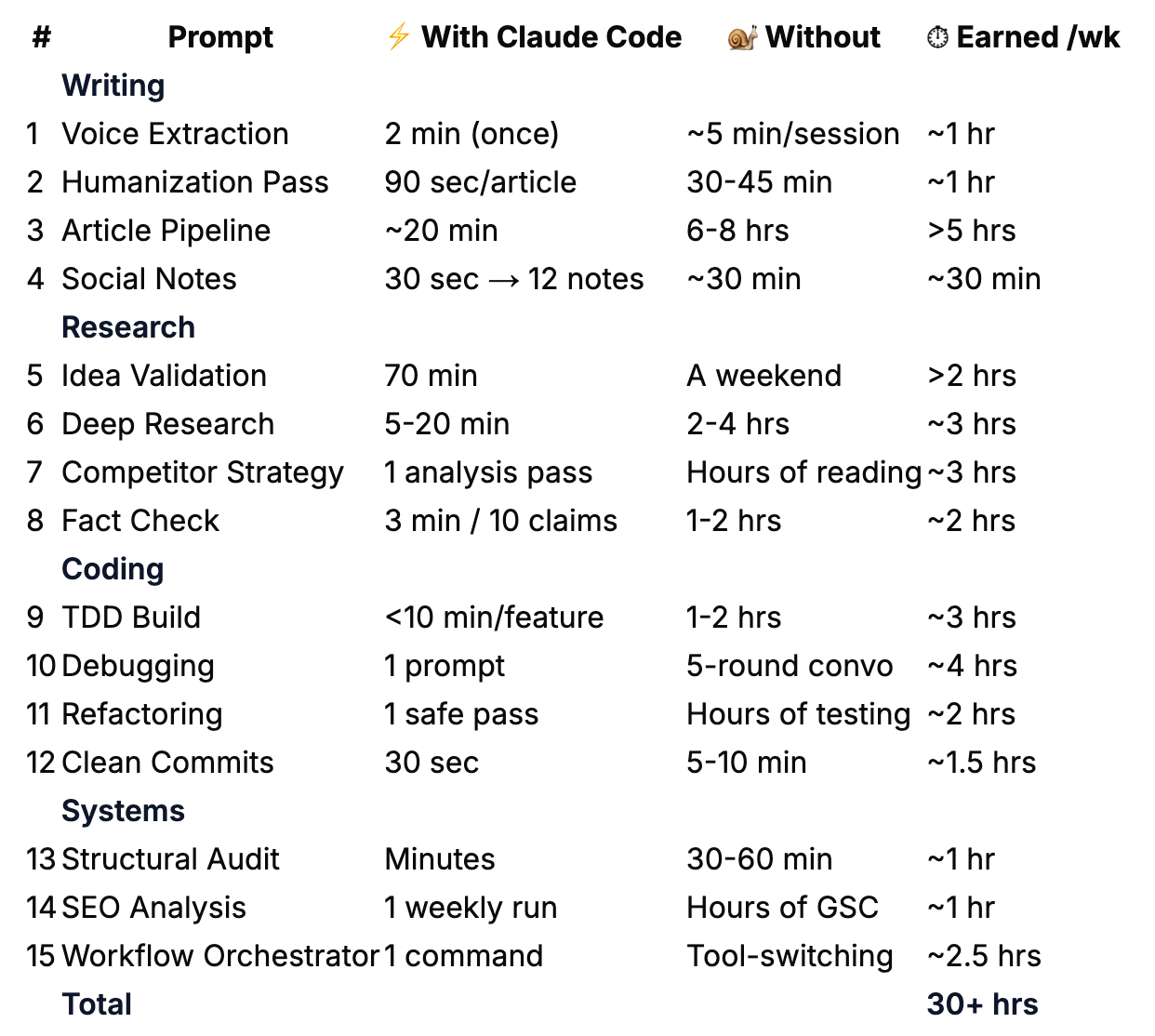
These prompts are optimized for Claude Code, but with enough context, any AI can use them. Use these as anchors. Modify them. Make them yours. The best Claude Code prompt is the one you build from an example and never have to look up again.
What you’ll go through with me:
Writing Prompts (4): voice extraction, article pipelines, humanizing, and repurposing
Research Prompts (4): idea validation, deep research, competitive strategy, and fact verification
Coding Prompts (4): building features, debugging, refactoring, and clean commits
Systems and Orchestration Prompts (3): structural auditing, search analysis, and workflow automation
The Prompt Progression: from copy-paste to slash commands to MCP-connected systems
🎁 Towards the end, you’ll get all 15 prompts, the slash command table, the prompt progression framework, and access to the full 241-prompt kits across writing, research, and coding.
Hi, I’m Jenny 👋
I teach non-technical people how to vibe code complete products and launch successfully. AI builder behind VibeCoding.Builders and other products with hundreds of paying customers. See all my launches →.
In this series, I’m opening up the prompt collections, tools, and systems I’ve built up over time. The ones I use daily but have never walked through publicly. There’s a gap between what I run behind the scenes and what I’ve shared so far. This series closes it.
If you’re new to Build to Launch, welcome! Here’s what you might enjoy:

Writing Prompts
Most people underestimate this workflow. Four prompts covering the full content creation cycle: voice extraction, AI drift detection, article pipelines, and cross-platform repurposing.
Prompt 1: Voice Extraction — Make AI Learn How You Write
⏱ ~1 hr/week — runs once, saves re-describing your voice every session
The prompt:
Read the articles in [Your Vault], pick the 5 most
recent or most engaged. They're all by the same author (me).
Analyze them and produce a Voice Card as a reusable style profile
to add to my CLAUDE.md under a "## Writing Voice" section.
Cover these 6 layers, from most visible to invisible. The questions
are examples of what to look for, not a checklist, follow whatever
patterns actually stand out.
1. STRUCTURE: How I organize a piece. Front-load value or build
to it? How I open and close? Headers, lists, blockquotes,
what tools do I reach for?
2. SENTENCE PATTERNS: Rhythm and construction. Average length,
variation, fragments. Where the punch lands. How I handle
complex ideas, break them up or let them flow?
3. VOCABULARY FINGERPRINT: Signature words and phrases I lean on.
Words conspicuously absent. Register choices ("use" vs "utilize,"
"but" vs "however") that reveal formality and personality.
4. TONE: Directness level, warmth-to-authority ratio, how I handle
disagreement, where humor shows up, how I address the reader.
5. PHILOSOPHY & EMOTIONAL ANCHORS: Beliefs that recur across
pieces. What values drive my topic selection. What emotion I
consistently try to create in the reader. This is what makes
two writers with identical mechanics feel completely different.
6. WHAT I AVOID: The negative space, patterns, words, structures,
and angles conspicuously absent from my writing. This defines
a voice as much as what's present.
Format the Voice Card as markdown I can drop directly into CLAUDE.md.
Then list 3 sentences from the samples that are most "me", the
lines where my voice comes through strongest. Explain why.
Why it works:
Captures why you write (philosophy, emotional anchors, negative space), not just mechanics. Two writers can have identical sentence patterns and feel completely different.
Runs once, works forever. Analyzes 5 articles in under 2 minutes, saves to
CLAUDE.md. Every future session starts with your voice loaded.
When to use it:
Once, at workspace setup. Update every 6 months. I caught AI-induced drift in my own writing workflow this way: longer sentences and smoothed-out edges I genuinely liked.
What makes it different:
Portable artifact, not session-bound. Pasting samples into ChatGPT trains one conversation. The Voice Card persists across every session and project.
Prompt 2: Voice-Checked Humanization Pass
⏱ ~1 hr/week — 90 seconds per article vs. 30-45 min of manual AI-pattern hunting
The prompt:
Read the Voice Card in my CLAUDE.md (under “## Writing Voice”).
Then read the draft at [Your Vault]/[article].md.Run these 7 checks against both the Voice Card and the draft:
VOICE DRIFT CHECK: Compare the draft’s sentence patterns, rhythm,
and tone against the Voice Card. Flag any sections where the writing
drifted from my documented style. Be specific — quote the drifted
sentence and explain what my Voice Card says I’d actually write.EVALUATE INTENSIFIERS: For each “actually,” “truly,” “genuinely,”
“just,” “really” — apply the 3-second test. Read with the word,
then without. Did you lose punch or contrast? If yes, keep. If no,
cut. Example: “What actually works” keeps it (implies most advice
doesn’t). “I actually think” loses it (filler).EM-DASH DISCIPLINE: Limit to 2-3 per article max. For each em-dash,
try a period first (works 80% of the time). “You’re not building
an app — you’re encoding how you think” becomes “You’re not building
an app. You’re encoding how you think.”KILL FORMULAIC CONTRASTS: “It’s not X, it’s Y” gets rewritten
every time. That pattern is the fingerprint of AI writing.REMOVE AI VOCABULARY + PATTERNS: delve, embark, craft, realm,
game-changer, unlock, tapestry, pivotal, harness, landscape,
ever-evolving. Also cut: “Here’s the thing...” “It’s worth noting
that” “In conclusion” “Moreover” “Furthermore”ADD SPECIFICITY: “hundreds” → “300+”, “takes some time” → “20 hours”,
“really cheap” → “$0.03 per query”. Name every vague “something,”
“in a different way,” or “things started to change.”PUBLISHED COMPARISON: Read my 3 most recent articles in
[Your Vault]/. Find one sentence in the draft that sounds
least like something I’d publish, and one that sounds most like me.
Explain why.For each change, note what was changed and why.
Flag any words you evaluated and chose to KEEP (with reasoning).
Apply all fixes directly to the draft file.
Why it works:
Checks against two sources of truth: your Voice Card and your published articles. Not a vague “make it more human.”
Catches drift you can’t see yourself. The slow creep of longer sentences and smoothed-out edges from weeks of writing with AI.
When to use it:
Last step before publishing. ~90 seconds per article, catches 8-12 changes I wouldn’t spot manually.
What makes it different:
Targets the two most reliable AI fingerprints: em-dashes (lazy rhythm) and “It’s not X, it’s Y” contrasts (AI produces 10x more than humans). Edits the file in place. No copy-pasting.
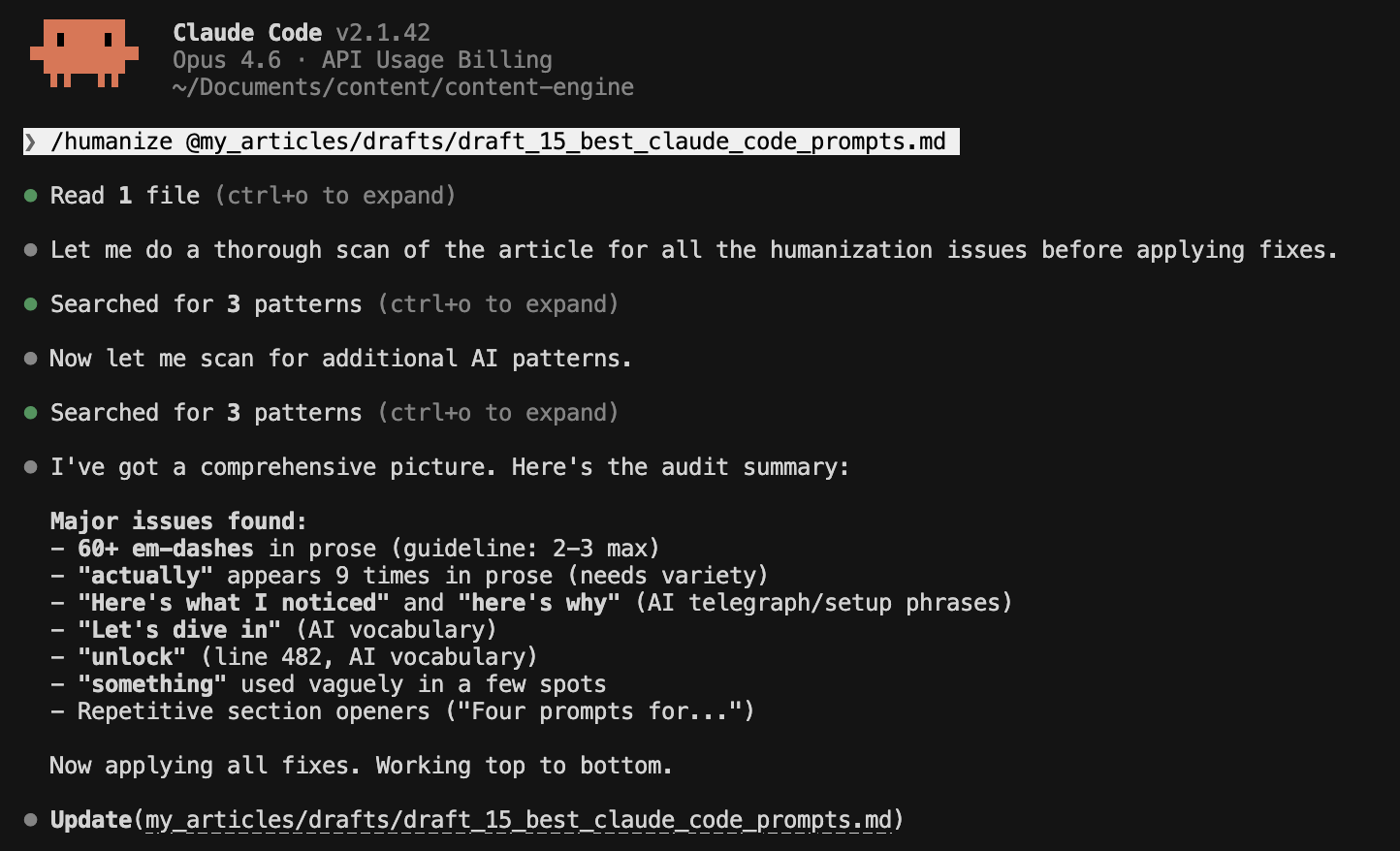
This is my last-mile editing step. I run it as part of a 3-4 prompt sequence before publishing. The full pre-publish pass includes a grammar-and-tense fixer, a line editor for clarity, and a formatting check.
Prompt 3: Draft to Published — The Full Article Pipeline
⏱ >5 hrs/week — 20-min re-runs vs. 6-8 hours juggling phases manually
The prompt:
Run the complete article pipeline for [article folder]:
Phase 1: Check status — what exists, what’s missing
Phase 2: Create draft using the pillar article template
Phase 3: Generate hero image prompt + alt text
Phase 4: Run full audit chain (structure → sections → polish)
Phase 5: Add internal backlinks at philosophy moments
Phase 6: Generate title, subtitle, URL slug, meta description
Phase 7: Pre-publish checklistSkip any phase that’s already complete.
Pause after Phase 6 for my review before the final checklist.
Why it works:
Sequenced workflow with skip logic. Picks up where you left off. Run it mid-process and it skips completed phases.
Built-in review gate before the final checklist.
When to use it:
Every content cycle. First run: 2-3 hours. Re-runs: ~20 minutes. I run this for every Wednesday article.
What makes it different:
7 phases in one context window. “Skip what’s done” makes it a system, not a checklist.
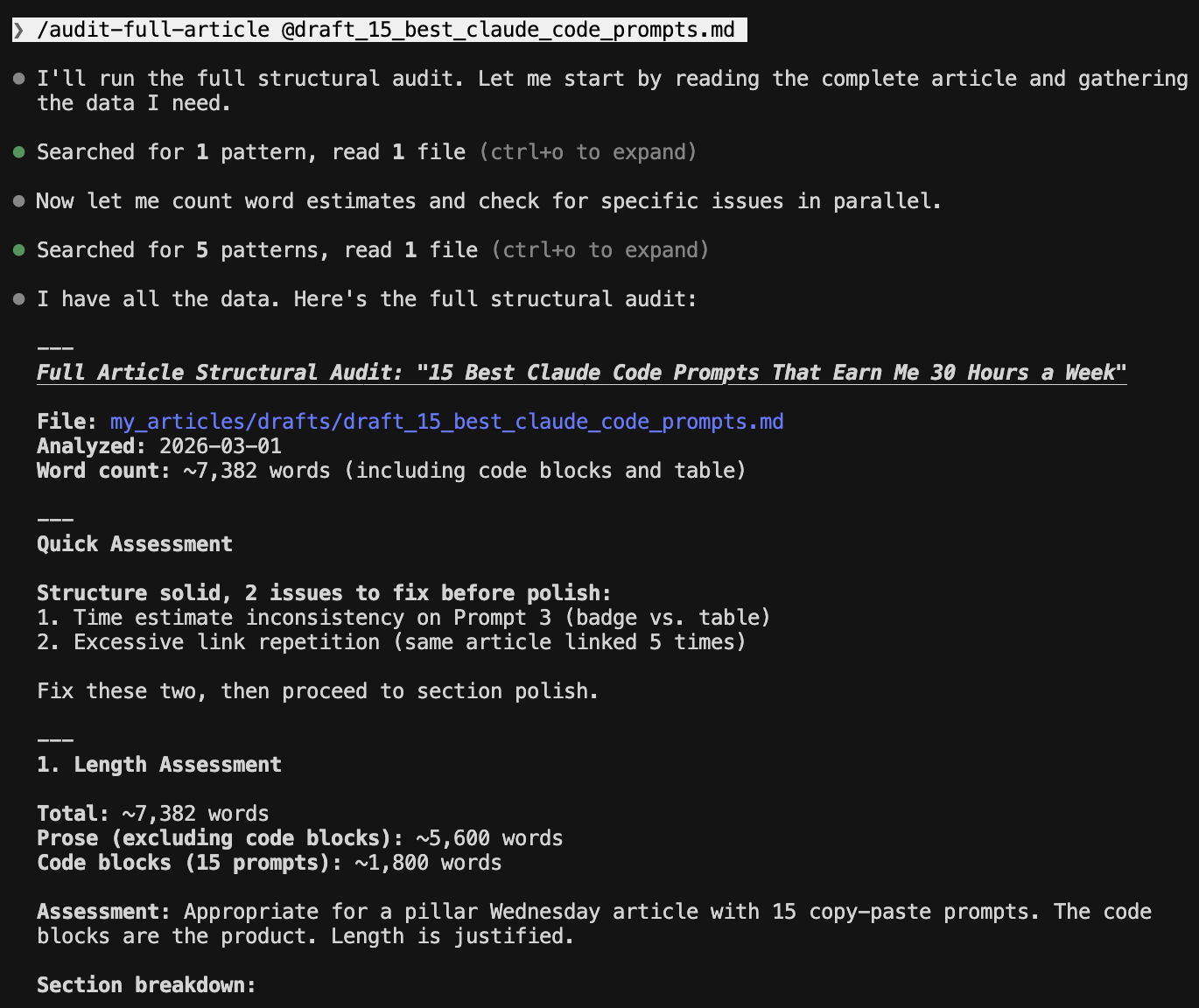
I encode this as /audit-full-article. One command that routes to 7 sub-workflows. The full orchestrator handles 10+ phases including post-publish distribution.
Prompt 4: Turn One Article Into a Dozen Social Posts
⏱ ~30 min/week — 12 notes in 30 seconds vs. writing each one from scratch
The prompt:
Generate 10-12 social media notes from this article.
Distribution (adjust these percentages to match your content style):
[X]% thought-provoking (pattern reveals, mindset shifts, contrarian takes)
[Y]% educational (system breakdowns, honest metrics, tool comparisons)
[Z]% personal (building journey moments, vulnerable shares)
THE FIRST LINE OF EVERY NOTE MUST STOP THE SCROLL. Open with a
hook pattern like:
“Stop [bad habit].”
“Most people will never [desirable outcome].”
“I [stopped/started] [specific thing].”
(I have a full library of 40+ hook templates with engagement data
— link at the end of this article.)For each note:
Assert, don’t hedge. “This works” not “this might help.”
Short sentences (15 words max)
Specific numbers, not vague (”300+” not “hundreds”)
One quotable line per note (screenshot-worthy)
Under 80 words total
Use the debate method for thought-provoking notes:
Identify a tension in the article (e.g., “building fast vs. building right”)
Argue both sides (2-3 points each)
Synthesize into a nuanced insight
Write the note from that synthesis
Why it works:
Not Claude Code-specific, and that’s the point. Distribution ratio prevents all-educational (textbook) or all-personal (no value) output.
The debate method (argue both sides of a tension, then synthesize) produces original notes, not summaries. (Full system in The Viral Substack Notes Creation System.)
When to use it:
After publishing. 12 notes in about 30 seconds. That’s 2-3 weeks of content from one article. Works in Claude Code, ChatGPT, or both.
What makes it different:
The debate methodology. “Find tensions, argue both sides, synthesize.” I haven’t found this in other repurposing prompts.
If any of these prompts saved you from typing the same instructions again, share this with someone who’s still copy-pasting from browser tabs.
Those are the 4 writing prompts I reach for most. Next: research prompts for validating ideas and verifying claims before you launch.
Research Prompts
Validating ideas, deep research, competitor strategy, and fact verification.
Four prompts for the work you do before you publish.
Prompt 5: “Should I Build This?” — Idea Validation Research
⏱ ~2 hrs/week — 70-min validated decision vs. a weekend of tab-hopping
The prompt:
I want to build [product/tool/app description] in [niche/space].
Before I invest time building, run a full validation. I need to
know three things: does something like this already exist, is it
technically feasible, and is the gap real?PHASE 1 — MAP THE LANDSCAPE (use web search):
Find 10-15 existing solutions in this space. For each one, create
a row in a comparison table:
Name + URL
What it does (one sentence)
Business model (free / freemium / subscription / affiliate / ads)
Target audience
Biggest limitation or complaint (check reviews, Reddit, forums)
After the table, answer: What’s the GAP? What do none of these
do well, or at all?PHASE 2 — TEST TECHNICAL FEASIBILITY:
For each data source or API my product would need, test access
in this order:
RSS feeds — try domain.com/feed/ and domain.com/rss/
Public API — try domain.com/wp-json/wp/v2/posts (WordPress)
or check for documented APIsrobots.txt — check domain.com/robots.txt for explicit blocks
Terms of service — any restrictions on data use?
Classify each: ✅ Open access, ⚠️ Limited/rate-limited, ❌ Blocked
If data access isn’t relevant (e.g., not an aggregator), skip
this phase and note why.PHASE 3 — DEMAND SIGNALS:
Look for evidence that people actually want this:
Reddit threads, forum posts, or tweets asking for it
Competitor products with strong engagement or reviews
Adjacent products people are misusing to fill this gap
Search volume signals (if you can estimate)
PHASE 4 — BUILD / DON’T BUILD VERDICT:
Based on phases 1-3, give me:
A clear recommendation: build, don’t build, or build differently
The minimum viable version (what’s the smallest thing I could
ship to test demand?)The biggest risk (technical, market, or competition)
What I’d need to validate next with real users
Why it works:
Three outcomes, all useful: already exists (don’t build), data locked down (not worth it), or real gap (green light).
I validated my own product this way: 16 sites, 7 usable data sources, build decision in 70 minutes.
When to use it:
Before starting any new product or side project. Cheaper than a weekend building something nobody wants.
What makes it different:
Phase 3 (demand signals) separates “gap exists” from “people want it filled.” Forces a concrete verdict, not a research dump.
Prompt 6: Deep Research With Live Sources
⏱ ~3 hrs/week — 5-20 min vs. 2-4 hours of browser-tab research per session
The prompt:
I need to research [topic] for [purpose — article, product decision,
comparison, etc.].Here are my specific questions:
[Specific question]
[Specific question]
[Specific question]
[Specific question]
[Specific question]
Use web search for live data — don’t rely on your training data alone. For each question:
Search authoritative sources (official sites, published research,
documentation — not random blog posts)Include the source URL for every claim
Flag anything you’re uncertain about or couldn’t verify
Note where information is missing — gaps matter as much as findings
Save the complete research to [Your Vault]/[topic]_research.md
with this structure:
One markdown section per question, with sourced answers
A summary table of key findings
A “gaps and next steps” section listing what still needs
human verificationA “sources” section with all URLs for easy reference
If a research file already exists for this topic, read it first and
build on what’s there instead of starting over.
Why it works:
MCP for live data + workspace for persistent output. Research accumulates across sessions instead of disappearing into chat history.
I built this for a client project. Simple research takes under 5 minutes. Thorough runs go up to 20 minutes, consolidating 100+ credible sources into one structured file.
When to use it:
Anytime you catch yourself opening 15 browser tabs. Come back days later. Context is already loaded.
What makes it different:
Reads existing research before starting. Compounds over time. “Gaps and next steps” tells you what it couldn’t find, so you know where to spend your own time.
Prompt 7: Competitor Content Strategy Reverse-Engineering
⏱ ~3 hrs/week — one analysis replaces hours of manual reading and note-taking
The prompt:
Read the last 10-15 articles from [creator/publication].
(For voice and writing style analysis, use the Voice Extraction
prompt above. This prompt is about content STRATEGY, not style.)Analyze and report:
CONTENT STRATEGY:
What topics do they cover vs avoid? Any obvious gaps?
Publishing cadence — how often, what days, any patterns?
Free vs paid split — what goes behind the paywall?
How do they sequence topics? (standalone vs series?)
MONETIZATION:
Where do CTAs appear? (beginning, mid, end, all three?)
What do they sell? (courses, templates, coaching, SaaS?)
How do they frame the paid offering — scarcity, value, community?
What’s free and what’s gated?
AUDIENCE & COMMUNITY:
Do they reference readers by name?
Do they link to or collaborate with other creators?
What’s their comment engagement pattern?
How do they build trust? (vulnerability, data, credentials?)
Then give me:
3 things to adopt (with reasoning)
3 things to ignore (with reasoning)
1 gap they’re not filling that I could
Why it works:
“3 to adopt, 3 to ignore, 1 gap” forces recommendations, not descriptions. The ignore list matters. Most creators copy everything, including what doesn’t work.
When to use it:
When entering a niche, or quarterly to recalibrate. For understanding what your audience expects, not for copying.
What makes it different:
Skips voice/style (that’s Prompt 1). Focuses on business decisions: monetization, CTA placement, content gaps.
Prompt 8: “Is This Actually True?” — Fact Verification
⏱ ~2 hrs/week — 10 claims verified in 3 minutes vs. checking each one yourself
The prompt:
Read the draft at [Your Vault]/[article].md.
Extract every factual claim — product names, feature descriptions,
pricing, dates, URLs, attributions.For each claim, use web search to verify against
this source hierarchy:
Tier 1: Official documentation (docs.company.com)
Tier 2: Official blog/announcement (company.com/blog)
Tier 3: Official help center (help.company.com)
Tier 4: Reputable press (TechCrunch, The Verge, Reuters)Verify five things per claim:
It exists (is this a real thing?)
The name is correct (official name, not a blogger’s shorthand?)
Attribution is correct (right company/person?)
Description is accurate (does official source match my wording?)
Any linked URL actually works
Red flags to watch for:
Deprecated features (ChatGPT “plugins” → now “actions”)
Features attributed to wrong product
Marketing language vs actual feature names
Date/version mismatches (announced 2025, you wrote 2026)
Pricing that changed since you last checked
Save the verification report to
[Your Vault]/[article]_verification.md with:
✅ Verified — [claim] — [source URL]
⚠️ Partially correct — [what’s wrong] — [correction] — [source]
❌ Incorrect — [what’s wrong] — [correction] — [source]
🔍 Unverifiable — [claim] — [why it couldn’t be confirmed]Then go back to the original draft and fix any ⚠️ or ❌ items
directly. Leave a comment next to each fix so I can review.
Why it works:
4-tier source hierarchy specifies where to look and in what order. Not “verify this.” Five checkpoints catch unofficial names, wrong attributions, misassigned features.
Reads draft and verifies against live sources in a single pass. No copy-pasting into a chat window.
When to use it:
Before publishing anything referencing tools, features, or pricing. Checks 10 claims in under 3 minutes. Factual accuracy also matters for AI discoverability. AI engines won’t cite content they can’t verify.
What makes it different:
One run: reads draft → verifies → fixes → saves report. Red flags section catches deprecation, the #1 source of tech content errors.
That’s 8 prompts across writing and research, the two workflows everyone needs. The research prompts already showed you what it looks like when Claude Code works across your files, your sources, and your codebase as one connected workflow.
The next 7 go further. Coding prompts and system prompts that chain everything together:
Code that builds and tests itself — no back-and-forth
Debugging that reads the error, traces the source, and fixes in place
Refactoring that won’t break what’s already working
Clean commits with an approval gate before anything ships
A structural audit that checks any draft against your own template
SEO analysis that tracks your search position over time
One command that orchestrates your entire workflow end to end
Plus the Prompt Progression Framework: how to turn any of these into a permanent slash command you never type again.
Coding Prompts
The complete coding cycle: build features, fix what breaks, improve without breaking, and ship clean commits.
Prompt 9: Build Features That Work the First Time
⏱ ~3 hrs/week — feature built and tested in <10 min vs. 1-2 hour manual cycles
The prompt: