
Claude Skills: What They Are, How They Actually Work, and How They Compare to GPTs and Gems
The four types most articles skip, the one mechanic that explains everything, and a 10-dimension comparison with ChatGPT GPTs and Gemini Gems.

Claude Skills are Anthropic’s answer to ChatGPT GPTs and Gemini Gems — saved workflows that load into Claude automatically, without re-explaining your process every session. Most explanations stop at the feature description. This one goes further: the four types most people don’t know about, the description field mechanic that determines whether a Skill ever actually runs, what the comparison with GPTs and Gems looks like across 10 real dimensions, and what 6 months running 30+ Skills daily taught me that the official docs don’t cover.

You’ve heard about Claude Skills. Maybe you’ve seen someone in a forum talking about it. Maybe you saw the announcement and thought “OK, so it’s like ChatGPT’s custom GPTs” — and moved on.
That’s fair. On the surface, the description sounds identical: save a custom AI workflow so you don’t have to re-explain it every session. ChatGPT has GPTs. Gemini has Gems. Now Claude has Skills.
But the mental model is wrong, and it leads people to underuse them.
The key difference isn’t what they do — it’s how they work. A GPT is a separate place you navigate to. A Skill travels with Claude into every conversation. You don’t go to it. It shows up. That shift in how the customization layer is delivered changes almost everything about how it actually gets used.
This guide covers what Claude Skills actually are, the four types most people don’t know about, how they work under the hood, how they stack up against GPTs and Gemini Gems, and whether they’re worth your time right now.
Hi, I’m Jenny 👋
I build AI systems and tools, then document exactly how I did it. I run the Practical AI Builder program — for people who already use AI and want to build real things with it. Check it out if that sounds like you.
If you’re new to Build to Launch, welcome! Here’s what you might enjoy:
What’s Inside:
What Claude Skills actually are — the definition without the marketing wrapper
The four types of Skills — most people only know about one
What an actual SKILL.md looks like — the real file, annotated
How to build your first Skill — six steps, no coding required
Claude Code vs Claude.ai Skills — same format, different home
How Skills work under the hood — the progressive disclosure mechanic + why Skills fail silently
Skills vs Projects vs Prompts vs MCP — the disambiguation table the official docs don’t give you
Claude Skills vs ChatGPT GPTs vs Gemini Gems — the 10-dimension comparison
The open standard nobody talks about — why your Skills aren’t locked to Claude
Who Skills are actually for — and when to skip them
A real production Skills system — what 30+ Skills running daily actually looks like
Next steps — where to start based on where you are
Frequently asked questions — free plan, Claude Code, file limits, sharing
What Claude Skills Actually Are
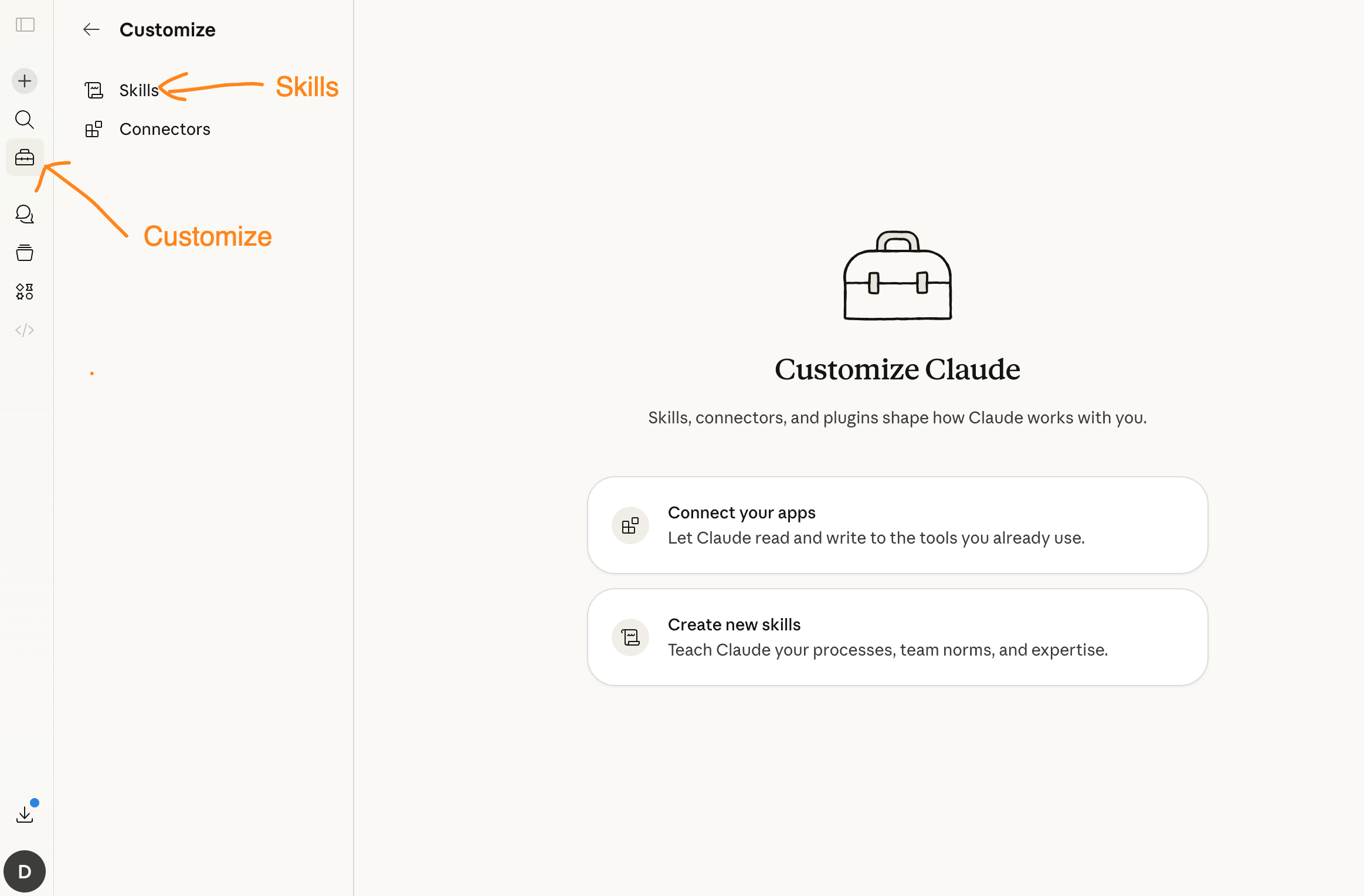
Claude Skills are folders of instructions, scripts, and resources that Claude discovers and loads when they’re relevant to what you’re doing.
The official Anthropic definition: “Skills teach Claude how to complete specific tasks in a repeatable way.”
The plain-English version: instead of re-explaining your workflow every session, you write it down once. Claude loads it automatically when the work calls for it.
The difference from a saved prompt matters. A saved prompt is something you paste in. A Skill is something Claude reaches for. You don’t trigger it — Claude decides when it’s relevant and loads it.
The analogy that makes it click
Think about how you work with a good colleague. You don’t brief them on your preferences every morning. Over time they just know: this is how you like reports formatted, this is the process for client outreach, this is the system for flagging issues. They carry that expertise into every conversation without you re-explaining it.
That’s what a Skill does. It holds expertise that Claude brings to the work automatically — including the judgment about when to apply it.
With ChatGPT GPTs, you open the GPT Store, select the custom GPT you want, and work inside that separate context. The expertise doesn’t travel with you. You travel to it.
When did Skills launch?
Anthropic launched Claude Skills on October 16, 2025. They’re available on Free, Pro, Max, Team, and Enterprise plans. One requirement: code execution must be enabled in your account settings. If you’ve never touched that setting, it’s off by default — flip it on before Skills will work.
The Four Types of Skills You Can Use Today
“Claude Skills” isn’t one thing. It’s four categories with different sources, access levels, and purposes. Most articles only mention one.
Anthropic Skills — already running, whether you know it or not
These are Skills built and maintained by Anthropic. They include enhanced document creation for Excel, Word, PowerPoint, and PDF files. Every Claude user gets them. Claude invokes them automatically when relevant — which means you may already be using Skills without having set anything up.
If you’ve ever asked Claude to help with an Excel spreadsheet and noticed it handling formulas more precisely than usual, that’s an Anthropic Skill at work.
Custom Skills — the ones you build
You create these yourself. The structure is a folder containing:
A
SKILL.mdfile with your instructions in Markdown (required)Optional scripts — Python, Bash, or other executables that Claude can run
Optional reference files that load on demand
Optional assets like templates or brand files
No coding required for simple Skills. You write instructions in plain text, upload the folder, and Claude has a new specialization.
Common things people build: brand guidelines, note-taking systems, data analysis workflows, custom report formats, email templates, meeting note structures.
Organization-provisioned Skills — the enterprise differentiator
For Team and Enterprise plans, organization Owners can push one Skill to every team member’s account instantly. No individual setup, no version drift, no “wait, are you using the updated template?”
This is the thing GPTs and Gems don’t have. When your team adopts a new procedure, one admin update propagates to everyone. Your entire team’s Claude has the same institutional knowledge loaded.
If you’re evaluating Claude vs. ChatGPT for team use, this is the decision point.
Partner Skills — professionally built, ready to install
The Skills Directory includes Skills from companies like Notion, Figma, and Atlassian. These are designed to pair with their corresponding MCP connectors — so a Notion Skill combined with a Notion connector means Claude can read your Notion workspace and format output to match your conventions, without building either from scratch.
When you want the whole package — Skill, connector, and commands bundled into one install — that’s what Claude Code Plugins do. I tested 11 of them on real work to find which are worth keeping and which overlap with things you already have.
What an Actual SKILL.md File Looks Like
Most explanations describe the format. Here’s the real file — the notes Skill that runs every time I’m drafting or scheduling a Substack note:
---
name: notes
description: Generate and schedule Substack notes using 7 formulas. Use this when drafting a note, choosing a formula for a piece of content, or planning a publishing schedule. Handles formula selection, timing, and formatting automatically — no need to specify which formula.
---

# Substack Notes Skill

## What this Skill does
Generates Substack notes using one of 7 formulas. Selects the right formula based on the content type. Makes scheduling decisions (timing, spacing, day-of-week optimization) without being asked.

## The 7 formulas
1. Insight pull — extract one non-obvious idea from a longer piece
2. Contrast pair — two things most people conflate, clearly separated
3. Before/after — what changed after building or learning something
4. Honest admission — something that didn't work, and what replaced it
5. Reader question — a question worth asking publicly
6. Number anchor — a specific stat, count, or result with context
7. Process reveal — one step of a workflow, shown concretely

## Formula selection logic
- New article published → insight pull or number anchor
- Building in public → before/after or process reveal
- Reacting to industry news → contrast pair
- Engagement needed → reader question
- Credibility moment → number anchor

## Scheduling rules
- Minimum 48 hours between notes
- Never publish on Monday (lowest open rates)
- Best windows: Tuesday 8am, Thursday 11am, Saturday 9am (ET)
- Maximum 3 notes per week
Three things about this file that most tutorials don’t cover:
The description front-loads the trigger. “Use this when drafting a note, choosing a formula, or planning a publishing schedule” — that’s the Layer 1 text Claude actually reads before deciding whether to load the Skill. If the use case isn’t in the first sentence, Claude may not load it.
The structure is parse-friendly, not readable. Headers, lists, decision trees. Claude parses structured text more reliably than narrative paragraphs. A well-written SKILL.md reads slightly robotically — that’s a feature, not a bug.
It encodes judgment, not just procedure. The formula selection logic is the part that saves real time. I used to decide which formula to use for each note. Now Claude makes that call. The Skill holds the decision framework so I don’t have to.
How to Build Your First Claude Skill
Six steps. No coding required for a basic Skill.
Step 1: Pick one workflow you re-explain to Claude more than twice a week.
That’s your first candidate. Not the most complex workflow — the most repeated one. The tone guidelines you paste every session. The report structure you correct every time. The note formula you specify each time you ask for a note. Start with one repeated task.
If you’re new to building with Claude at all, the spec-first habit that applies here — figure out what done looks like before writing a single instruction — is covered in how to start vibe coding. The principle is the same whether you’re building an app or writing a Skill.
Step 2: Create a folder named after the Skill.
Name it something Claude can match to the task: notes/, weekly-report/, brand-voice/. Inside it, one file: SKILL.md.
Step 3: Write the description first — before anything else.
This is the step most tutorials skip, and it’s the most important one. The description is what Claude reads at Layer 1 to decide whether to load the Skill at all. A vague description means the Skill never runs.
Structure it as: what this Skill does + when exactly to use it.
---
name: weekly-report
description: Format and write the weekly performance report. Use this when drafting a weekly report, summarizing metrics, or structuring results for the team. Applies the standard report template with executive summary, three data sections, and action items.
---
Step 4: Write the instructions in structured format.
Headers, numbered lists, decision trees — not paragraphs. Claude parses structured text more reliably than prose. Be specific about when each rule applies, not just what it says.
Step 5: Upload it.
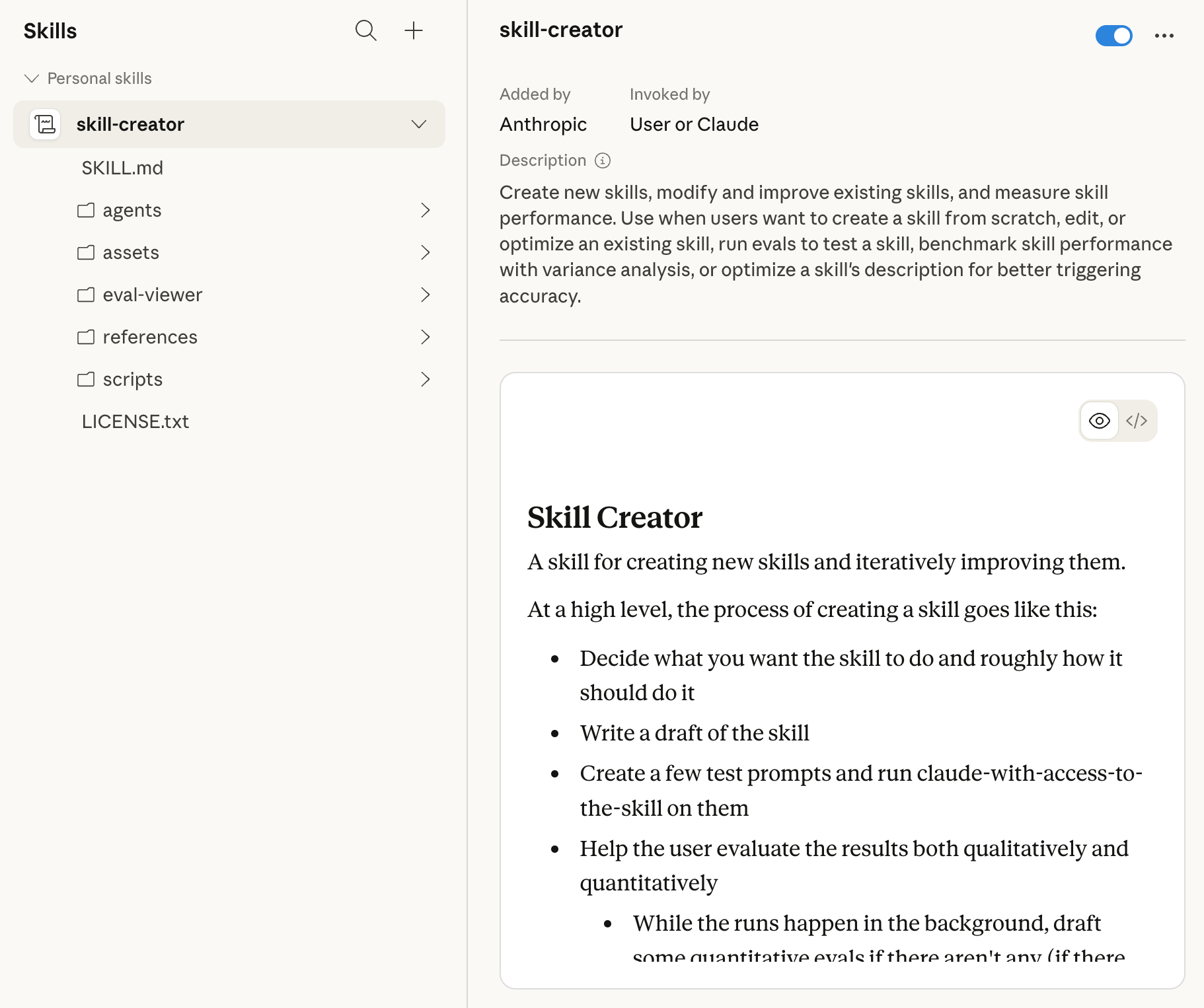
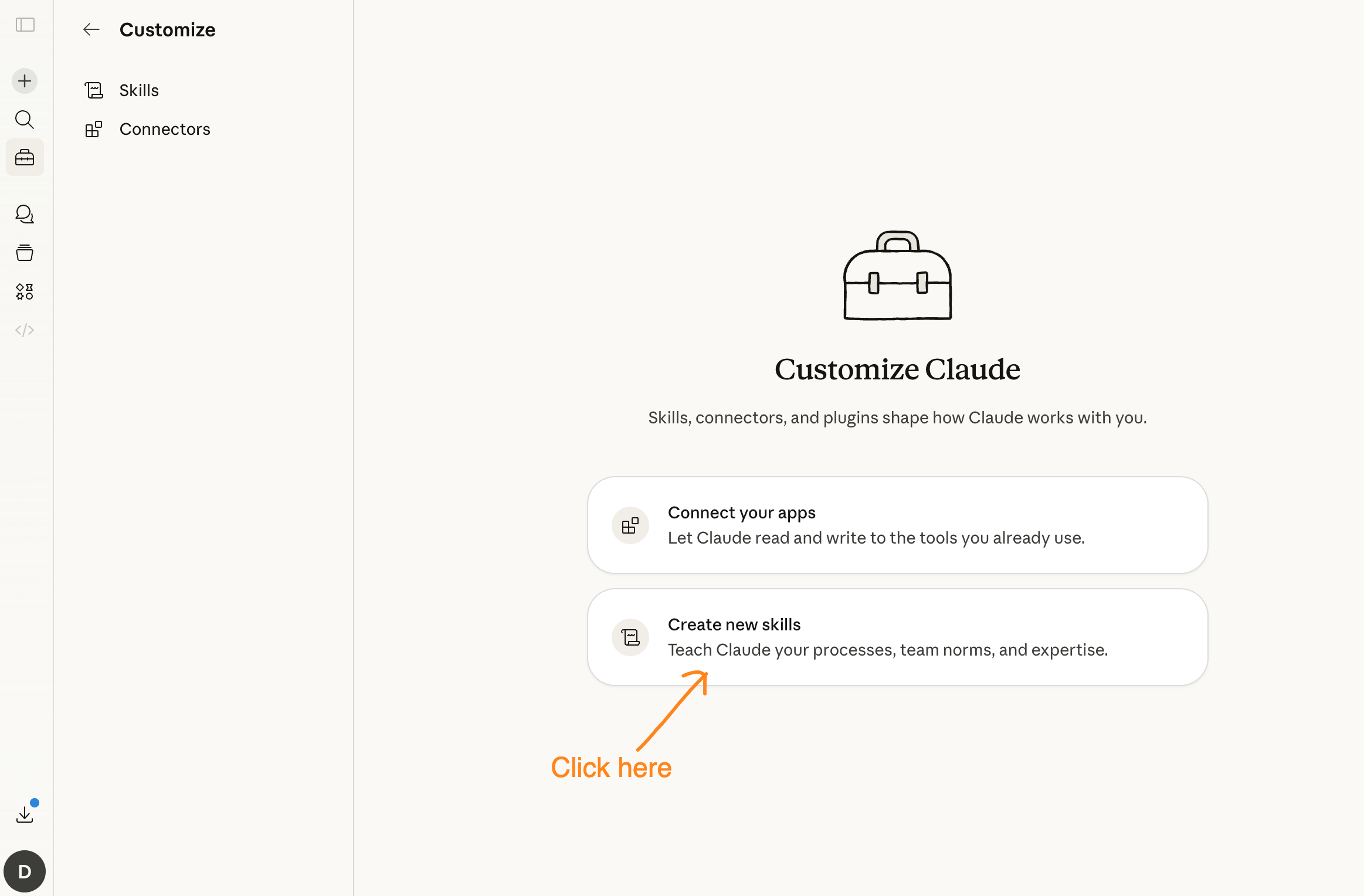
Claude.ai: Settings → Customize → Skills → Add Skill → upload your folder
Claude Code: Drop the folder into
.claude/skills/in your project repo — Claude Code finds it automatically, no upload needed
Step 6: Test with a real task, not a test prompt.
Don’t ask “do you know about my report Skill?” Give Claude the actual work: “Write this week’s report.” If the Skill loaded, the output will match your structure. If it’s generic, the description didn’t match — check the first sentence first.
Claude Code Skills vs Claude.ai Skills — Same Format, Different Home
Same SKILL.md format. Completely different delivery.
Claude.ai Skills upload through Settings → Customize → Skills. They’re available globally — every conversation, every project, everywhere you use Claude.ai.
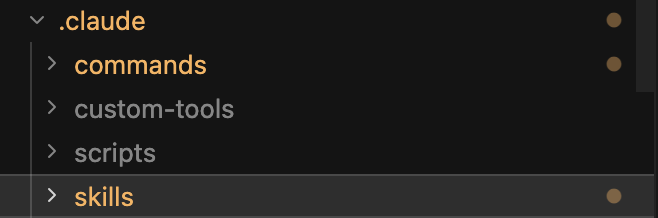
Claude Code Skills live inside your project repository at .claude/skills/. Claude Code discovers them when it reads your project. They’re scoped to that repo — your code review conventions Skill applies when Claude Code is working in that codebase, and nowhere else. (New to Claude Code? I tested it against 7 other AI coding tools on the same project — the comparison is a useful starting point for understanding what it is and when it’s the right tool.)
Claude.ai SkillsClaude Code SkillsWhere they liveAccount settings.claude/skills/ in repoScopeAll conversationsThis project onlyShared with teamOrg-provisioned (Team/Enterprise)Anyone with repo accessVersion controlNoYes — Skills live in gitBest forPersonal workflows, brand voice, content systemsCode conventions, team standards, project-specific rules
Two things worth noting about Claude Code Skills specifically:
Version control matters more than it sounds. When a Skill is in git, you can see when it changed, who changed it, and roll it back if something breaks. If a Claude.ai Skill quietly stops behaving correctly, there’s no history. If a Claude Code Skill changes behavior, git blame tells you exactly what happened.
Team sharing works differently. Claude.ai Skills push to team members through org provisioning (Team/Enterprise only). Claude Code Skills share automatically — anyone who clones the repo gets the Skills. For open-source projects, that means your Skills are public. Worth checking what’s in them before committing.
How Skills Work Under the Hood
Most AI customization systems load everything at once. Dump all your instructions into the system prompt. Hope the model reads them. Watch context get bloated.
Claude Skills use progressive disclosure instead. It’s worth understanding because it’s also the reason Skills fail silently when set up wrong.
The three-layer load sequence
Layer 1 — Metadata (~100 tokens): The Skill’s name, description, and tags are always present in context. This is how Claude knows a Skill exists and what it’s for.
Layer 2 — Instructions (<5,000 tokens): The full SKILL.md content loads when Claude determines the Skill is relevant to the current task.
Layer 3 — Reference files and scripts: These load on demand, only when Claude needs them for the specific task at hand.
The result: a system with 30 Skills doesn’t burden every conversation with 30x the instructions. Only what’s relevant loads.
The part nobody warns you about: the description field
The description field in Layer 1 is everything. Claude uses it to decide whether to load the Skill at all. If Claude can’t tell from the description that a Skill applies to what you’re doing, it never loads the instructions — your carefully written Skill is invisible.
Anthropic truncates Skill listings at roughly 250 characters. If your key use case is buried in sentence three of your description, Claude never sees it.
The lesson from running 30+ custom Skills: front-load the use case in the first sentence. If the Skill handles “Substack note scheduling with 7 formulas and publish-time optimization,” that goes in sentence one, not buried after a paragraph of background.
Why Skills fail silently — and the four patterns behind it
When a Skill doesn’t load or runs into a broken file path, there’s no error message. Claude doesn’t say “Skill not found.” It just proceeds without the Skill — producing slightly wrong output that looks mostly right.
This is what catches most people. You notice something’s off in the output. You assume Claude is being inconsistent. The real answer is usually one of four things:
Pattern 1 — Description too vague. The Skill exists, but Layer 1 (the 250-character description) doesn’t tell Claude when to use it. “Helps with writing tasks” will never trigger. “Use when drafting Substack notes, selecting a formula, or scheduling a publishing week” will. The Skill never loaded. Your output is generic. You have no idea why.
Pattern 2 — File path changed. A reference file moved, got renamed, or was deleted. Layer 3 tries to load it, gets nothing, and Claude proceeds without it. If your Skill depends on a brand voice document that lives at ./brand/voice.md and you reorganized your folder structure three months ago, that reference is broken. Claude doesn’t tell you. It just skips it.
Pattern 3 — Description overlap between Skills. Two Skills have overlapping descriptions. Claude loads one when you expected the other. The output looks close to right — wrong formula, wrong format, slightly off tone — and you spend 20 minutes wondering what changed.
Pattern 4 — Context window pressure. When a conversation gets long, Claude deprioritizes Skills to preserve context space. A Skill that loads reliably in a fresh session may not load in session hour three. If your output degrades over a long chat, this is often the cause — not inconsistency, not a broken file.
In my own system: after 6 months of accumulating Skills, one audit found 59 broken path references, 20 orphaned Skills that had never been called, and one 1,239-line legacy command still running alongside the current system with nothing flagging the conflict. The full audit process and the script that found all of it is here.
Skills vs Projects vs Prompts vs MCP — The Confusion Decoder
These four tools get conflated constantly, including in Anthropic’s own documentation. They’re not alternatives. Each solves a different problem in the same workflow.
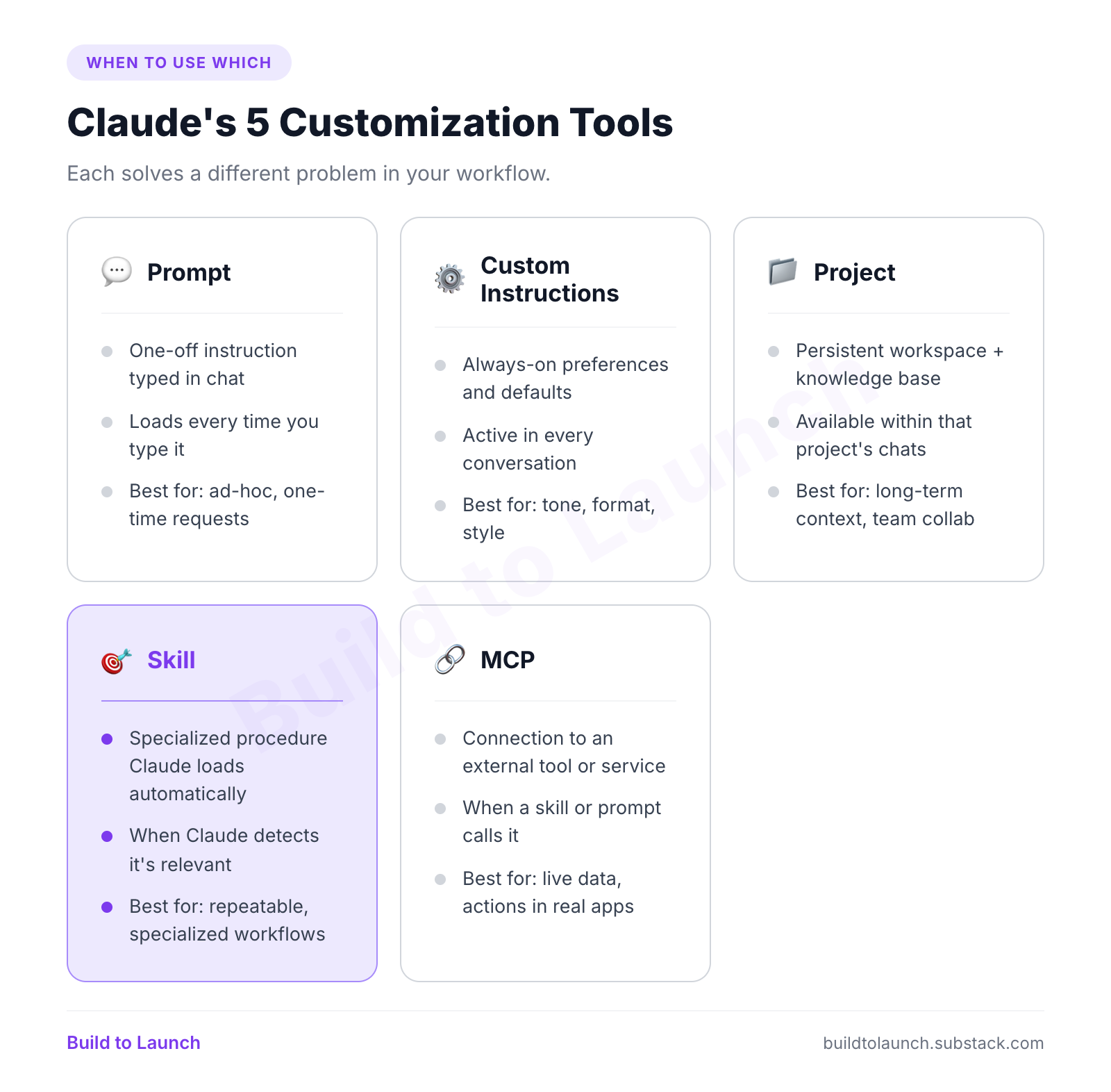
The relationship that matters most: Skills and MCP work together, not instead of each other. MCP connects Claude to external services. Skills teach Claude how to use those connections effectively. You need both if you want Claude to do something meaningful with an external tool.
Projects and Skills complement each other too. A Project holds persistent context for a specific initiative. Skills hold specialized procedures that work across all your conversations — not just within one Project. The full Claude ecosystem — chatbox, Cowork, commands, Skills, connectors, and plugins — is a stack of layers, each one removing something you’d otherwise have to do manually.
The practical rule: if you want something true in every conversation (formatting preferences, tone), use Custom Instructions. If you want Claude to handle a specific type of work with expertise — note scheduling, report generation, code review — use a Skill.
Claude Skills vs ChatGPT GPTs vs Gemini Gems
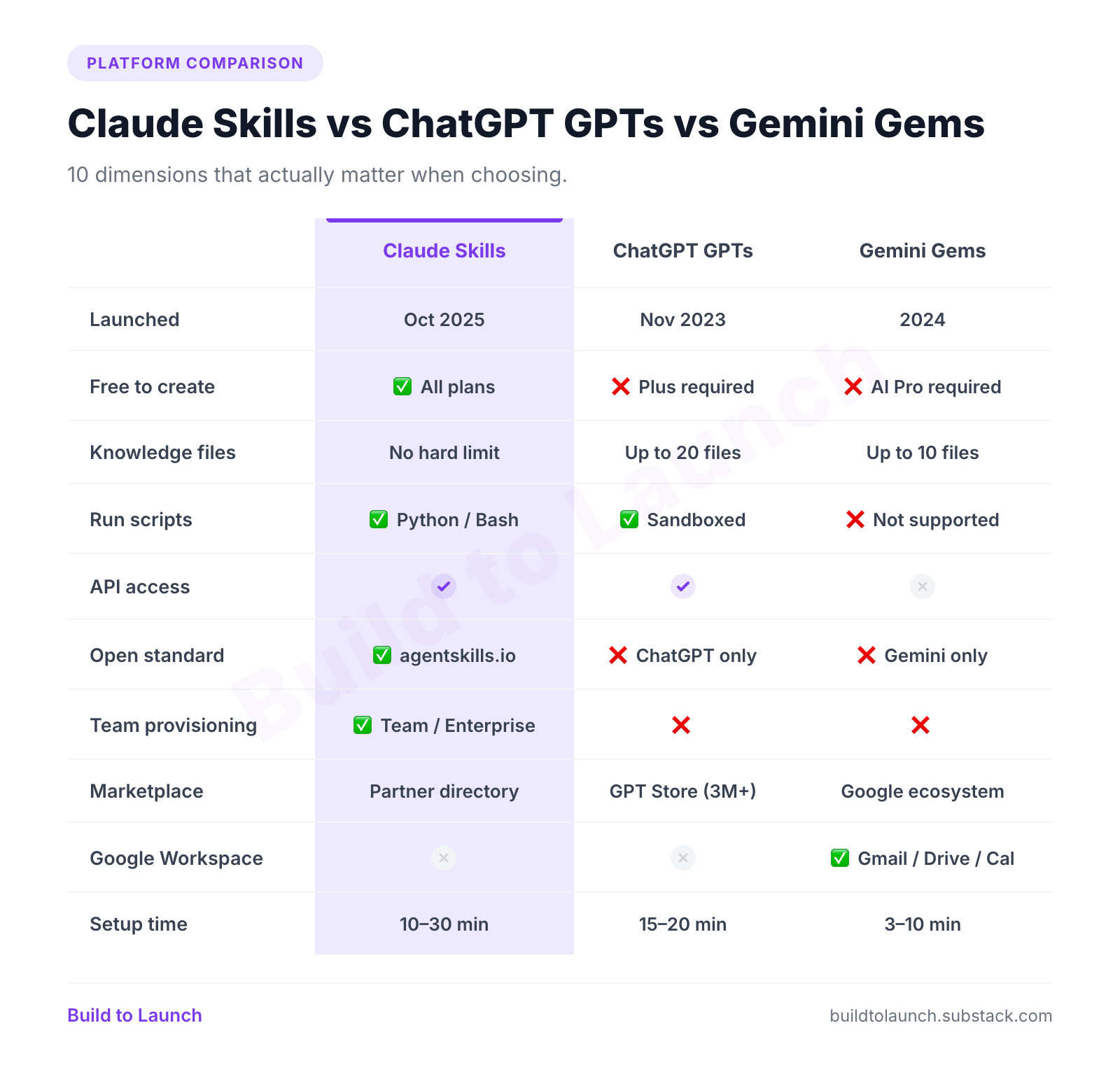
All three solve the same problem. The differences are in how deep they go, where they work, and what happens when you need them across a team.
The quick version
ChatGPT GPTs have the biggest head start. 3 million created since November 2023, roughly 159,000 public in the GPT Store. The ecosystem is enormous. You need a Plus plan to create GPTs, but anyone can use existing ones. The limitation: they’re locked to ChatGPT and don’t travel anywhere else.
Gemini Gems are the easiest to create — 3 to 10 minutes, minimal setup required. Their genuine advantage is Google Workspace integration. A Gem can read your Google Drive, pull from Gmail, reference your Calendar. Nothing else matches this. The limitation: no API access, file limit of 10, and no team provisioning.
Claude Skills have the deepest customization and the most strategic architecture. The trade-off is a smaller ecosystem and a newer launch — October 2025 vs. November 2023 for GPTs.
The data
When to choose each
Choose Claude Skills if you want depth over breadth, you need team provisioning, you care about portability, or you want to embed executable scripts in your workflow.
Choose ChatGPT GPTs if you need the largest ready-made ecosystem — 3 million GPTs already built, covering nearly every use case. Or if you’re building for GPT-5’s agentic capabilities.
Choose Gemini Gems if your work lives in Google Workspace. The Gmail and Drive integration is genuinely better than anything Claude or ChatGPT currently offer in that domain.
The Open Standard Nobody Talks About
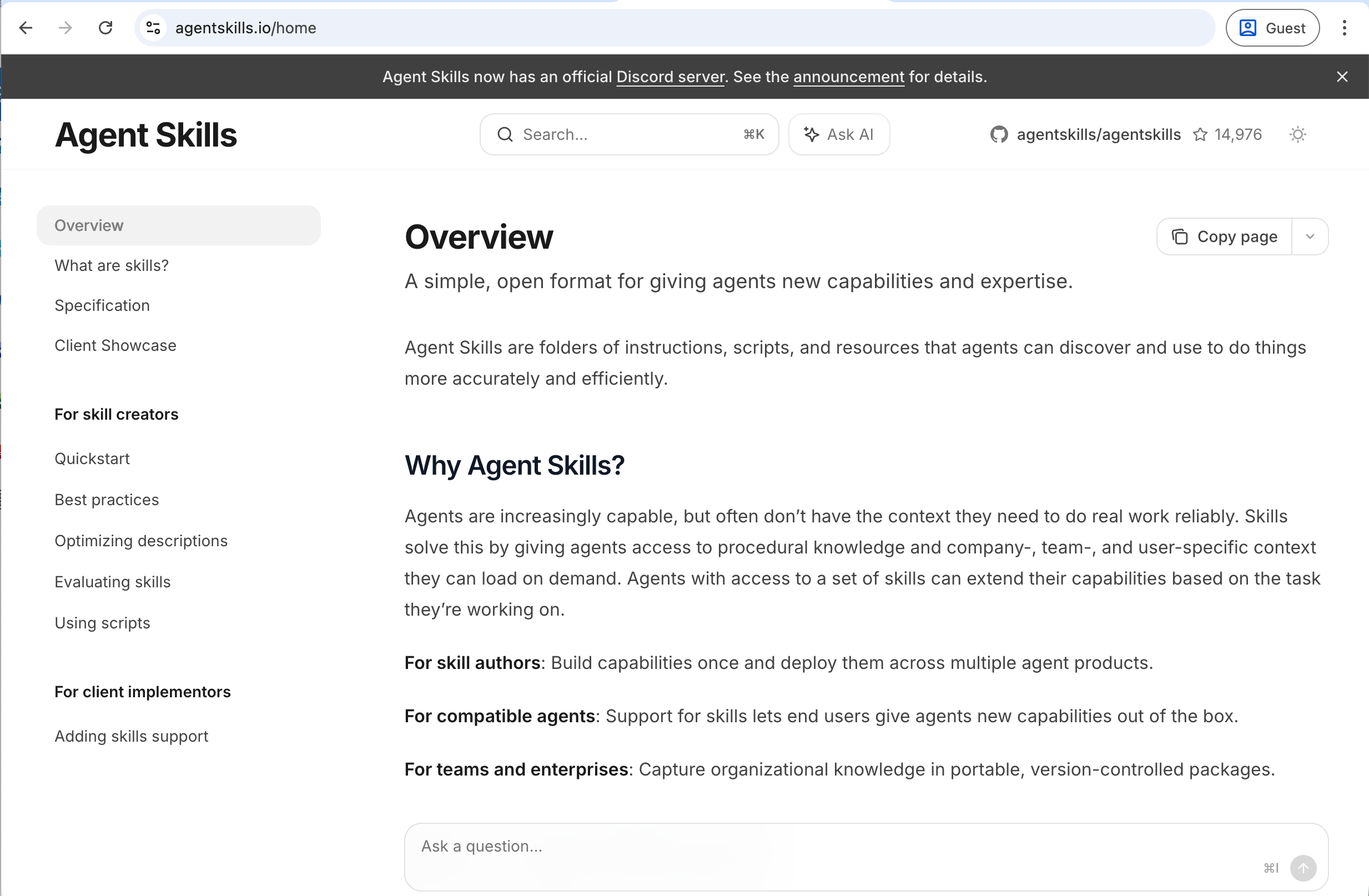
The thing most comparison articles miss: Claude Skills are built on an open standard called agentskills.io.
What that means in practice: a Skill you write for Claude works in VS Code, GitHub Copilot, and any other platform that adopts the agentskills.io spec. More than 30 platforms currently support it.
Your GPTs only work in ChatGPT. Your Gems only work in Gemini. Your Claude Skills aren’t locked to Anthropic. They’re an asset in an open format, usable wherever the standard is supported. If you switch primary AI tools in two years, the Skills travel with you.
This has a secondary benefit that’s easy to miss: it means Skills have a governance model. The spec is published. Third parties can audit it. It’s not subject to what Anthropic decides to change in their private API. That matters more for teams and enterprises than individual users — but it’s a real structural difference.
The Skill Creator tool
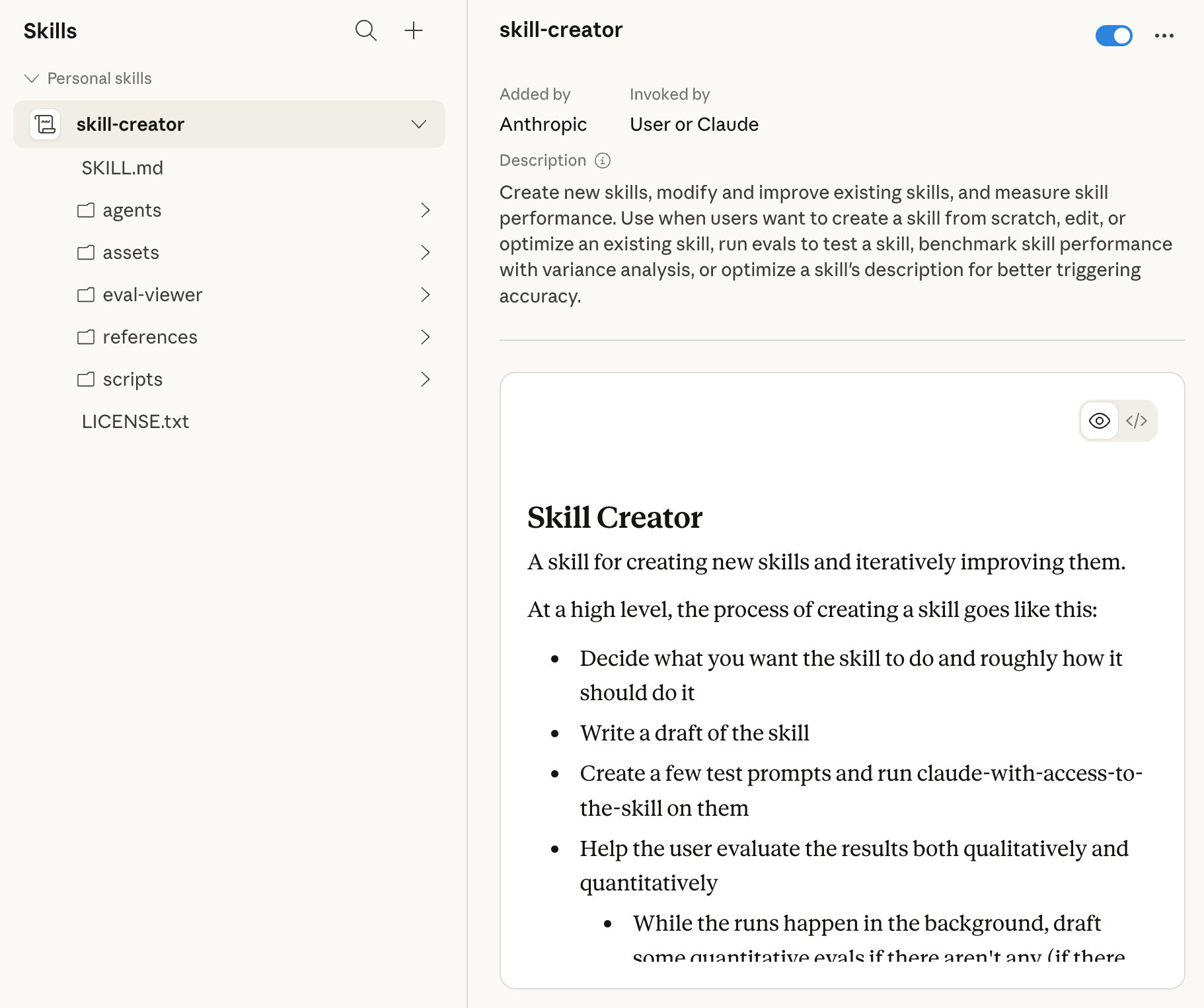
In March 2026, Anthropic updated the Skill Creator tool with a testing framework. You can now write evals for your Skills, run A/B tests between versions, benchmark performance, and catch regressions — without writing code.
This is software development rigor applied to prompt engineering. Skills shouldn’t be written and forgotten — they should have test suites, just like code. A Skill that worked well against Claude Sonnet might behave differently against a newer model. The eval framework catches that before it quietly breaks your workflow.
Who Skills Are Actually For — And When to Skip Them
Skills reward specific people. They’re overkill for others.
Good fit for Skills
Knowledge workers with fixed weekly processes. If you write reports every Friday, run the same research process every week, or format documents to the same spec every time — that process belongs in a Skill. You write it once. Claude carries it forward without re-explaining.
Teams who need consistent behavior. If everyone on your team needs Claude to follow the same brand guidelines, use the same templates, apply the same compliance rules — org-provisioned Skills mean one admin setup, consistent execution across everyone.
Builders who want to encode expertise. A Skill is a way of externalizing institutional knowledge so it’s not locked in one person’s head. If you’ve built a system that works, a Skill captures it in a form that’s reusable and shareable. This is what practical AI building actually looks like at the system level: not learning more tools, but turning the workflow you already know into something that runs without you.
Anyone who says “I have to re-explain this every single session.” That’s the exact problem Skills solve.
Skip Skills (for now) if
You use Claude for varied, ad-hoc tasks. If you’re asking Claude different questions every day and rarely repeat yourself, Custom Instructions or Projects will serve you better with less setup.
You need the largest ready-made ecosystem right now. The GPT Store has 3 million options. The Claude Skills directory is much younger and smaller. If you need something off the shelf, GPTs likely already have it.
Your work is primarily in Google Workspace. Gems have genuine advantages here that Skills don’t match yet.
The floor everyone forgets
Even if you never build a custom Skill, you’re already using Anthropic Skills. Every time Claude handles Excel, Word, PowerPoint, or PDF documents with enhanced capabilities, that’s a built-in Skill running automatically. Skills are already on. You’re just deciding whether to go deeper.
What a Real Production Skills System Looks Like
The content engine behind every Build to Launch article runs on Claude Skills. Not as a demo — as the actual production system.
The .claude/skills/ directory has more than 30 custom Skills organized into functional categories:
Article creation: The full writing pipeline — opening structure, guide maps, self-intro placement, section patterns, ending system, survey placement, CTA placement. Each is a separate Skill with one job.
Social notes workflow: Formula selection, scheduling rules, timing judgment. The Skill handles the decisions I don’t want to make every time — which formula to use for a given piece of content, how to space a publishing schedule, what to optimize for reach vs. depth.
Research: The research brief structure, topic sweep, competitor analysis, use-case ranking. (The research Skill pairs with a Substack MCP — I built a research agent that studies Substack creators I admire, which shows what Skills + MCP looks like for a real research workflow.)
SEO and brand: SEO optimization rules, brand voice constraints, humanizing pass.
Gumroad: Product page structure, naming conventions, short descriptions.
The most-used single Skill is the notes workflow — it generates Substack notes using 7 different formulas and makes scheduling decisions automatically, without me dictating each step.
What that looks like in practice: before the Skill existed, drafting a note meant opening a reference doc, picking a formula, checking the publishing schedule, deciding on timing, then writing. Now I say “write a note from this article” and Claude makes every one of those calls — formula selection, timing, spacing from the last note — without being asked. The Skill holds the decision framework. I just tell it what to work from.
The insight from running this system: Skills don’t just save time. They encode judgment. The question isn’t “how do I speed up this step?” — it’s “what decision do I make the same way every time, and can Claude make that call for me?” Once you reframe it that way, what belongs in a Skill becomes obvious.
The harder lesson: Skills need auditing, not just building. The longer the system runs, the more reference files move, the more Skills overlap, the more descriptions drift. When Skills start failing silently — wrong output, inconsistent behavior — the instinct is to add another Skill to fix it. That makes it worse. The right response is an audit.
The scheduling layer — running Skills autonomously on a cron schedule without being asked — is a separate piece entirely. How to Install OpenClaw and Run Your First Autonomous Agent covers that setup. And if you want to see what it looks like when you hand the keys over completely, What Happened When I Let OpenClaw Run My Business for Four Weeks is the live experiment.
Go Deeper
If this article gave you the map, these go into the territory:
Stop Adding New Claude Skills — Fix the Broken Ones First — You’ve got Skills set up. They’re not working reliably. This is the architecture audit: the three containers (CLAUDE.md vs Skill vs Command), five failure patterns, and the script that found 59 broken references in a real production system.
How to Onboard to Claude Without the Learning Curve — How Skills, Plugins, Commands, Connectors, and Cowork all fit together in one plain-English walkthrough with a real example per layer.
Stop Installing Every Claude Code Plugin — Here’s How to Tell What’s Actually Worth It — Plugins bundle Skills + commands + connectors into one install. Here’s which ones are worth it after testing 11 of them.
Best MCP Servers for Claude Code — Skills teach Claude what to do. MCP gives Claude what to work with. These are the connectors worth setting up first.
I Built an AI Research Tool to Study Substack Creators I Admire — A real Skills + MCP workflow in production: what the research Skill does, how it pairs with the Substack connector, and what the output looks like.
4 Levels of AI Automation — Where Skills fit in the broader automation stack, from simple prompts to fully autonomous agents running on schedule.
Next Steps
If you’ve never set up a Skill
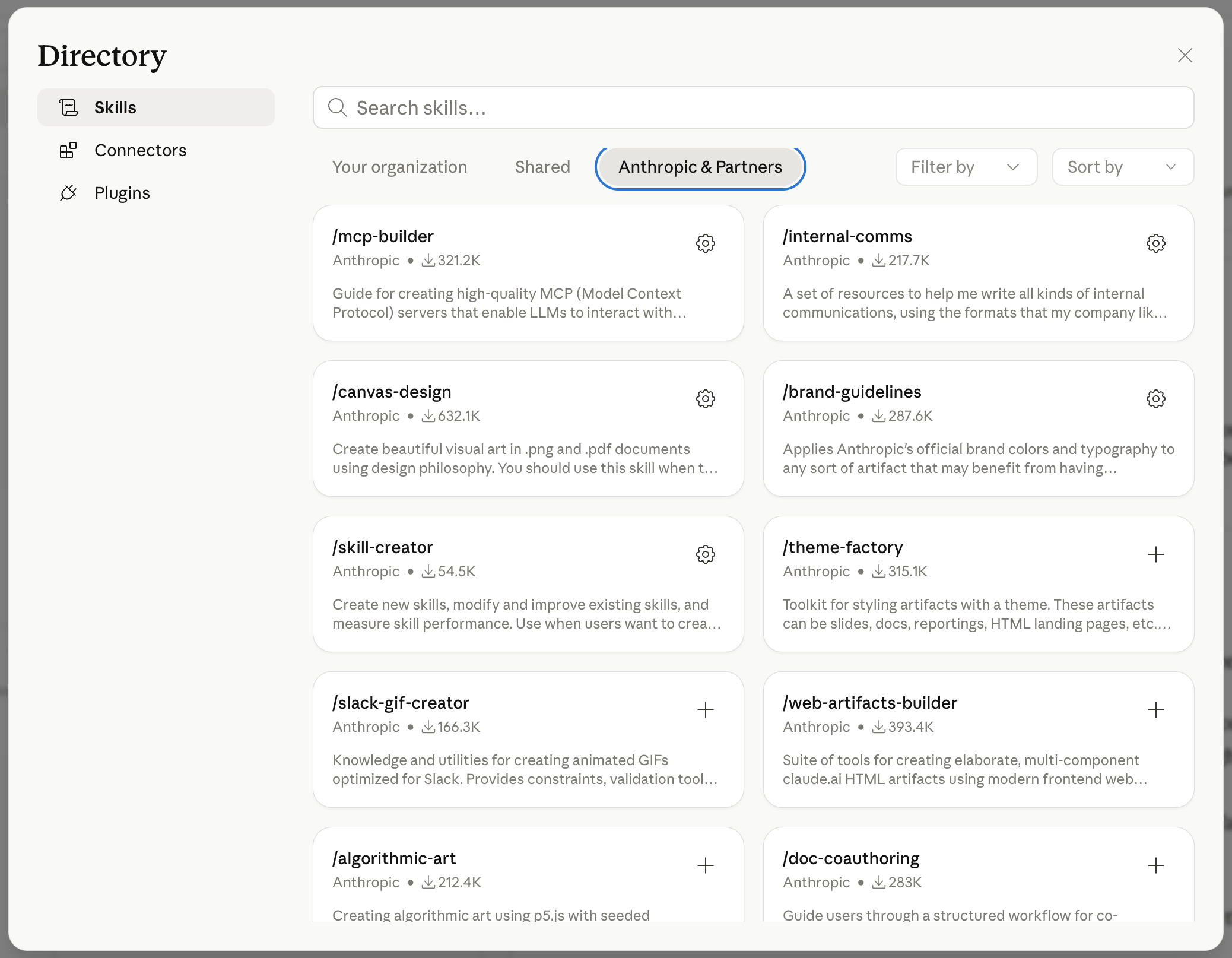
Start with the Skills directory in Claude.ai — go to Settings → Customize → Skills. Browse what’s already there from Anthropic and partners before building anything custom. You might not need to build at all.
If you want to build your first custom Skill
Pick one workflow you explain to Claude more than twice a week. Write the instructions in a plain .md file. Keep the first sentence of the description hyper-specific — it’s how Claude knows when to load the Skill. Upload it as a .skill folder and test it on a real task.
If you’re setting up Skills for a team
Talk to your account admin about org-provisioned Skills on a Team or Enterprise plan. One Skill update pushing to everyone is the reason to pay for the tier, not just the seat count.
Frequently Asked Questions
Are Claude Skills free to create?
Yes. Custom Skills are available on all Claude plans, including Free. Building and uploading custom Skills doesn’t require a paid subscription. You need code execution enabled in your account settings.
Do Claude Skills work in Claude Code?
Yes, with a separate workflow. Claude Code Skills follow the same SKILL.md format but are stored in the .claude/skills/ directory of your project repository, not uploaded through the Claude.ai interface. Same format — different delivery mechanism.
How is a Claude Skill different from a ChatGPT GPT?
The key differences: GPTs are a separate destination you navigate to; Skills load into your regular conversation automatically. Skills can contain executable Python or Bash scripts that Claude actually runs; GPTs run code in a sandboxed interpreter only. Skills follow an open standard (agentskills.io) that works across 30+ platforms; GPTs are locked to ChatGPT.
What’s the file limit for Claude Skills?
There’s no hard file limit. Skills are file-based in an open format, so the limit is effectively your folder size and what Claude’s context window can handle on demand. GPTs cap at 20 files; Gemini Gems at 10.
Can I share my Skills with others?
Yes. For Team/Enterprise plans, organization Owners can push Skills to all team members. For individuals, you can share the .skill folder directly or package it as part of a Claude Plugin.
What’s the workflow you keep re-explaining to Claude that should probably be a Skill by now?
— Jenny
Why Upgrade · Practical AI Builder Program · Templates · Builder Showcase