
Best MCP Servers for Claude Code: Replace Your Workflow, Keep Your Brain
Research, sell, build, publish, debug — without breaking your chain of thought.

Most people use Claude Code with zero MCPs. Here's what happens when you connect it to Perplexity, NotebookLM, Stripe, Gumroad, Notion, and everything else — research, payments, scheduling, publishing, all without breaking your chain of thought. Real workflows, one-line installs, and the story behind the protocol.

If there is one rabbit hole I have gone deep into over the past year, it’s MCP.
I’m an AI builder and vibe coder whose attention is spread across everything: writing articles, creating products, managing a community, selling on Gumroad, researching, coding, publishing across platforms. All of it, every day.
And every time I hit friction in any of those workflows, the answer kept being the same: there’s an MCP server for that.
So when I say “best MCP servers,” I don’t mean the ones with the most GitHub stars. I mean the ones that survived daily use across all of this. I tried dozens. Dropped most. Kept a handful.
What you’ll go through with me:
How Anthropic Wrote the USB Standard for AI — Then Gave It Away
What Real Work With MCP Looks Like: five workflows across writing, publishing, selling, building, and planning — with prompts you can try yourself
When the MCP You Need Doesn’t Exist — the gaps nobody’s filling yet
🎁 Towards the end: claim the free MCPs you can install today, starter configs by role, and a curated directory of 70+ verified servers.
Hi, I’m Jenny 👋
I teach non-technical people how to vibe code complete products and launch successfully. AI builder behind VibeCoding.Builders and other products with hundreds of paying customers. See all my launches →
If you’re new to Build to Launch, welcome! Here’s what you might enjoy:

How Anthropic Wrote the USB Standard for AI — Then Gave It Away
Before I walk you through the stack, let’s talk about what MCP is and why the story behind it matters more than any individual server.
What MCP is (2-minute version)
MCP = Model Context Protocol. It’s how AI tools connect to everything else.
Claude Code without MCP is a phone that only makes calls.
MCP servers are the apps.You don’t need to build these connections yourself. Over 1,000 already exist. You install them.
Without MCP: copy-paste between Claude and everything else.
With MCP: Claude reads your real data, takes actions, remembers across sessions.
If you’re brand new to Claude Code itself, start with the beginner guide first. MCP is what you add after you’re comfortable with the basics.
The origin story — and the massive move
November 2024: Anthropic creates MCP and open-sources it. Free. Open standard. Python and TypeScript SDKs.
Months later: Cursor adds support. Windsurf adds support. Zed, Replit, Codeium, Sourcegraph. One by one, the developer tools start speaking the same protocol.
March 2025: Sam Altman publicly announces OpenAI will adopt MCP across ChatGPT and all products. Their direct competitor’s protocol.
Then: Google follows with Gemini. Microsoft brings it to Copilot.
Then: Anthropic donates MCP to an independent foundation so no single company owns it.
By early 2026: 1,000+ community-built MCP servers.
When your biggest rival looks at what you built and says “we’re using that” — the standard already won. This isn’t “Claude has plugins.” Anthropic wrote the USB spec for AI tools, then gave it away so the whole industry could build on it.
And that has a direct consequence for you:
If an MCP server doesn’t work across tools, it’s incomplete.
The protocol is client-agnostic by design. A properly built server works in Claude Code, Claude Desktop, Cursor, Windsurf, and VS Code. The only thing that changes is one config path:
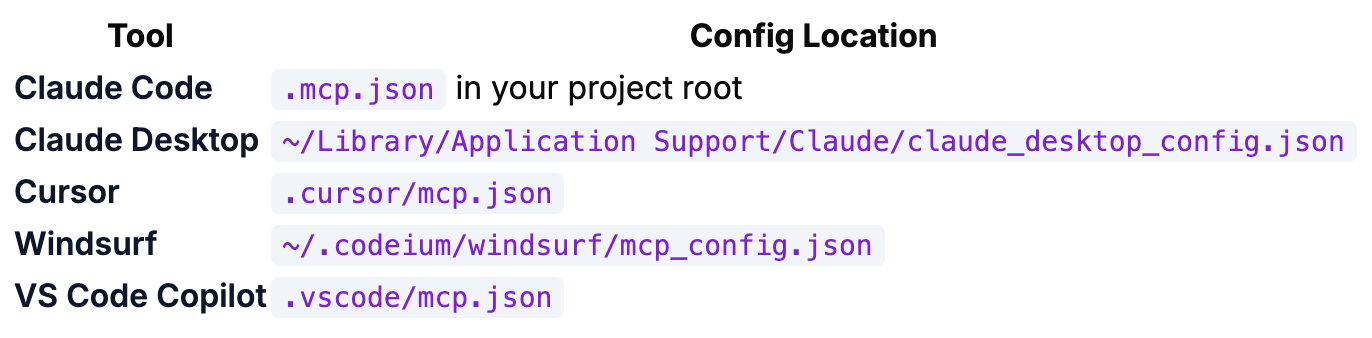
Same server. Different path. If someone builds an MCP locked to one tool, that’s either intentional decision or sloppy implementation. The whole point is: invest once, use everywhere.
I wrote about this shift, turning Claude from a chatbot into a connected intelligence, months ago. Since then I’ve been running MCP servers daily.
Two things most lists get wrong
The best MCPs match your friction, not the trending list.
My stack looks weird to a developer, a marketer, a writer. It looks right for someone who runs a newsletter, a community, a Gumroad store, a handful production apps and client projects all at once.
I started with three questions:
What am I copy-pasting?
What tabs do I keep switching between?
Where do I lose 10 minutes every time?
Every MCP I kept exists because it killed a specific friction point. Your stack will look different. That’s the point.
Memory is the most underrated category.
Most people start with data connectors or research tools. Useful, but incremental.
After interviewing Jing Xie about MemMachine, the open-source AI memory layer his team built at MemVerge, I got fully inspired and extended my own memory layer for Claude. An MCP that I call it ai-memory-agent.
Memory changes the whole relationship. Claude goes from “tool I explain things to every session” to “collaborator who knows my projects, my voice, my decisions.” This is the MCP that makes every other MCP more powerful.
The Best MCP Servers — Ranked by Friction Killed
You can find listicles anywhere. Claude Desktop shows dozens in its integrations page.
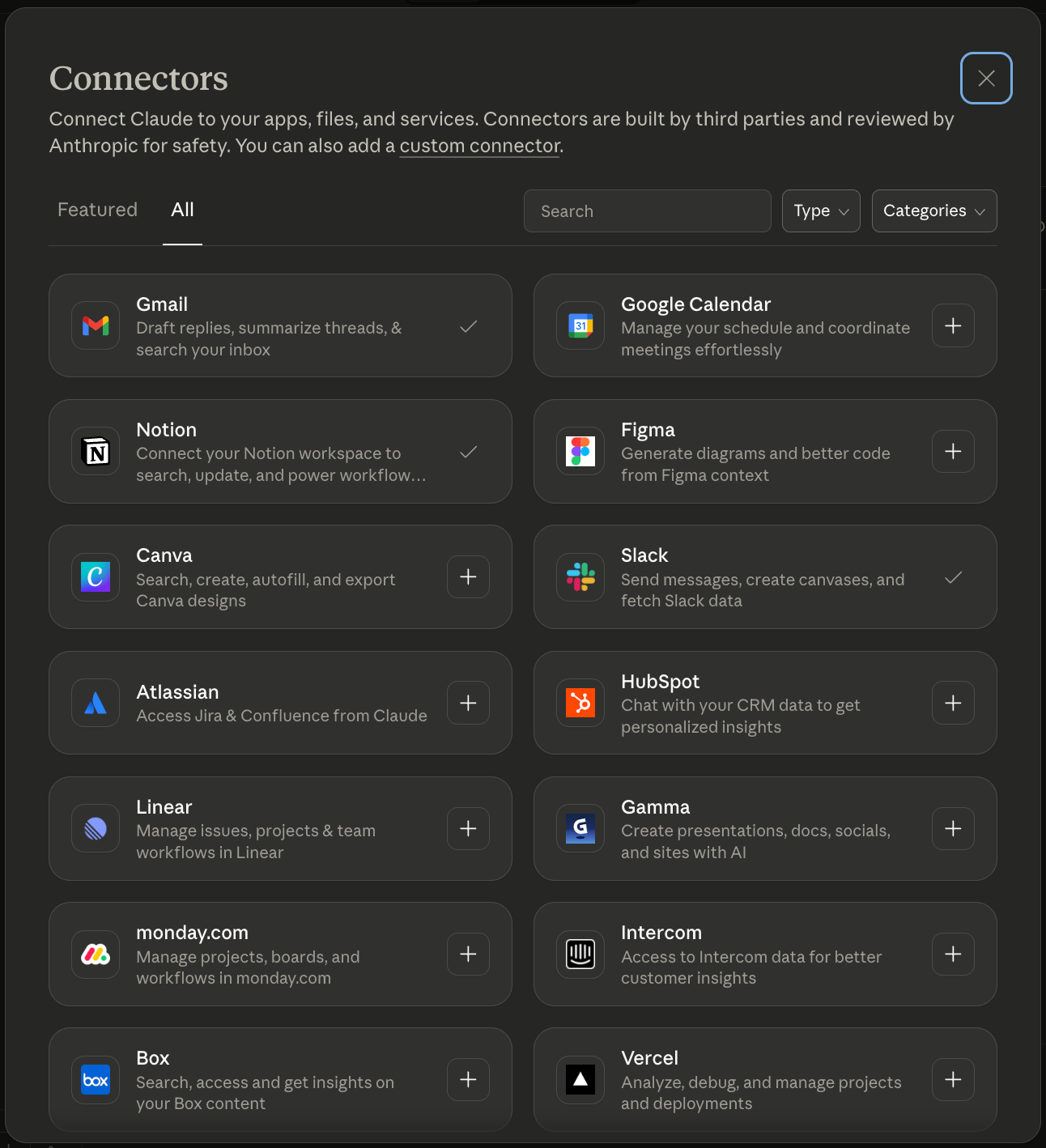
After trying all sorts servers, I’ve found every MCP does one of four things:
connects Claude to your existing data,
helps Claude research without you switching tabs,
gives Claude memory that persists across sessions, or
lets Claude take action on your behalf.
The four categories describe the primary friction each MCP removes. Many MCPs blur across categories. I put each one where it makes the biggest dent in my day. Your categorization might look different, and that’s totally fine.
For each MCP, I’m rating setup difficulty, how often I actually use it, and cost, based on a year of daily use.
🟢 Easy (one config line, minutes)
🟡 Medium (API key or auth flow, under an hour)
🔴 Advanced (self-hosting, multiple steps)
#1. Connect: Give Claude a Direct Line to Where Your Stuff Lives
These are the MCPs where the mental leap is the smallest. Of course Claude should be able to see your Notion. Of course it should read your Slack.
The friction they kill: copy-pasting between apps, re-uploading files every session, and logging into services just to check one thing.
Notion MCP · 🟢 Easy setup (OAuth) · Daily · Free server, Notion plan
claude mcp add --transport http notion https://mcp.notion.com/mcp
Connects to my workspace where I plan shared items: content calendars, project tracking, task databases. Claude pulls what I need without me switching tabs.
The Notion AI agents guide I wrote shows what becomes possible once Claude can see your workspace.
Slack MCP · 🟢 Easy setup · Daily · Free server, Slack plan
claude mcp add --transport http slack https://mcp.slack.com
Reads messages, searches channels, pulls thread context. Replaces the friction of logging into Slack, scrolling to find a conversation, copy-pasting the relevant parts, and explaining the context.
Google Drive MCP · 🔴 Advanced setup (self-host with Google Cloud OAuth) · Weekly · Free
Google shipped official MCP servers for Maps, BigQuery, and Compute Engine, but not Drive. You’d need to self-host a community server and configure your own OAuth credentials. It works once running, but the setup friction is real compared to Notion and Slack where it’s one command and a browser prompt. Google will get there.
Supabase MCP · 🟢 Easy setup (built into Claude Code) · Every session · Free server, Supabase plan
claude mcp add --transport http supabase "https://mcp.supabase.com/mcp?project_ref=YOUR_REF"
Retrieves my community database, my app data, my builder profiles. Also writes data, runs migrations, deploys edge functions. In my day its primary role is connecting Claude to what’s already in the database.
Obsidian MCP · 🟡 Medium setup (manual install from GitHub) · Daily · Free
If your knowledge base lives in Obsidian, this connects it. Separate plugins exist for Claude Code and Claude Desktop, no single unified server yet.
#2. Research: Let Claude Look Things Up For You
These MCPs don’t just connect to data you already have; they search, process, and synthesize things you don’t have yet. The mental leap is a little bigger: instead of “Claude can see my files,” it’s “Claude can go find things for me.”
Perplexity MCP · 🟡 Medium setup (session token) · Every session · Free server, Perplexity subscription
claude mcp add perplexity -e PERPLEXITY_SESSION_TOKEN="your_token" -- uvx --from "perplexity-webui-scraper[mcp]@latest" perplexity-webui-scraper-mcp
The MCP I reach for most. Web search with multiple AI models, fact-checking, competitive analysis, real-time research. Any time I need to verify a claim or check what’s current, Claude searches and returns results with citations. No browser tab.
NotebookLM MCP · 🟡 Medium setup (auth required) · Weekly · Free
claude mcp add notebooklm -- uvx notebooklm-mcp
Deep research synthesis. I seed sources into a notebook, competitor articles, research papers, documentation, and Claude queries the synthesized results. Also generates audio overviews, which I use for content research while making dinner.
Substack Article MCP · 🟡 Medium setup (auth required) · Daily · Free
claude mcp add substack-article -- npx -y substack-article-mcp
This one’s built by me. It reads published articles, checks engagement stats, pulls full text for repurposing. Technically it connects to my newsletter, but the reason I reach for it is research, looking up what I’ve already published, finding internal links, checking what angles I’ve already covered, and finding articles I’m interested in. It’s lookup, not action.
Whois MCP · 🟢 Easy setup · As needed · Free
claude mcp add whois -- npx -y @bharathvaj/whois-mcp@latest
Domain availability lookups. Admittedly, I buy a lot of domains... quickviralntoes.xyz, substackexplorer.com, vibecoding.builders, postingly.io…
Two seconds per check, no browser needed, cross-compare ten name ideas in real time.
#3. Remember: Give Claude a Brain That Persists
This is where the mental leap gets real:
Data connectors give Claude access to your stuff.
Research lets Claude find new stuff.
Memory gives Claude access to you, your projects, your decisions, your voice, your relationships.
The friction it kills: re-explaining yourself at the start of every session. Both of these are custom-built. I’ll show how they work in reality in the next section.
AI Memory MCP · 🟡 Medium setup (remote database) · Every session
Custom build — persists memories in a database with semantic search. Store decisions at key moments, retrieve them across sessions.
I built this one. Claude remembers my projects, decisions, preferences, writing voice, deadlines, and action items across sessions. This is the MCP I used the most. Always.
DuckDB / StackContacts MCP · 🟡 Medium setup (local database) · Weekly
Built by Finn Tropy. Local database with contact and subscriber information — Claude knowing my world, not just my files.
#4. Act: Let Claude Ship, Sell, and Publish
Everything above is about Claude understanding and thinking. This is where Claude does things in the real world, on real platforms, to real audiences.
The biggest mental leap: you’re not just giving Claude access. You’re giving it permission.
Substack Notes MCP · 🟡 Medium setup (API token) · Daily · Free*
claude mcp add -s user substack-notes -- npx -y substack-notes-mcp --token YOUR_TOKEN
Get the installer and token at quickviralnotes.com/settings.
Handles my entire notes pipeline. Claude generates notes from articles using formulas I’ve tested, schedules them across days with proper spacing. What used to be a 45-minute manual process is now one sentence and a review pass.
Gumroad MCP · 🟡 Medium setup (API key) · Weekly · Free server, Gumroad account
claude mcp add gumroad -e GUMROAD_ACCESS_TOKEN="your_token" -- npx -y gumroad-mcp-server
Create offer codes, check sales data, manage products. When I finish an article that references a product, I create a launch code in the same conversation, no separate login.
Stripe MCP · 🟢 Easy setup (OAuth) · Weekly · Free server, Stripe account
claude mcp add --transport http stripe https://mcp.stripe.com
Manage payments, subscriptions, create coupons. Combined with Supabase for the database layer, I can troubleshoot a payment issue end-to-end without opening three dashboards.
Crosspost MCP · 🟡 Medium setup (API key) · Weekly · Free*
claude mcp add crosspost -e CROSSPOST_API_KEY="your_key" -e CROSSPOST_API_URL="https://postingly.io" -- npx -y crosspost-mcp
Sign up at postingly.io to get your API key.
Posts to X, Bluesky, LinkedIn, and Threads from one conversation. Claude adjusts for each platform’s character limits, formatting, and expectations. One conversation, four platforms.
n8n MCP · 🔴 Advanced setup (self-hosted) · As needed · Free (self-hosted)
claude mcp add n8n -e N8N_BASE_URL="http://localhost:5678" -e N8N_API_KEY="your_key" -- npx -y @nicobailon/n8n-mcp-server
Workflow automation, webhook triggers, multi-step sequences, connecting services that don’t have their own MCP. When I need something more complex than a single MCP can handle, n8n fills the gap.
This isn’t the full list. There are 1,000+ MCP servers and counting. I put together a curated directory of 70+ verified servers with install instructions, repo links, and status for every one. Grab the Complete MCP Server Directory for free.
What Real Work With MCP Looks Like
The list above tells you what each MCP is. This section shows how they work together. My week doesn’t split into “data connector time” and “research time.” It splits into writing, publishing, selling, building, and planning. The MCPs blur across all of it.
As a Writer: The BTLF Collaboration Workflow
Every week for Build to Launch Friday, I collaborate with a guest writer.
Before MCPs, this meant logging into VibeCoding.Builders to check profiles, going to Substack to understand voices, copy-pasting project details into Claude, manually generating interview questions, writing to google doc, sharing them, then collecting answers back and forth.
Now the workflow lives in one Claude Code session.
I (Claude Code / Cursor) use Substack Article MCP to pull my previously published BTLF articles so Claude understands the format, the tone, and the kind of stories I tell, it sees the collaboration from every angle.
Then I (Claude Code / Cursor) pull the guest writer’s application from Supabase to understand who they are, and query the database to dig into their project details.
While Claude is reviewing the builder’s project, another agent is spun up to connect to the VibeCoding.Builders backend to audit the writer’s actual website, so Claude gets everything: the builder themselves, their project specifics, and the live site.
With all of that context loaded, Claude generates interview questions tailored specifically to their work. After reviewing and light editing, I push the questions directly to a draft page on VibeCoding.Builders and share a secret link.
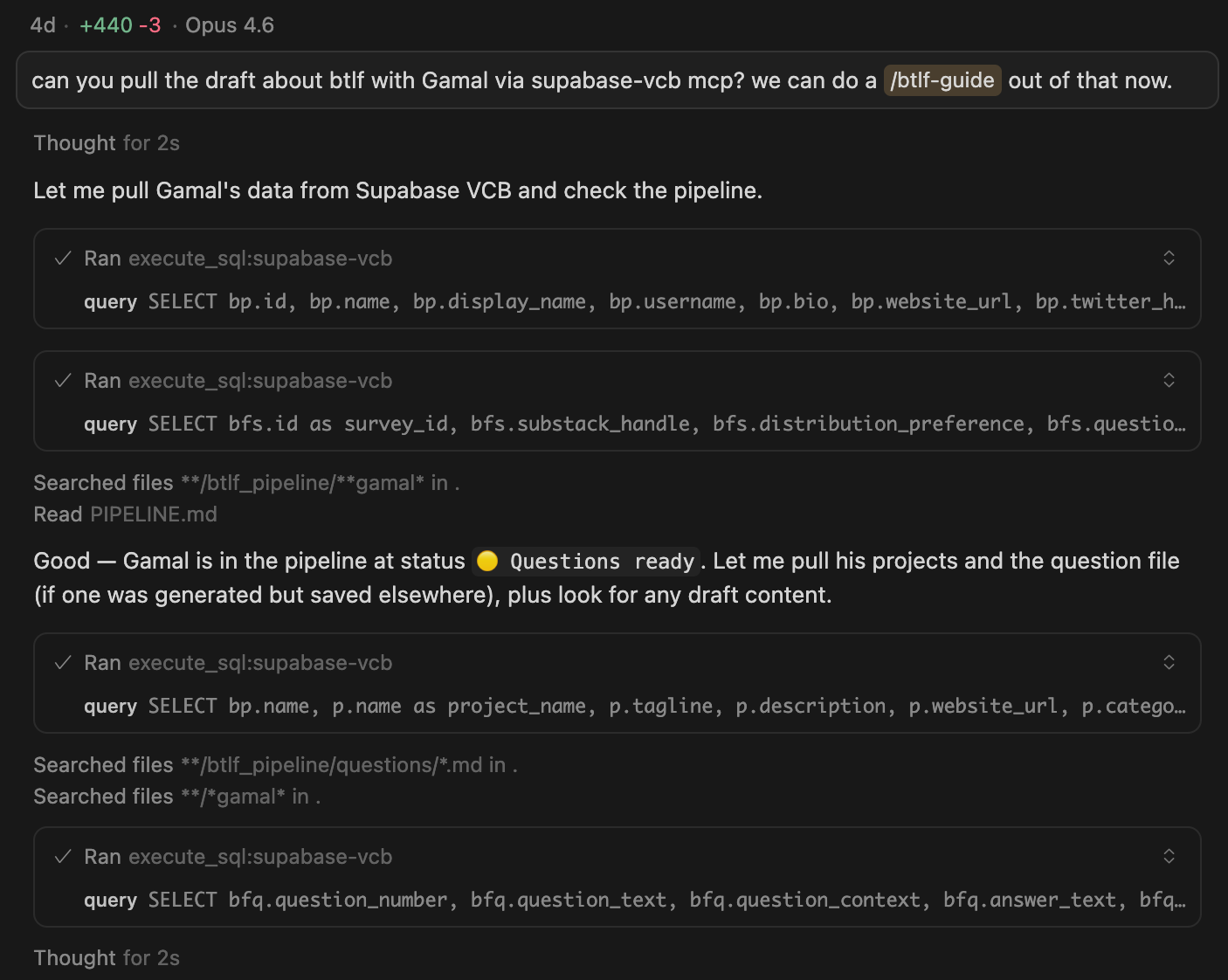
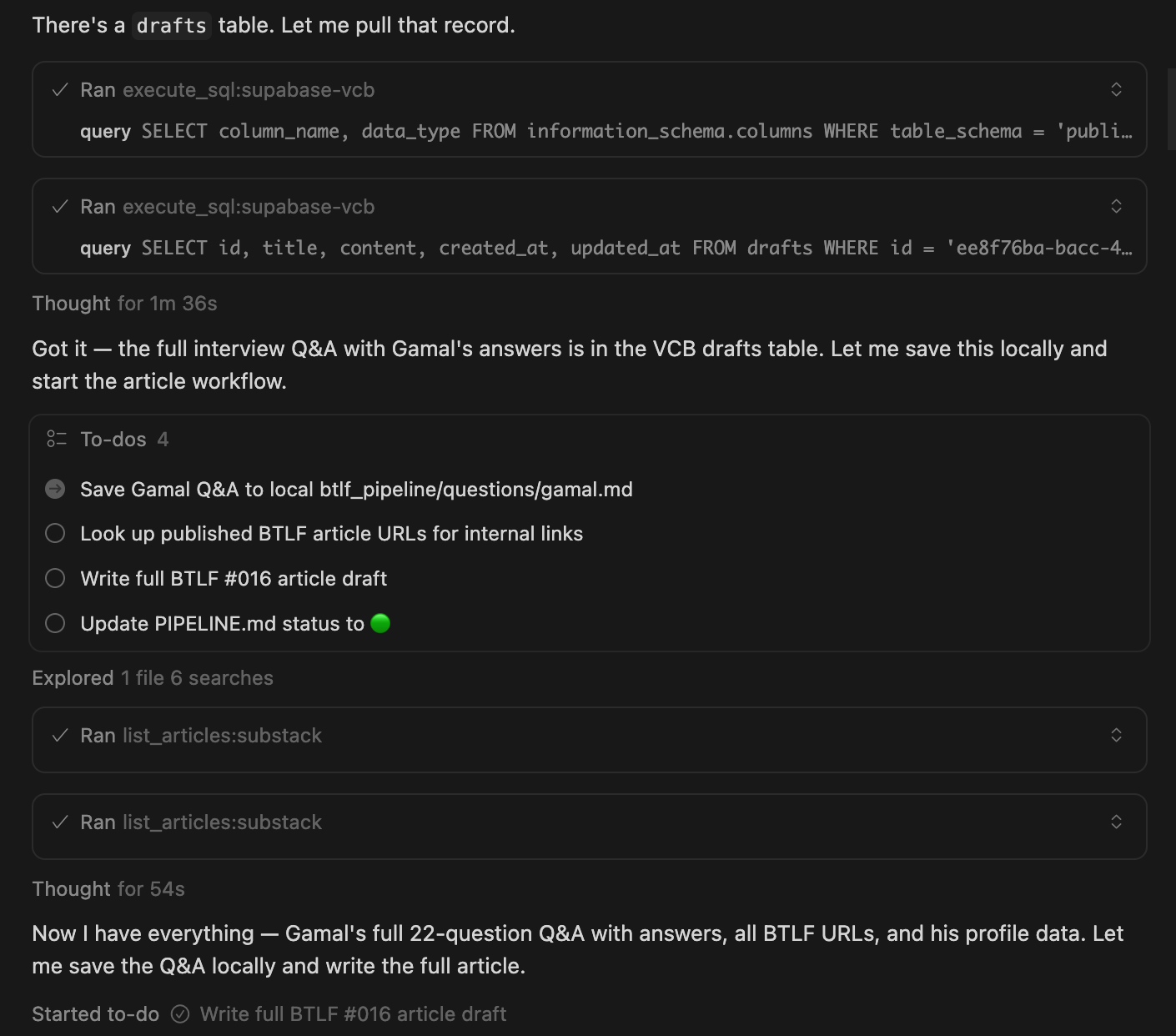
When the guest writer returns their answers, I retrieve everything in the same session, save it locally, and start crafting. AI Memory already knows my article format, my voice, my editing style. I don’t explain any of it. The reformatting happens locally where Claude can read and restructure everything, and the final draft goes through one review pass with the co-writer before publishing.
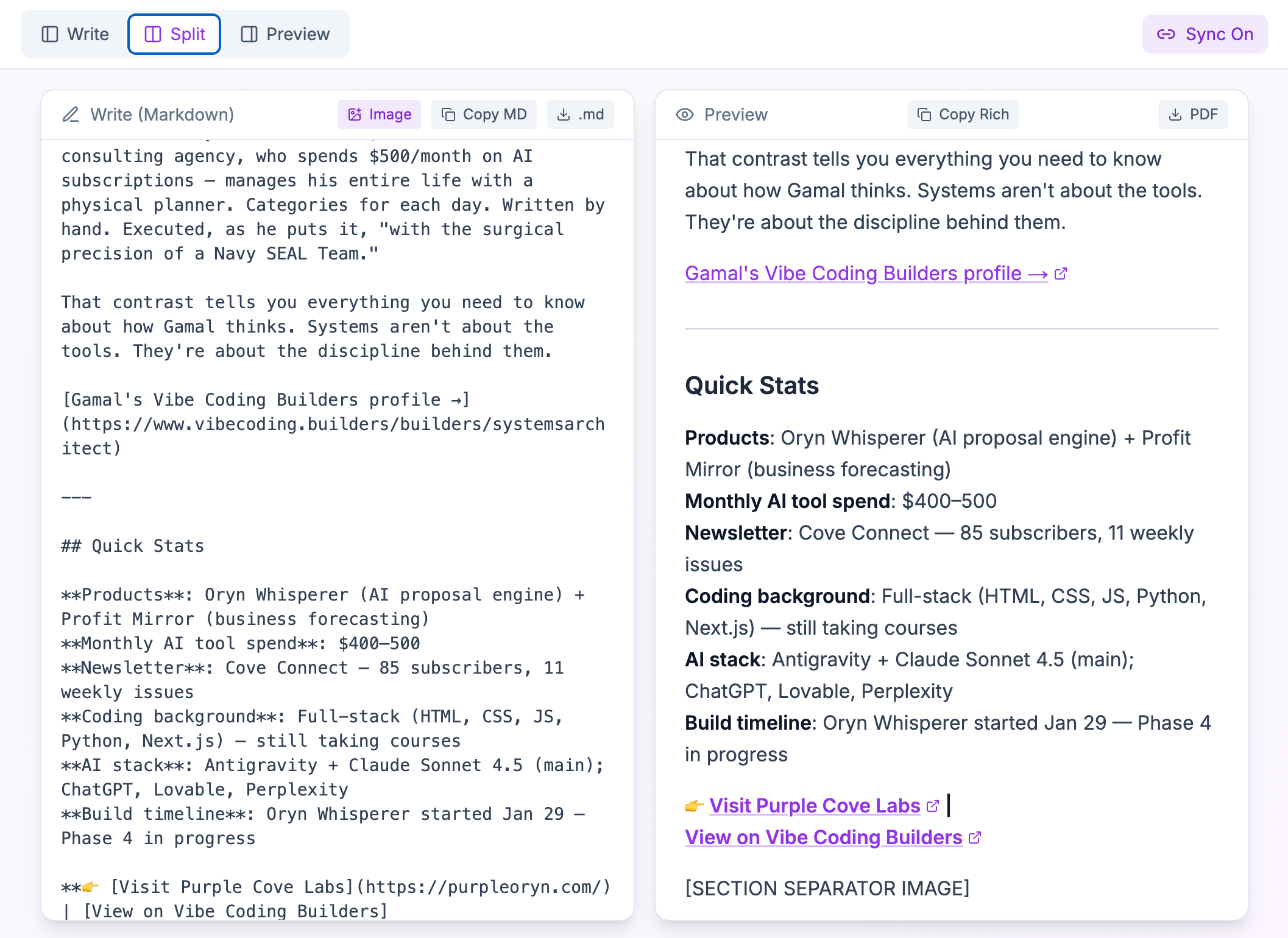
You can find the draft page from here, and the final published article with Gamal Jastram here.
MCPs in this workflow: Supabase, Substack Article, AI Memory
Try this prompt:
“Read my last 5 articles and tell me which topics I should’ve written.”
As a Publisher: Research, Product Tie-ins, and Distribution
When I’m writing a deepdive article, like this one, the session starts with research and ends with distribution.
Perplexity handles fact-checking mid-sentence. When I wrote that OpenAI adopted Anthropic’s protocol, I didn’t open a browser. I said “Did OpenAI officially announce MCP support, and when?” Ten seconds. Verified with citations.
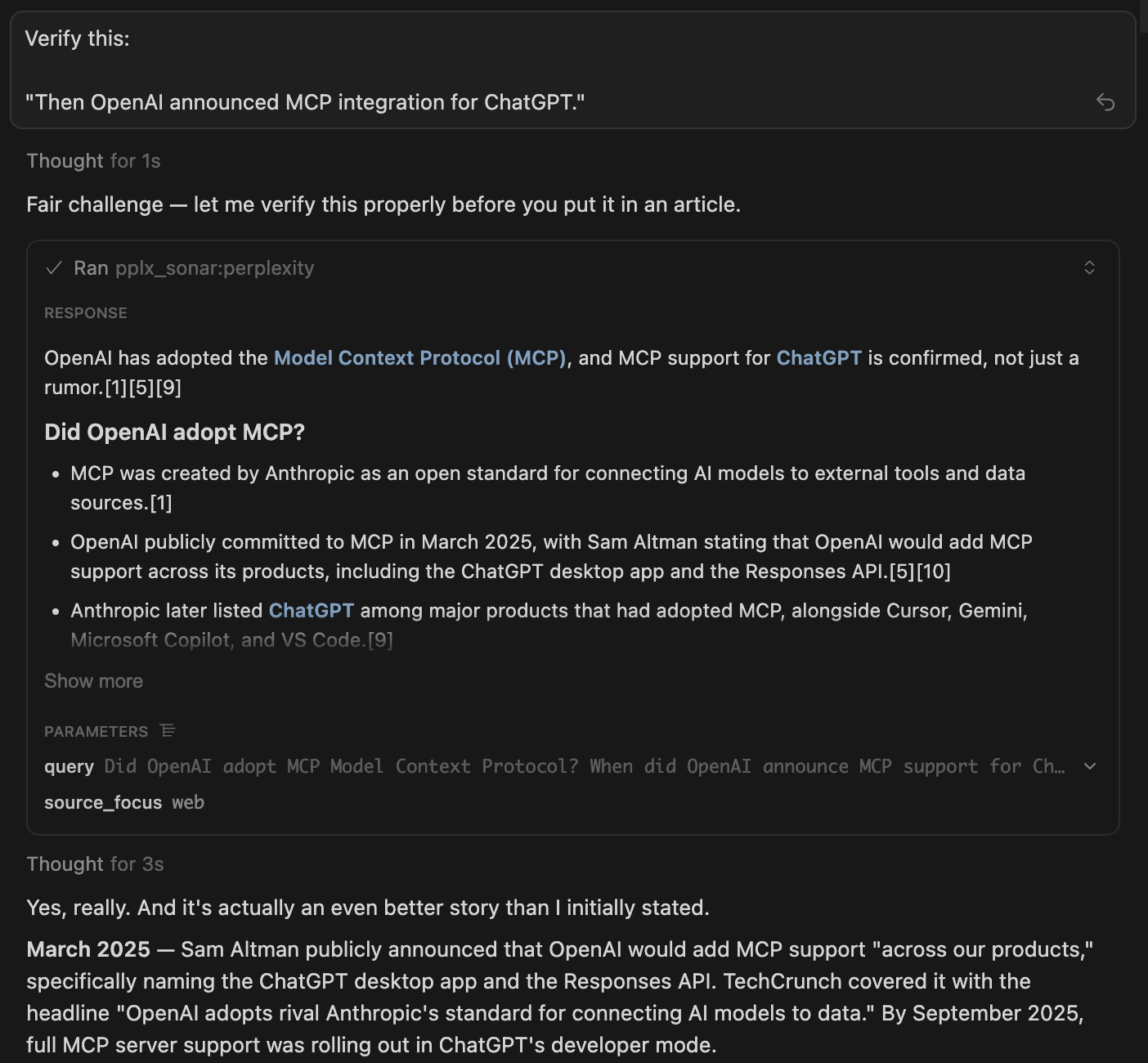
NotebookLM goes deeper. I loaded five competitor MCP articles and asked what angles they all miss. Nobody was covering the origin story. That became the opening of this article.
Meanwhile, Gumroad MCP solves a problem you don’t think about until you have tens of products: I forget what I’ve already published.
Before writing a new product tie-in, I ask Claude to check what’s already on my Gumroad store so I don’t accidentally duplicate something or miss an obvious internal link.
Substack Article MCP does the same for articles, pulling previously published content to find what I should reference.
When the article is finished, I don’t manually format it. Everything is in local markdown, and I push it through the VibeCoding.Builders draft editor via Supabase for rich text rendering. Copy, paste into Substack, and it’s ready. I schedule publication for 3-4am, that’s when my readers are up, and immediately after, Substack Notes MCP creates and schedules a note sharing the article. I don’t set an alarm. I don’t forget. It’s handled.
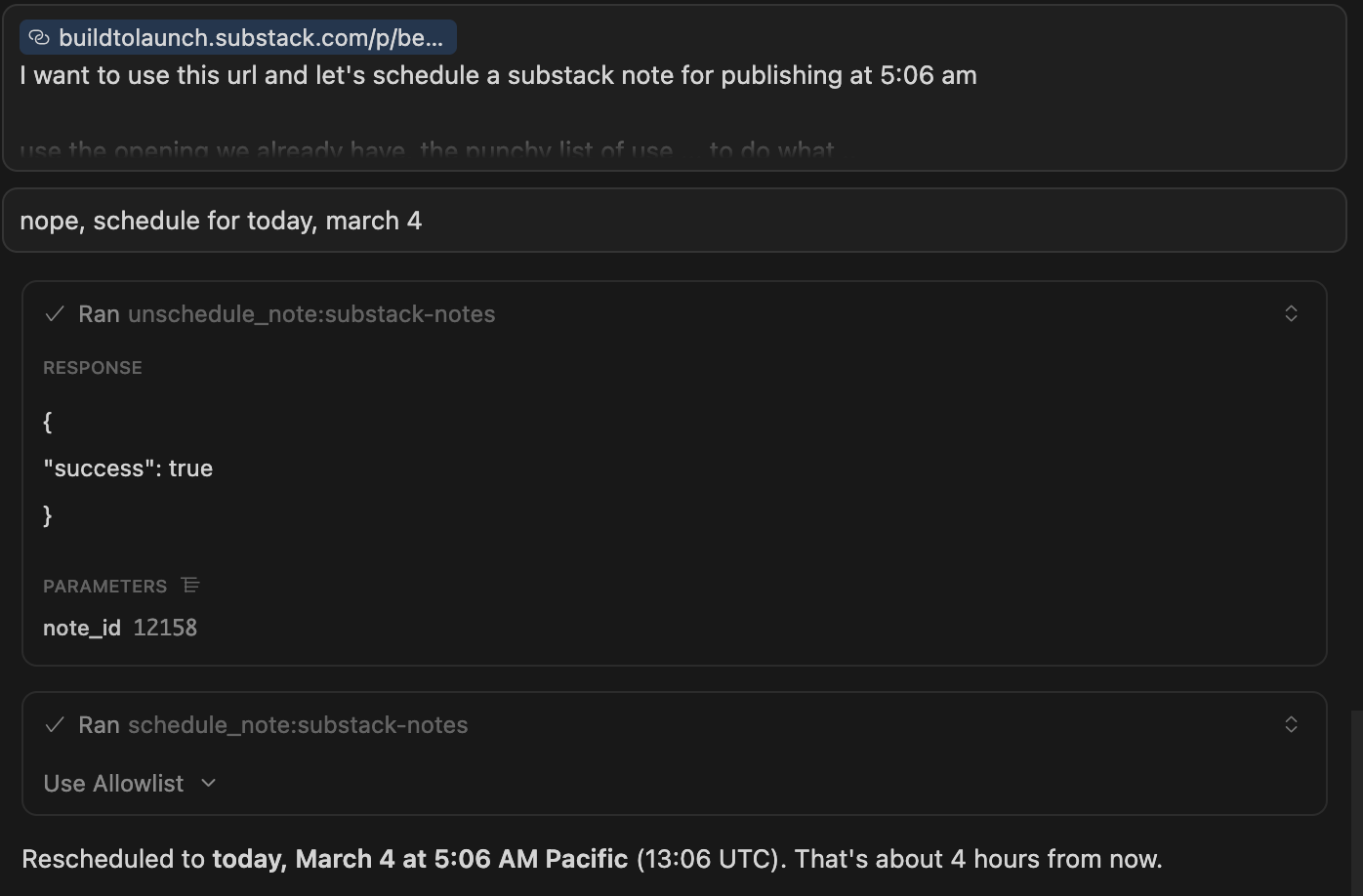
MCPs in this workflow: Perplexity, NotebookLM, Gumroad, Substack Article, Supabase, Substack Notes
Try this prompt:
“Fact-check this claim: [paste your sentence]. Give me the source and data.”
As a Builder and Seller: The Full Product Lifecycle
I build apps and sell digital products. Those two things used to live in completely different workflows — code in the terminal, sales in a browser dashboard, payments in another dashboard. Now it’s one conversation.
When I’m building my apps, Vercel handles everything on the backend side: queries, migrations, cron jobs, error debugging.
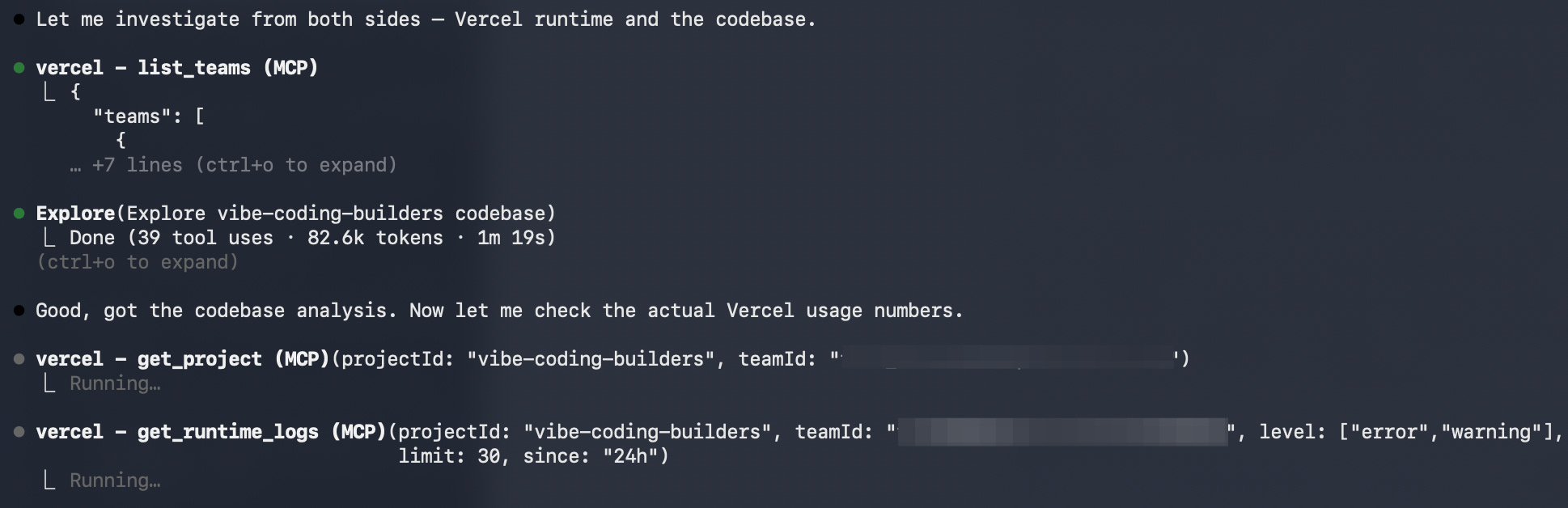
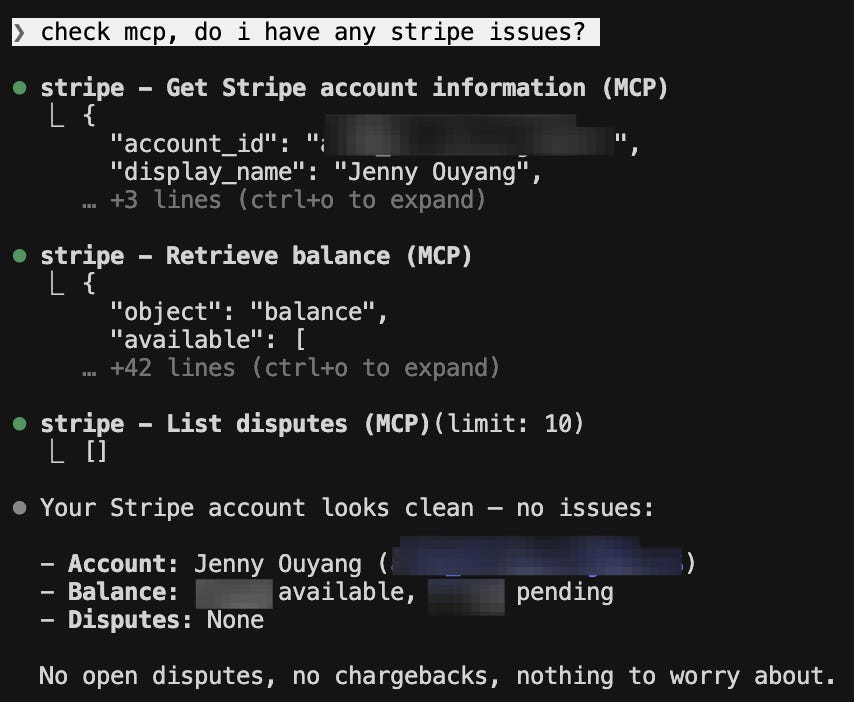
Stripe MCP handles payment integration, subscription management, and troubleshooting. When there’s a bug involving a failed payment, Claude queries Supabase for the erroneous record and checks Stripe for the transaction state.
End-to-end debugging without opening three dashboards.
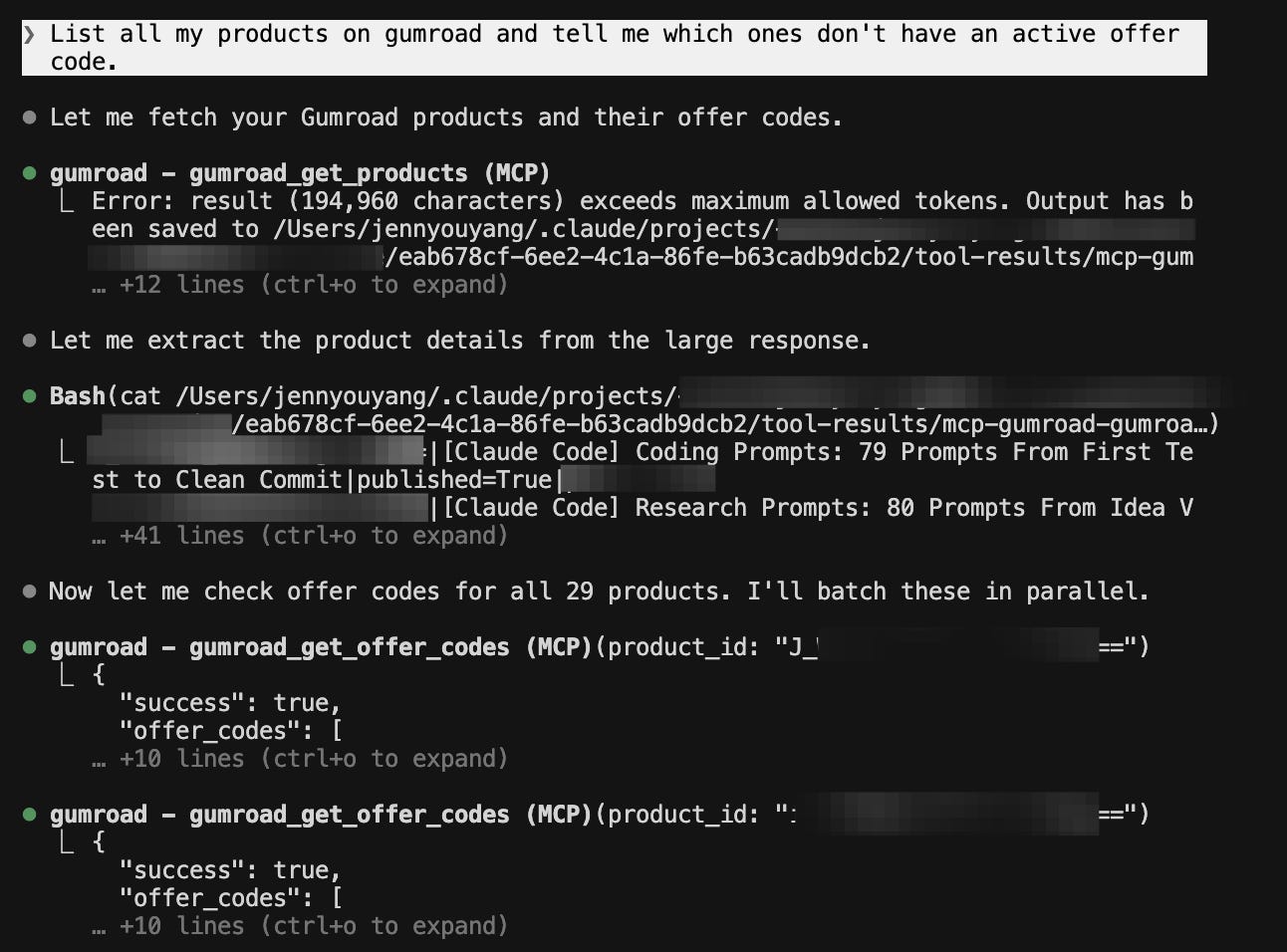
When I’m selling, Gumroad MCP lets Claude create offer codes, check sales data, and manage products. When I finish writing an article that references a product, I say “Create a 50% off launch code for the MCP Starter Pack, limited to 20 uses”, done, in the same conversation where I wrote the article. No separate login. No switching context.
MCPs in this workflow: Supabase, Stripe, Gumroad
Try this prompt:
“List all my products on gumroad and tell me which ones don’t have an active offer code.”
As a Planner: Memory, Domain Hunting, and Context Switching
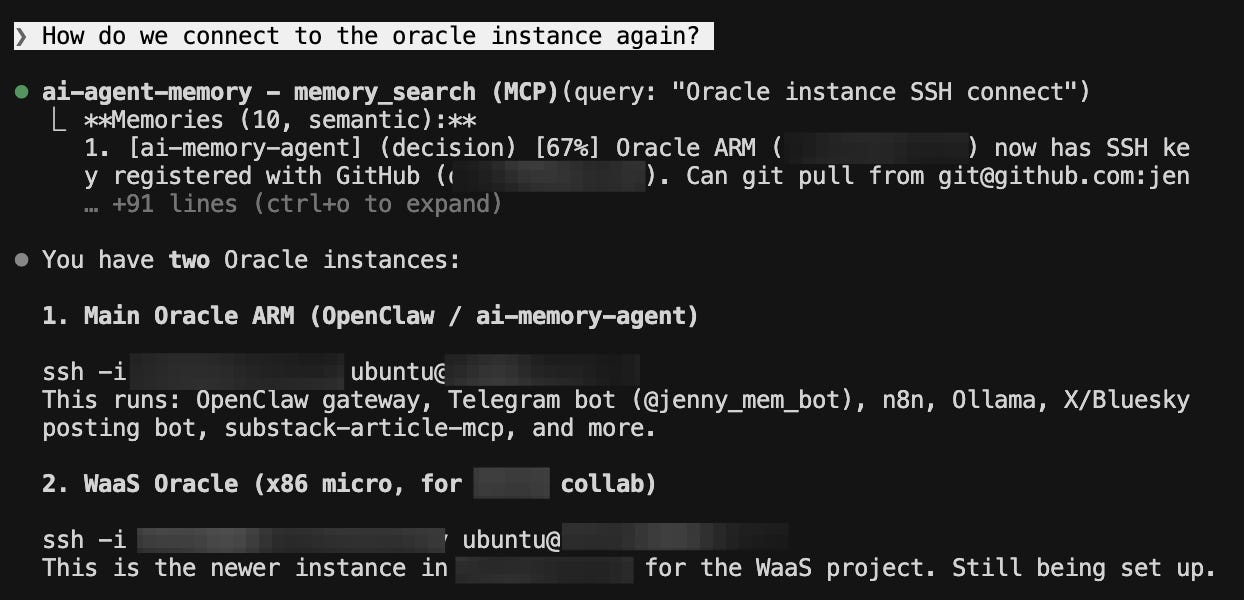
This is the connective tissue. AI Memory is the MCP I reach for in every other role, but its own workflow is planning and decision-making. When I’m about to decide on something — a product name, a strategy shift, a technical approach — I check what I’ve already decided. “What did we settle on for the MCP article angle?” Claude pulls it up from three conversations ago.
I store everything: SSH connection details for self-hosted services, how different parts of OpenClaw are set up, my personal board of 11 cron jobs and side projects. When I switch mid-project because an idea pops up, I drop it in memory as an action item and pick it up later. “Where did we leave off last time? What tasks do we need to pick up?” Zero re-explanation.
Whois MCP lives here too. I buy a lot of domains, Quick Viral Notes, Substack Explorer, VibeCoding.Builders, Postingly.io — and brainstorming happens inside Claude Code. I’ll pitch ten name ideas and ask Claude to check which ones are actually available. Cross-compare in real time, no browser tab needed. Two seconds per lookup instead of manually typing each one into a registrar.
MCPs in this workflow: AI Memory, Whois
Try this prompt:
“Remember that I’m working on [your current project] and my next milestone is [goal].” Then in your next session: “What was our action items for [your current poject]?”
I could keep going.
There are use cases I haven’t covered, emailing, scheduling to X, Bluesky, LinkedIn, Threads…, CRM, analytics, and new ones showing up every week.
But the point isn’t to list every possible workflow.
The point is this: imagine one central hub where you focus on your ideas and your problems, and you send out agents to handle the rest.
Your mental energy stays sharp. You stay on top of everything.
If you’re using Stripe, there’s an MCP for that.
If you sell on Shopify, there’s one for that too.
If your product or platform doesn’t have an MCP yet, that’s where it gets interesting.
When the MCP You Need Doesn’t Exist
I write a weekly newsletter. I work on custom workflows. I sell digital products. I build and launch apps. Each of those roles spins out dozens of tasks at different urgencies, and I’m constantly shuffling between them, losing track of where I left off, what needs picking up, what I decided three sessions ago. Then a new idea pops up, and the whole stack shifts again.
The friction isn’t any single tool. It’s the context switching. It’s trying to remember what was left half-finished across four different modes of work.
That’s when I deeply appreciate the MCP ecosystem.
It isn’t just something you consume, it’s something you could shape. Something that remembers where you were. Something you talk to and it hands back your action items, connects the dots across projects, and fetches context faster than you could ever recall it yourself.
Interviewing Jing Xie about MemMachine pushed me over the edge. The concept: persist memories, use semantic search to retrieve them, store decisions at key moments. Say “remember this” now, ask “what did we decide?” three sessions later, and get the right answer back.
So I started building:
Substack Newsletter MCP — explore the landscape, surface creators, find peers worth following
Substack Notes MCP — retrieve and analyze notes performance
Substack Article MCP — dynamically fetch any Substack article instead of browsing to find it
AI Memory MCP — the connective tissue across all four roles, so Claude knows where I left off no matter which hat I’m wearing
Crosspost MCP — distribute to X, Bluesky, LinkedIn, and Threads from one conversation
All of them are free (as the beta version). They all work with Claude Code, Claude Desktop, Cursor, and any MCP client, because that’s the whole point of MCP being an open protocol.
And that’s the real unlock of this ecosystem. There are 1,000+ MCP servers today, and the number doubles every few months. If the server you need already exists, install it and go. If it doesn’t, you have permission to build it. The protocol is open. The tools are free. The gap between “I wish this existed” and “I shipped it” has never been smaller. My Claude Code Project Ideas article has a whole tier dedicated to building connected systems like these if you want to see what’s possible.
Start Here: One Server, One Prompt, Five Minutes
Every workflow I showed you uses at least two servers at once. Perplexity fact-checks what Supabase surfaced. AI Memory remembers what decisions are made. Notion keeps tasks tracked. Substack Notes schedules what Substack Article read. Each MCP you add doesn’t just add one capability, it multiplies what you can do with every other MCP in the stack. That compound effect is real.
Here’s how to start feeling it yourself:
Step 1: Install the one MCP that matches your world
Pick one. Install it. Try the prompt. You’ll feel the difference in your first session.
If you write on Substack → Add Substack Article MCP. Free, open source. Try: “Read my latest article and suggest 3 social posts based on the key insights.”
If you live in Notion → Add Notion MCP. One OAuth click. Try: “Pull my content calendar and tell me what’s overdue.”
If you sell on Gumroad → Add Gumroad MCP. Connect with your API key. Try: “List all my products and tell me which ones don’t have an active offer code.”
If you build with Supabase → Add Supabase MCP. Built into Claude Code — just connect your project. Try: “Show me the schema for my main table and flag anything that looks like it needs an index.”
If you research constantly → Add Perplexity MCP. Try: “Research [topic you’re working on] and give me a summary with citations I can verify.”
Step 2: Add a second from a different category
Once your first MCP is running, pick one from a different part of the list.
If you started with a data connector like Notion, add a research tool like Perplexity.
If you started with Substack Article, add Notion or Slack.
The moment two MCPs are active in the same session — one pulling your data, one looking up something new — you’ll feel the compound effect.
They don’t just add up. They multiply.
Step 3: Keep following the friction
After a week with two MCPs, you’ll start noticing friction you didn’t even register before.
“Why am I still copy-pasting from Slack?”
“Why am I logging into Gumroad just to create a discount code?”
Each time you notice it, check the reference list above or the Complete MCP Server Directory.
Add one at a time. Let each one settle into your workflow before adding the next.
Your gift to the full stack on day one
I put together an MCP Starter Pack with my complete .mcp.json config, five starter configs by role (creator, developer, researcher, solopreneur, minimal), an installation troubleshooting guide, and an MCP evaluation checklist. Plus the Complete MCP Server Directory with 70+ verified servers.
The Substack Article MCP is free on Gumroad, open source, and works with Claude Desktop, Claude Code, Cursor, and any MCP client.
If any of this helped you think differently about your setup, share it with one person who’s still copy-pasting between Claude and everything else.
Frequently Asked Questions
Do I need Claude Code specifically, or do MCPs work with other tools?
MCPs work with any tool that supports the protocol. Claude Desktop, Claude Code, Cursor, Windsurf, VS Code with Copilot. The servers are the same. Only the config file location changes.
Are MCPs safe? Can they break things?
Most MCPs are read-only by default. They let Claude see your data, not change it. Some (like Substack Notes or Crosspost) can write, but Claude always asks for confirmation before taking action. Check any MCP’s README to see if it’s read-only or read-write.
Do I need to pay for MCPs?
Most are free and open source. Some connect to paid services (like Supabase or Perplexity), which have their own pricing. The MCP server itself is usually free.
What if I install an MCP and it doesn’t work?
The three most common issues: wrong file path in config (check spelling), missing API key in environment variables, and forgetting to restart Claude Code after adding the config. The starter pack has a troubleshooting guide for the 10 most common errors.
How many MCPs is too many?
There’s no hard limit, but each active MCP uses memory. I run 15 without issues. Start with 1-2 and add as you find friction. If Claude starts feeling slow, check which servers you’re not using and remove them.
If you’re turning your expertise into products, building with AI, or helping others do the same, you belong here. Join the Vibe Coding Builders community and get featured on Build to Launch Friday.
What’s the one tool you wish Claude could talk to? Drop it in the comments. There’s probably an MCP for it, and if there isn’t, maybe we could build one.
— Jenny
Why Subscribe · Build With AI · Templates · Builder Showcase
Thank you for the great advice, Jenny. It's a lot to take in but you lay it out so concisely, it makes it manageable to implement.